

A good CCaaS migration plan does five things in order: it audits what your contact center really does today, defines who owns what, sequences the move in waves, proves the new platform under live load, and staffs the weeks after go-live. Skip any of them and the risk lands on your customers and agents first. This guide walks through each step for operations and CX leaders who run critical service lines.
TL;DR
- Treat discovery as an audit of real behavior (routing rules, workarounds, dead queues), not a system export.
- Write the operating model (who is responsible for what, including during incidents) before you configure anything.
- Migrate in waves by team, line of business or channel, and run old and new in parallel where the stakes are high, such as healthcare and financial services.
- Plan 30 to 60 days of hypercare after go-live, with enough people to run it.
- Decide early who will staff the transition: your internal team, or a managed nearshore team extension.
Table of Contents
- What a CCaaS migration actually involves
- Step 1: Define the primary vision before you pick features
- Step 2: Run discovery like an audit
- Step 3: Build the operating model early
- Step 4: Choose a cutover model and sequence the waves
- Step 5: Plan compliance and security into the build
- Step 6: Train agents on the new workflow, not just the new screens
- Step 7: Go live, then protect the first 60 days
- How long will it take?
- Where staffing makes or breaks the plan
- Our perspective: protect the customer first, the project second
- How Altiam CX supports a migration
- A one-page checklist
- FAQ
- Sources
What a CCaaS migration actually involves
Contact Center as a Service (CCaaS) replaces on-premises contact center infrastructure with a cloud platform that brings voice, email, chat, SMS and social interactions into one interface and connects to business apps such as your CRM. The software swap is the easy part to describe. The hard part is everything attached to it.
NiCE’s own buyer guidance lists what has to move: integrations, phone numbers, routing logic, data, reporting, workforce processes, agent training and testing. Every one of those has an owner, a deadline and a way to break a live call.
That is why we think of a migration as an operations project with a technology component, not the other way around. Your customers do not care which platform answers. They care that the call connects, the agent knows who they are, and the answer is right.
Step 1: Define the primary vision before you pick features
AWS Prescriptive Guidance says a successful contact center migration starts with business requirements, then people, processes and technology, and recommends a short primary vision statement to guide decisions. A common vision is minimal user disruption, with customers prioritized first, then agents, then system operators.
This matters because it settles arguments later. When a vendor offers a feature that would require a risky Saturday cutover, the vision tells you whether it is worth it. Accepting small, controlled disruption is usually more realistic than chasing zero downtime.
Write down:
- The three to five outcomes the move must deliver (for example, lower abandonment, faster onboarding of new agents, easier channel expansion).
- What you will not trade away (for example, call recording continuity, or after-hours coverage).
- The date pressures that are real, such as a contract expiry or hardware end of life, versus those that are only habit.
Step 2: Run discovery like an audit
The most common reason migrations disappoint is what practitioners call process debt: undocumented legacy routing rules, forgotten queues and manual agent workarounds that nobody remembers creating. If you export your configuration and rebuild it as is, you port those problems into a more expensive platform.
A useful discovery covers:
- Call flows and IVR trees. Map every path, including the ones with fewer than ten calls a week. Rare paths are often the compliance-sensitive ones.
- Queues and skills. Which queues still receive traffic? Which agents hold skills that no rule mentions?
- Integrations. CRM screen pops, ticketing, identity checks, payment tools, recording and quality systems. Each needs its own test plan.
- Phone numbers and carriers. Porting lead times and carrier dependencies can set your whole schedule.
- Reporting. List every report leaders actually open, then rebuild those first. Dashboards nobody reads can wait.
- Agent workarounds. Sit with agents. Spreadsheets, sticky notes and side chats reveal gaps the system export never will.
The output is a short inventory with a decision on each item: keep, redesign or retire. Retiring is the cheapest outcome, so look for it.
Step 3: Build the operating model early
Teams often leave this to the end. That is a mistake. AWS describes the operating model as a RASCI matrix and process flow defining who handles support tickets, who manages queue messages and who makes business-critical decisions in an emergency. It is not technical documentation, and leaving it late delays go-live sign-off.
Answer these before build starts:
- Who can change a call flow in production, and who approves it?
- Who owns the carrier relationship and the vendor support ticket?
- Who decides to roll back at 6 a.m. on cutover day?
- Who updates scripts and standard operating procedures (SOPs) when a flow changes?
If your answer to any of these is “it depends who is on shift,” you have found a risk.
Step 4: Choose a cutover model and sequence the waves
There are three practical patterns.
| Approach | How it works | Best for | Main risk |
|---|---|---|---|
| Big bang | All teams and channels switch on one date | Small, simple operations | Any defect hits every customer at once |
| Phased waves | Move by team, site, line of business or channel | Most mid-sized and enterprise operations | Longer period of running two platforms |
| Parallel run | Old and new platforms handle comparable work at the same time | Healthcare, financial services, legal intake | Higher short-term cost |
For critical functions, we favor phased waves with a parallel run on the highest-risk line. A parallel run costs more for a while, but it lets you compare abandonment rates and handle times on both platforms under real load before you commit. The same practitioner guidance treats it as the safest option for regulated work.
How to order the waves
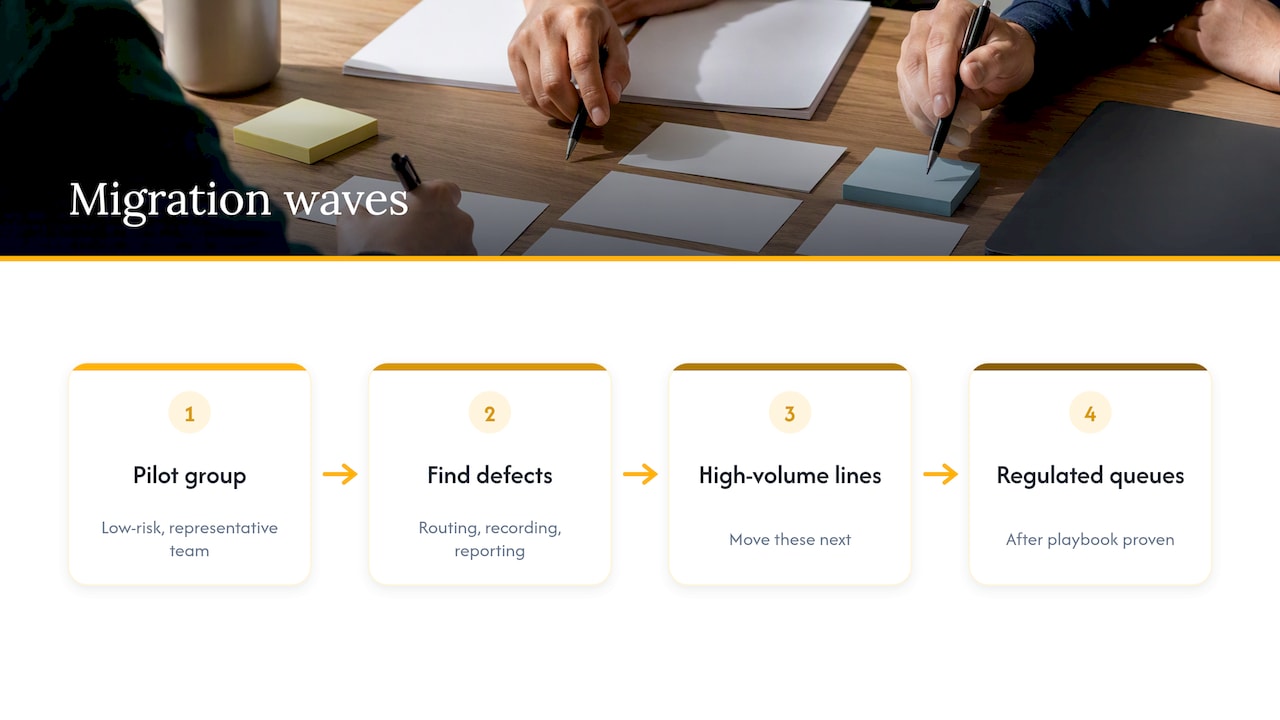
Start with a low-risk, representative group: an internal help desk, a single product line, or a team with strong supervisors. Use it to find defects in routing, recording and reporting. Then move the high-volume lines, and leave your most regulated or highest-value queues for when the playbook is proven.
Set cutover and rollback criteria in writing
Define, in numbers, what “good” looks like in the first hours: answer rate, abandonment, average handle time, call quality complaints, failed logins. Define the threshold that triggers rollback and who calls it. Without that, go-live day becomes a debate.
Step 5: Plan compliance and security into the build
If your contact center touches patient information, the platform and anyone who handles it for you have legal obligations. HHS guidance on HIPAA and cloud computing says a covered entity may use a cloud service to store or process ePHI provided it has a HIPAA-compliant business associate agreement with the provider and otherwise complies with the HIPAA rules. Confirm this with your compliance officer and counsel before any patient data moves.
Payment data, call recording consent and data retention rules vary by state and industry, so involve legal early rather than at sign-off. For contract language to insist on, see our guide to cloud contact center security terms to demand before signing.
Step 6: Train agents on the new workflow, not just the new screens
Agents experience migration as a change in their day, not a change in architecture. Train on real scenarios: a transfer that used to be one click, a customer who needs a callback, a supervisor who wants to listen in. Give them a floor-walker or a dedicated chat channel for the first weeks.
Two habits help:
- Train in cohorts that match the migration waves, so the lesson is fresh when the switch happens.
- Update SOPs and scripts in the same sprint as the call flow change. Out-of-date documentation is how workarounds, and process debt, begin again.
Step 7: Go live, then protect the first 60 days
Go-live is the start of the risky period, not the end. Practitioners recommend a 30 to 60 day hypercare period to catch edge-case defects and confirm agent adoption, and organizations that skip it tend to live with unresolved performance issues. That article is about CRM moves, but the logic holds for any platform with live users.
A workable hypercare rhythm:
- Week 1: daily stand-up, a single defect log, supervisors on the floor, extended coverage for peak hours.
- Weeks 2 to 4: twice-weekly reviews of abandonment, handle time and quality scores against your pre-migration baseline.
- Weeks 5 to 8: retire the temporary processes, finalize SOPs, and hand the platform to business-as-usual ownership.
Hypercare needs people. Agents are learning, supervisors are triaging and the backlog from cutover day still needs clearing. If you are weighing whether to hire for that surge, a call center agent salary guide is a useful reference for benchmarking pay when you budget temporary or permanent roles.
How long will it take?
No honest figure fits every organization. Duration depends on the number of integrations, the number of phone numbers to port, the amount of routing logic to redesign and how many waves you run. Simple, single-site operations move faster than multi-site operations with custom CRM integrations and regulated workflows.
A sound way to estimate: list the discovery items from Step 2, assign each a build and test effort, then add time for wave sequencing, parallel run and hypercare. Ask your platform vendor for timelines from comparable customers, and treat a plan with no buffer for porting and testing as a red flag.
Where staffing makes or breaks the plan
Most migration plans are strong on technology and thin on people. Yet the project asks your team to do two jobs at once: keep customers served and learn a new platform. Typical failure points:
- Your best agents are pulled into testing and training, so live queues lose experience.
- Supervisors are stretched across the old system and the new one.
- Peak season collides with a wave.
There are three ways to close that gap: hire temporarily, redistribute internally or add a managed team. Our outsourcing transition plan shows how to bring in an outside team without service outages, and the same principles apply when the outside team’s job is to absorb volume during a platform move. Our guide to customer support workforce optimization covers how to size and schedule the team afterward.
Our perspective: protect the customer first, the project second
We work with operations leaders in healthcare, legal, ecommerce and financial services, where a dropped call can be a missed appointment, a lost intake or a frustrated patient. From that vantage point, we see migration plans fail in a consistent way: they are written for the platform and not for the people who answer the phone.
Our view comes down to three convictions:
- Documented processes migrate; tribal knowledge does not. If the SOP does not exist before cutover, write it during discovery. That is also the work that makes a nearshore team productive quickly.
- Capacity is a migration workstream. Plan coverage for training hours, parallel run and hypercare the way you plan licenses and carriers.
- Cultural and language alignment protects quality under pressure. When volume spikes during cutover, agents who share your customers’ language and time zone resolve issues faster and sound like part of your brand. That is the reason we deliver bilingual teams from Latin America, in time zones close to US business hours.
We would rather help you run a smaller, safer wave than watch a big-bang date drive the schedule.
— Daniela
How Altiam CX supports a migration
We do not sell CCaaS platforms. We supply the operational layer around them: managed customer support, back-office operations and managed team extension so your core team can focus on the migration while trained nearshore agents keep service steady. For healthcare organizations, our patient support and SOP management work centers on documented procedures, which is also the groundwork a migration needs. For law practices, legal intake and inquiry handling keeps calls answered and appointments scheduled during platform changes. See also our healthcare contact center guide for ops leaders.
If you are scoping a migration and want to talk through staffing, reach us through the Altiam CX site.
A one-page checklist
- Primary vision statement agreed by operations, IT and compliance
- Inventory of flows, queues, integrations, numbers and reports, each marked keep, redesign or retire
- RASCI matrix and incident escalation path signed off
- Wave plan with entry and exit criteria
- Rollback thresholds written in numbers
- BAA or equivalent data protection agreements in place where required
- Training cohorts mapped to waves
- Updated SOPs and scripts released with each change
- Hypercare staffing and daily review schedule
- Post-migration KPI baseline comparison at 30 and 60 days
FAQ
What should a CCaaS migration plan include?
At minimum: a primary vision, a discovery inventory, an operating model, a wave plan with rollback criteria, compliance requirements, agent training, and a hypercare period. Integrations, phone number porting and reporting each deserve their own workstream with a named owner.
Should we migrate all at once or in phases?
For most mid-sized and enterprise contact centers, phases are safer because a defect affects one group instead of every customer. A big bang can work for small, simple operations. In regulated lines such as healthcare or financial services, add a parallel run on the highest-risk queues.
Can we migrate without any downtime?
Sometimes you can come close, but AWS guidance suggests accepting minimal, controlled disruption is often more realistic than aiming for none. Schedule changes in low-volume windows, test number porting in advance and keep a rehearsed rollback.
Who should own the migration?
A business owner from operations or CX should lead, with IT, security, compliance and the platform vendor in defined roles. IT-only ownership tends to produce a technically correct system that does not match how the floor works.
How do we keep service levels steady during the move?
Protect capacity. Backfill agents who are in training or testing, add supervisor coverage during each wave, and track abandonment and handle time daily. A managed team extension is one way to add that capacity without hiring permanently.
Sources
- What is CCaaS? Contact Center as a Service Explained, NiCE
- AWS Prescriptive Guidance: Strategies for migrating your contact center
- Cloud Contact Center Migration: A Phased Checklist from Discovery to Cutover
- Operational workstream, AWS Prescriptive Guidance
- Guidance on HIPAA & Cloud Computing, HHS
- CRM migration in 2026: switch without losing pipeline, Week CRM


