A legal document indexing workflow is the repeatable path every file takes from the moment it arrives to the moment someone can find it again: intake, classification, metadata capture, text extraction, quality control, filing and controlled retrieval. Done well, it makes files easier to find, easier to track by production date and more available to multiple staff members. Done badly, it leaves attorneys searching inboxes at the worst possible hour. This guide lays out the seven steps, the fields to capture, the checks that make an index defensible and the points where a person, not software, must decide.
TL;DR
- Index every document at intake against a fixed profile: document type, matter, date, confidentiality level and retention rule.
- Use one naming convention and ISO-8601 dates so records sort and search the same way for every team member.
- Extract text with OCR, then validate: track exceptions, sample results and keep a log of who changed what.
- Litigation indexing needs auditing and chain of custody. Routine matter files need consistency and speed.
- Limit access by matter and by named user, and keep indexing privileges away from ordinary reviewers.
Table of Contents
- What a legal document indexing workflow actually does
- The seven steps, from intake to retrieval
- Which fields and naming conventions to use
- Litigation indexing versus routine matter files
- Validating the index
- Where automation helps and where people decide
- Security, access and audit trail
- Perspective
- Getting the workflow staffed
- Work with a team that keeps the process running
- FAQ
- Sources
What a legal document indexing workflow actually does
Indexing assigns identifiable attributes to a document, such as metadata, keywords or full text, so it can be located later. In a law practice, that means two layers working together.
The first layer is the profile: the structured fields a person or system assigns (client, matter, document type, date, author, confidentiality). The second is the full-text index: a searchable map of every word in the collection. Concordance administration guidance describes it plainly: the dictionary lists every word or string in the record collection, and the index holds directions to each one. The same guidance says a database must be indexed before it can be searched, and that how records are indexed affects what reviewers can find.
You need both layers. A profile without full text misses the sentence buried on page 40. Full text without a profile returns 3,000 hits with no way to narrow them by matter, date or privilege status.
The workflow matters more than the software. The same tool produces a clean index in one firm and a mess in another, because the difference is the rules people follow before and after a document is loaded.

The seven steps, from intake to retrieval
1. Intake and logging
Every document enters through a defined door: a client portal, a shared mailbox, a courier drop, a production volume from opposing counsel. At the door, record what arrived, when, from whom and for which matter. Do not let documents sit unlogged in personal folders.
For litigation material, intake also means preservation. If evidence may be lost or altered before it reaches your system, the index is built on a weak foundation. A practical evidence preservation letter guide explains the documentation that helps make later processing and indexing defensible.
2. Triage and classification
Assign each item a document type from a controlled list (pleading, correspondence, medical record, contract, exhibit, discovery response). A controlled list is the single cheapest improvement you can make. Free-text document types turn into “Letter,” “letter,” “Ltr” and “Correspondence” within a month.
At this step, decide which workflow the item belongs to: routine matter file or litigation collection. The two have different rules, covered below.
3. Metadata capture
Capture metadata in two ways: pull what the file already carries (author, created date, file type), and add what only a person can know (matter number, privilege flag, exhibit label). Keep original metadata untouched. EDRM’s processing standards call for recording item-level metadata as it existed before processing, which protects you if anyone later asks what a file looked like when it arrived.
4. Text extraction and OCR
Scanned pages and image files have no searchable text until OCR creates it. In e-discovery, the processing stage does this and more. According to Craig Ball’s primer, processing tools decompress and explore items, extract text, embedded objects and metadata, hash and track items, then normalize and tokenize the text to build an index and database. Normalization matters because computers do not structure all electronically stored information the same way, and uniform treatment is what makes search reliable.
5. Quality control and exception handling
This is the step teams skip, and it is the one that makes an index trustworthy. Every processing run produces exceptions: password-protected files, corrupt files, images with no readable text. The same primer says a tool must track exceptions and generate an exceptions report so counsel can secure passwords, repair or replace files and run OCR, and it describes exception resolution as key to a defensible process.
Make the exceptions report a named deliverable with an owner and a closing date for each item.
6. Filing and naming
File the document in its matter folder under a standard name and link it to its profile record. More on conventions in the next section.
7. Controlled retrieval
Retrieval is the reason for everything above. A good system lets an authorized user search by keyword and narrow by custodian, date or document type. The Department of Justice’s litigation support description for one of its operations notes that users search through a web browser form, with keyword searches applied to the datasets for the matter they are authorized to access, including related terms such as custodian names and dates. Your firm’s version should work the same way: search scoped to the matter, filtered by the profile fields.
Which fields and naming conventions to use
There is no single mandated schema for a law firm, but published specifications show what a thorough profile looks like. The ADAC Legal Profile Specification lists classification fields including documentType, exhibitIdentifier, filingDate in ISO-8601 format, confidentialityLevel and retention policy details. Use it as a checklist rather than a mandate.
A workable minimum profile looks like this:
| Field | Example | Why it matters |
|---|---|---|
| Client and matter ID | 10482-0007 | Scopes search and access |
| Document type | Deposition transcript | Enables filtering from a controlled list |
| Document date | 2026-03-14 | ISO-8601 sorts correctly everywhere |
| Author or custodian | J. Alvarez | Supports custodian searches |
| Confidentiality level | Privileged | Drives access and production decisions |
| Exhibit or Bates identifier | EX-0214 | Ties the record to filings |
| Retention rule | 7 years after closing | Prevents ad hoc deletion |
| Source and intake date | Client portal, 2026-03-16 | Supports chain of custody |
The same specification also shows how naming conventions can be built: its jurisdiction profile identifiers are hierarchical and hyphen-delimited, based on ISO 3166 country codes, with “us” identifying the U.S. profile. You can borrow the idea for file names: stable segments in a fixed order, separated the same way every time.
A file-name pattern that works for many practices:
MatterID_DocType_YYYY-MM-DD_ShortDescription_vNN
For example: 10482-0007_Correspondence_2026-03-14_SettlementOffer_v01.
Three rules keep it usable:
- Dates always in year-month-day order.
- No spaces or special characters that break on some systems.
- Version numbers on every revision, never “final” or “final2.”
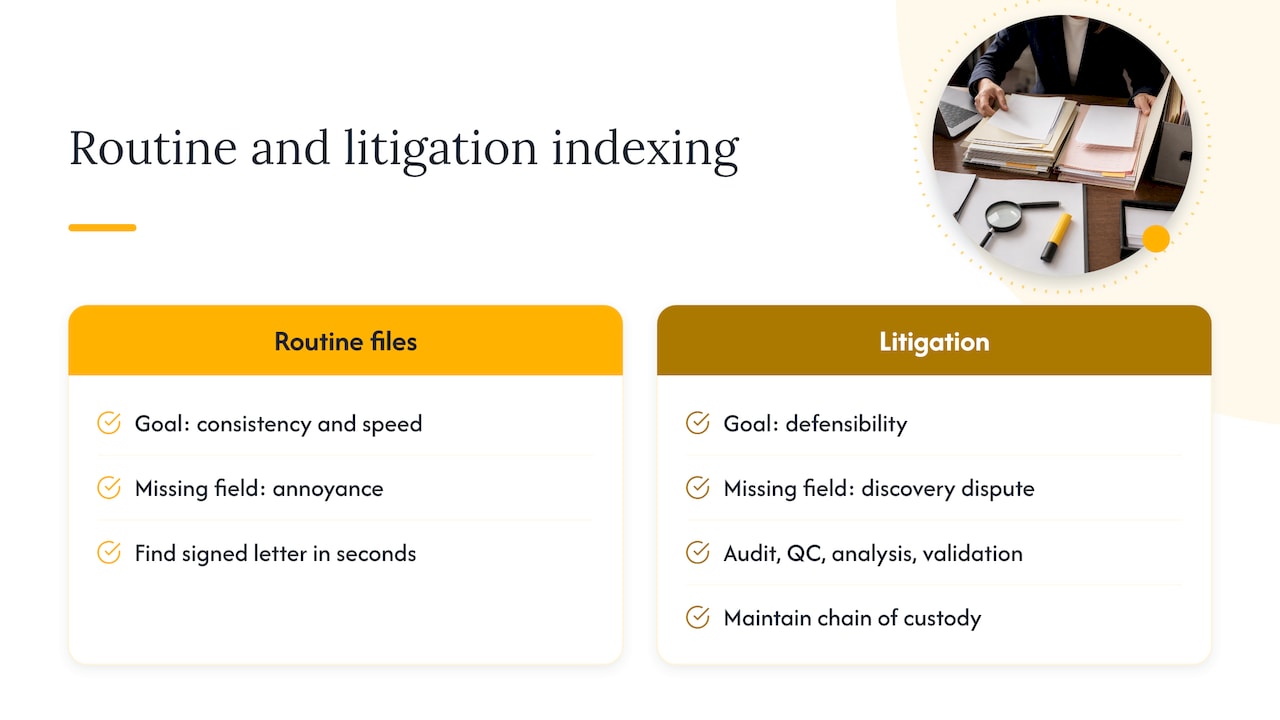
Litigation indexing versus routine matter files
The seven steps apply to both, but the standard of proof differs.
Routine client and matter files need consistency, speed and findability. The goal is that a paralegal or new associate locates the signed engagement letter in seconds. A missing field is an annoyance.
Litigation and e-discovery collections need defensibility. EDRM describes processing goals as discerning what data exists at the item level, recording original metadata and enabling defensible reduction by selecting only appropriate items to move forward. It also requires strict adherence to process auditing, quality control, analysis and validation, and chain of custody. A missing field can become a discovery dispute.
Databases add another wrinkle. The Sedona Conference’s database principles say that, absent a specific showing of need, a requesting party is entitled only to database fields containing relevant information and context, not the entire database. The principles also encourage parties to use test queries, pilot projects and interviews to gauge burden and reach consensus on scope. For your index, that means field-level documentation: know what each field means, because you may have to explain it.
For a deeper look at how the surrounding process fits together, see our legal document management process guide.
Validating the index
An index is only as good as your ability to show it is complete and accurate. Build validation into the workflow instead of treating it as a cleanup project.
- Reconcile counts. Compare the number of items received with the number indexed plus the number in the exceptions report. They must match.
- Sample for field accuracy. Pull a random sample from each batch and compare the profile fields with the documents themselves. Track error rates by field so you know where training is needed.
- Run test searches. Search for known documents and known terms. If a document you know exists does not appear, find out why before the batch is signed off.
- Close exceptions. Each unreadable or protected file needs a documented resolution.
- Log changes. Record who modified an index entry, what changed and when.
For workflows that use technology-assisted review, validation is more formal. EDRM’s draft protocol says the producing party statistically validates whether the process reached the desired recall level, discloses precision and may sample the documents the process omitted to check whether it missed significant relevant material. The protocol’s workflow also includes assembling the team, training the software, applying quality-control measures and validating results. Even if you never run TAR, the logic carries over: sample what the process left out, not only what it kept.
The Sedona principles make the same point for database collections: use reasonable measures to validate that a collection is reasonably complete and did not inadvertently modify the data.
Where automation helps and where people decide
Automation handles volume. OCR converts images to text, parsers extract metadata and software can suggest document types. These are the right tasks to automate because they are repetitive and checkable.
People handle judgment:
- Privilege and confidentiality calls. A tool can flag a likely privileged document. An attorney decides.
- Ambiguous or conflicting information. When two dates appear on one document, or a name matches two clients, someone with matter knowledge resolves it.
- Exceptions. Corrupt, encrypted or unreadable files need a person to chase the password or request a replacement.
- Index administration. Concordance guidance notes that reviewers are typically not given indexing or reindexing privileges because of the sensitivity of those operations, and that administrators should confirm all data is reviewed and proper backups are made before indexing or reindexing.
A good rule: automate the first pass, and route anything uncertain to a named reviewer with a deadline. Low-confidence results should never silently become part of the index.
Security, access and audit trail
An index is a map to your most sensitive information, so protect it like the documents themselves.
Scope access by matter. The DOJ’s description of its litigation operation says access is limited to case-specific databases supporting matters the user works on, and can be disabled or rescinded when personnel leave or are reassigned. Mirror that: when someone leaves a matter team, remove their access the same day.
Use named accounts. A DOJ privacy impact assessment describes named-user accounts assigned to a single individual, with access granted on a need-to-know basis. Shared logins make an audit trail meaningless.
Encrypt in transit and at rest. The same DOJ description covers encrypted drives for transfer, encrypted database storage and secure web access.
Keep the log. Every view, edit, export and permission change should be recorded and reviewable.
If you outsource any part of the workflow, security controls should be contractual and verifiable. Our guides on board-level data security controls in BPO partnerships and eDiscovery outsourcing risks counsel must control cover what to require.
Perspective
We see the same pattern in legal operations again and again. The firm buys good software, then loses time because intake is inconsistent. Documents arrive by email, portal and phone, and each one gets indexed a little differently.
Our view is that the index is an operations problem first and a technology problem second. It needs trained people following a written standard, a quality check on every batch and a clear owner for exceptions. That is the kind of disciplined, measurable work nearshore teams are built for.
At Altiam CX, we support law practices with intake and inquiry handling, client follow-ups, scheduling, back-office legal support and managed legal team extension. Our bilingual teams work from Latin America in your time zone, so attorneys keep their attention on legal judgment while a dedicated team keeps the front and back office of the practice moving. We build our engagements around performance frameworks, so you can see what the team delivers.
The strongest indexing workflow is one your people will actually follow on a busy Friday. Start there.
Daniela
Getting the workflow staffed
The steps above are simple on paper. The hard part is keeping them consistent as volume grows, which is where staffing decides the outcome. Intake logging, profile entry, exception follow-up and sampling are steady, repeatable tasks that compete with billable work when attorneys and paralegals carry them.
Two staffing models work for most practices:
- Dedicated back-office team. Trained staff own intake, classification and profile entry under your written standard. Our overview of legal back-office support for operations leaders explains how this is structured.
- Litigation support extension. Added capacity for case surges, with the same standards applied. See our litigation support outsourcing guide for how to scope it.
Work with a team that keeps the process running
If your intake and filing workflow depends on whoever has time, we can help. Altiam CX provides legal intake and inquiry handling, client follow-ups and case communication, appointment scheduling and coordination, ongoing client support, back-office legal support and managed legal team extension for law practices.

See how the intake and back-office services for law practices fit your workflow, or explore our full range of managed team extension services. Pricing is scoped to your engagement, so tell us your volume and standards and we will propose a structure.
FAQ
What is the difference between document indexing and document filing?
Filing places a document in a location, such as a matter folder. Indexing records the attributes and, where applicable, the full text that let you find it by more than its location. A well-run workflow does both at intake, so a document is findable by matter, type, date and content.
Which metadata fields matter most?
Start with client and matter ID, document type, document date, author or custodian, confidentiality level and retention rule. Published specifications such as the ADAC Legal Profile also include exhibit identifiers. Add fields only when someone will search or filter by them.
Do we need OCR for every scanned document?
Yes, if you want the contents to be searchable. Without OCR, a scanned page is an image, and only its profile fields can be found. Processing workflows extract text as a standard step, and files that fail extraction should land in an exceptions report for follow-up.
How often should the index be checked?
Check every batch at the time it is processed, using count reconciliation, a random sample and test searches. Reindex when records change, since Concordance guidance says it keeps databases current and efficient for full-text search. Schedule a periodic review of error rates by field to find training needs.
Who should be allowed to change the index?
A small group of named administrators. Concordance guidance notes reviewers are typically not given indexing privileges, and DOJ practice uses named-user accounts with need-to-know access. Everyone else searches and views within the matters they are assigned to.
Sources
- Litigation Document Management: Organizing and Indexing (NBI)
- Concordance Classic Admin Guide
- E-Discovery Processing Primer, Craig Ball
- EDRM Processing Standards Guide, Version 2
- ADAC Legal Profile Specification
- The Sedona Conference Database Principles
- EDRM Draft TAR Protocol
- U.S. Department of Justice Civil Division system description
- DOJ Privacy Impact Assessment for DISCO