
Five9 and Talkdesk are both cloud contact center platforms, and neither is the wrong answer. Five9 tends to suit teams that want a proven, horizontal platform with deep Salesforce and ServiceNow integration. Talkdesk tends to suit teams that want AI-led automation, vertical packaging and a lower entry price per seat. The right pick depends on your channel mix, your CRM, your industry and how many seats you actually run. This guide walks through each factor, then shows where the software decision ends and the staffing decision begins.
TL;DR
- Price: Talkdesk lists plans from $85 per user per month. Five9 lists bundles from $119 per concurrent seat per month, with a 50-seat minimum.
- Fit: Five9 is a horizontal platform with strong CRM integrations. Talkdesk leans into AI and industry clouds for healthcare, financial services and retail.
- Usability: G2 users rate Talkdesk higher for ease of use (9.1 vs. 8.3) and support quality (8.8 vs. 8.0).
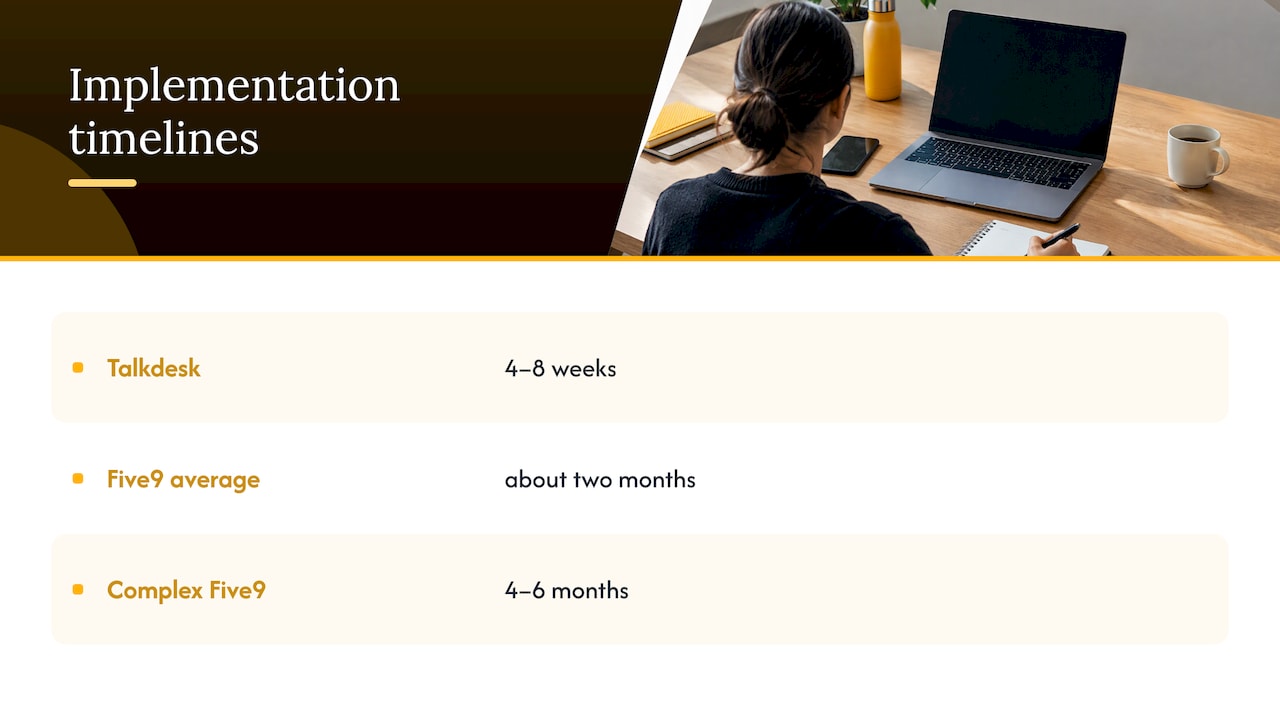
- Rollout: Independent estimates put Talkdesk at 4 to 8 weeks and Five9 at about two months, longer for complex builds.
- The gap neither closes: software does not staff your queues. Trained, bilingual agents are a separate decision.
Table of Contents
- The short answer: which one should you pick?
- How the two platforms position themselves
- Pricing: what US buyers can see
- AI, channels and workforce tools
- Integrations and rollout time
- What users say
- Industry fit: healthcare, legal, retail, financial services
- Where the software decision ends
- Perspective
- Put a trained team behind your platform
- How to run a fair evaluation
- FAQ
- Sources
The short answer: which one should you pick?
Pick by the shape of your operation, not by a feature count.
| If your operation looks like this | Lean toward |
|---|---|
| Large floor, heavy Salesforce or ServiceNow dependence, voice at scale | Five9 |
| Inbound-first, digital-forward, wants low-code routing and fast AI rollout | Talkdesk |
| Healthcare, financial services or retail with sector-specific workflows | Talkdesk’s industry clouds are worth a demo |
| Fewer than 50 concurrent seats | Talkdesk, because Five9 lists a 50-seat minimum |
| Migrating from an on-premises contact center | Five9 is often chosen for this path |
That table is a starting filter. The sections below explain the reasoning so you can test it against your own numbers.
How the two platforms position themselves
Five9 describes itself as a cloud contact-center-as-a-service provider for managing customer interactions across voice and digital channels, and it says it has provided cloud contact center software since 2001. Its homepage describes a platform that brings people, AI and systems together across inbound and outbound voice, web chat, SMS, email, WhatsApp and video, with routing, workflow orchestration and live-agent handoff with context.
Talkdesk frames itself differently. Its homepage presents a hybrid platform that combines CCaaS for people with customer experience automation for AI, including autonomous agents that carry out customer-service work end to end.
An independent advisory comparison summarizes the contrast this way: Five9 is strong in the mid-market and often chosen by organizations leaving on-premises systems, while Talkdesk emphasizes AI, vertical solutions and a microservices architecture that supports faster feature releases.
In plain terms: Five9 is the established platform with a long voice track record. Talkdesk is the AI-forward platform with industry packaging.
Pricing: what US buyers can see

Both vendors publish entry pricing, which is rare in this category. The numbers are not directly comparable, because the billing units differ.
Talkdesk lists per user per month on its official pricing page:
- Digital Essentials: $85
- Voice Essentials: $105
- Elite: $165
- Industry Experience Clouds: $225
Five9 lists its Digital bundle at $119 per concurrent seat per month. The page states that prices are per concurrent user, that usage-based charges may apply, and that the minimum is 50 seats.
Three details change the math.
- Named vs. concurrent seats. A concurrent model charges for agents logged in at the same time. If you run staggered shifts, a concurrent seat can cover more than one person. A per-user model charges for every licensed agent. Count your peak simultaneous logins and your total roster before you compare.
- Minimums. Talkdesk’s own comparison page lists no seat minimum against Five9’s 50. That is a vendor’s view of a rival, so confirm the current terms with both sales teams.
- Contract length. The same page lists a 36-month standard contract for Five9. Contract term, renewal rules and usage charges often matter more over three years than the list price.
A quick worked example, using list prices only. At 60 named agents on Talkdesk Digital Essentials, the list cost is 60 × $85 = $5,100 per month. At 60 concurrent Five9 Digital seats, it is 60 × $119 = $7,140 per month. But if your 60 agents work shifts and never exceed 40 simultaneous logins, 40 concurrent seats would be 40 × $119 = $4,760, though the 50-seat minimum would still apply. Add-ons, voice tiers and usage charges will move all of these figures, so treat them as an illustration of method, not a quote.
AI, channels and workforce tools
Both platforms cover voice and digital. The difference is in how AI and workforce tools are packaged.
- Five9 offers an intelligent virtual agent for self-service across web, chatbot, voice, SMS or WhatsApp. An advisory review lists an IVA, Agent Assist, AI Insights and workforce optimization in its suite.
- Talkdesk invests heavily in AI and offers industry-specific models. The same review notes that its workforce and quality tools are add-ons. Talkdesk’s pricing page confirms the pattern: Elite adds custom reporting, screen recording, performance management and workforce management on top of the Essentials capabilities.
What this means in practice: if quality assurance, forecasting and scheduling are central to how you run the floor, compare the tier where those tools actually appear, not the entry price. A $85 plan without workforce management is not the same product as a $165 plan with it.
AI features also vary by tier on both sides. Talkdesk’s own comparison page says its AI features differ by tier, and that Five9 puts its more advanced AI in higher tiers. Ask each vendor for the exact AI capabilities included at the tier you would buy.
Our view: AI works best on top of a clean process. If your knowledge base is thin or your call reasons are not categorized, a sophisticated virtual agent will automate confusion. Our guide to AI in customer support covers how to sequence this.
Integrations and rollout time
Five9 is known for deep native Salesforce and ServiceNow integrations and for ease of deployment, according to the same advisory comparison. Talkdesk’s Studio gives you a low-code flow builder for routing, which helps teams that want to change call flows without engineering help.
On timing, one independent review estimates Talkdesk implementations at 4 to 8 weeks, with Five9 averaging about two months and complex deployments taking 4 to 6 months. Your own timeline will depend on integrations, number porting, agent training and how many queues you migrate.
A practical rule: the platform go-live is only half the schedule. Agents need scripts, knowledge articles, quality scorecards and a ramp plan. Teams that plan the people side in parallel launch with fewer surprises. Our piece on how to scale support teams without sacrificing efficiency covers that sequencing.
What users say
On G2’s side-by-side page, users rate Talkdesk higher for ease of use (9.1 vs. 8.3) and support quality (8.8 vs. 8.0). The same page includes positive and critical reviews for both platforms, so read the negatives for the use case closest to yours.
Ratings are a signal about administrator and agent experience, not a verdict on fit. A platform that is easier to learn can still lack the integration depth your CRM needs. A platform with a steeper learning curve can pay off if your team is large and stable.
When you read reviews, filter by company size and industry. A 30-seat ecommerce team and a 600-seat healthcare floor are using different products in practice.
Industry fit: healthcare, legal, retail, financial services
Talkdesk focuses on vertical solutions for healthcare, financial services and retail, while Five9 is a horizontal platform, per the advisory comparison. Talkdesk’s pricing page says its Industry Experience Clouds add offerings for financial services, insurance, healthcare and life sciences, retail and consumer goods, travel and hospitality, utilities, commercial and residential services and government, with government custom-priced.
A vertical package can shorten setup if your workflows match it. A horizontal platform can be the better base if your processes are unusual or heavily tied to a CRM you already own.
For regulated sectors, the checklist is the same whichever vendor you choose:
- Request current compliance documentation from the vendor for the frameworks your sector requires, and have your compliance team review it.
- Review contract terms on data handling, breach notification and subcontractors before signing. Our guide to cloud contact center security contract terms lists what to demand.
- Extend those controls to the people using the platform. Remote and nearshore agents need access limits, device rules and monitoring, covered in our remote agent security controls.
Where the software decision ends
A contact center platform is a tool. It routes the call, records the interaction and reports the metrics. It does not answer the phone in the language your customer prefers, follow your standard operating procedures, or hold the line when volume doubles in a week.
That is why many operations leaders evaluate platform and staffing together. Before you commit to a three-year contract, a cost-to-serve analysis helps you see what each contact actually costs once licenses, labor, supervision and rework are counted. Often the license is the smaller line.
Three questions to settle before you sign:
- How many seats will you really need in 12 months? Concurrent-seat minimums and long terms punish overestimates.
- Who will staff them? In-house hiring, a domestic vendor and a nearshore partner each carry a different cost and ramp profile.
- What will you measure? Define first-contact resolution, quality score, average handle time and customer satisfaction before the platform is configured, so the reporting is built around outcomes. Our workforce optimization examples show how teams set those targets.
Perspective
We work alongside whichever platform our clients choose, and the pattern we see is consistent: the platform rarely decides whether service improves. The operating model does.
A well-configured system with thin staffing, weak scripts and no quality loop still produces long waits and inconsistent answers. A capable team with clear SOPs, cultural alignment with your customers and measurable performance frameworks gets more from either tool.
That is the idea behind how we build teams at Altiam CX. Bilingual agents in Latin America nearshore locations, working in your time zone, trained on your processes and your tools. Whether your stack is Five9, Talkdesk or something else, the agents plug into it, and our managed model keeps the reporting and accountability in place.
For healthcare, legal, ecommerce and financial services teams, where each interaction carries weight, we think the strongest move is to pick the platform for your workflows and pair it with a team built for your standards. Cost efficiency follows from fewer repeat contacts and better first answers, not from the license line alone.
Daniela
Put a trained team behind your platform
Once the platform is chosen, Altiam CX supplies the people and the operating discipline: managed customer support, technical assistance, back-office operations and managed team extension, delivered nearshore with bilingual agents and scalable team deployment. Fees are structured per seat, per hour or as a managed service, and we scope them to your volumes.
If you run a healthcare operation, see our patient support and SOP management services. If you run a law practice, see legal intake and client communication support. For everything else, start with our customer experience and team extension services, or talk to us about the mix of platform and staffing that fits your queue.
How to run a fair evaluation
Both vendors will give a strong demo. To compare them on equal terms:
- Write three real scenarios. For example: a billing dispute by phone, a refund request by chat, and an outbound appointment reminder. Ask both vendors to build them.
- Price the same configuration. Same channels, same tier of AI, same workforce tools, same seat count, same term.
- Ask about the total, not the list. Request usage charges, telephony costs, implementation fees, renewal rules and notice periods in writing.
- Map the integrations. List every system the agent touches. Confirm which connections are native and which need custom work.
- Talk to reference customers of your size and industry. Ask about the first 90 days, not the pitch.
- Plan the staffing in parallel. Decide who answers the queues, how they are trained and how quality is measured before the go-live date is set.
If you are also weighing different kinds of support tooling, our overview of customer support tools for enterprises and agencies can help you frame the wider stack.
FAQ
Is Five9 or Talkdesk cheaper?
On published entry prices, Talkdesk is lower: $85 per user per month for Digital Essentials, against $119 per concurrent seat per month for Five9 Digital. The billing units differ, so your shift pattern and tier choices decide the real cost. Request a written quote for the same configuration from both.
Which platform is easier to use?
On G2, users rate Talkdesk at 9.1 for ease of use against 8.3 for Five9, as shown on the comparison page. Ease of use also depends on your admin skills, integrations and training. Involve your supervisors in the demo.
Which is better for healthcare or financial services?
Talkdesk packages industry clouds for healthcare, financial services and retail, so it is worth a demo if your workflows match. Five9 is a horizontal platform that can work well if your processes center on a CRM such as Salesforce. In either case, have your compliance team review the vendor’s current documentation and contract terms.
How long does implementation take?
One independent review estimates 4 to 8 weeks for Talkdesk and about two months for Five9, with complex Five9 deployments taking 4 to 6 months. Your timeline depends on integrations, number porting and agent training. Plan staffing and training alongside the technical work.
Can a nearshore team work on either platform?
Yes. Our agents are trained on the client’s tools and processes, so the platform choice stays yours. We manage the team, the quality framework and the reporting around it.
Sources
- Genesys vs Five9 vs Talkdesk: CCaaS Platform Comparison
- Why Choose Five9? The Open Cloud Platform for CX
- Five9: AI Contact Center Platform
- Five9 Pricing
- Talkdesk: AI Customer Experience Automation
- Talkdesk Contact Center Software Pricing
- Talkdesk vs Five9: Contact Center Software Comparison
- Talkdesk vs Five9 (2026): Which CCaaS Platform Wins?
- G2: Compare Five9 and Talkdesk
- 90 Day Cost to Serve Plan for Mid Market Operations and Finance