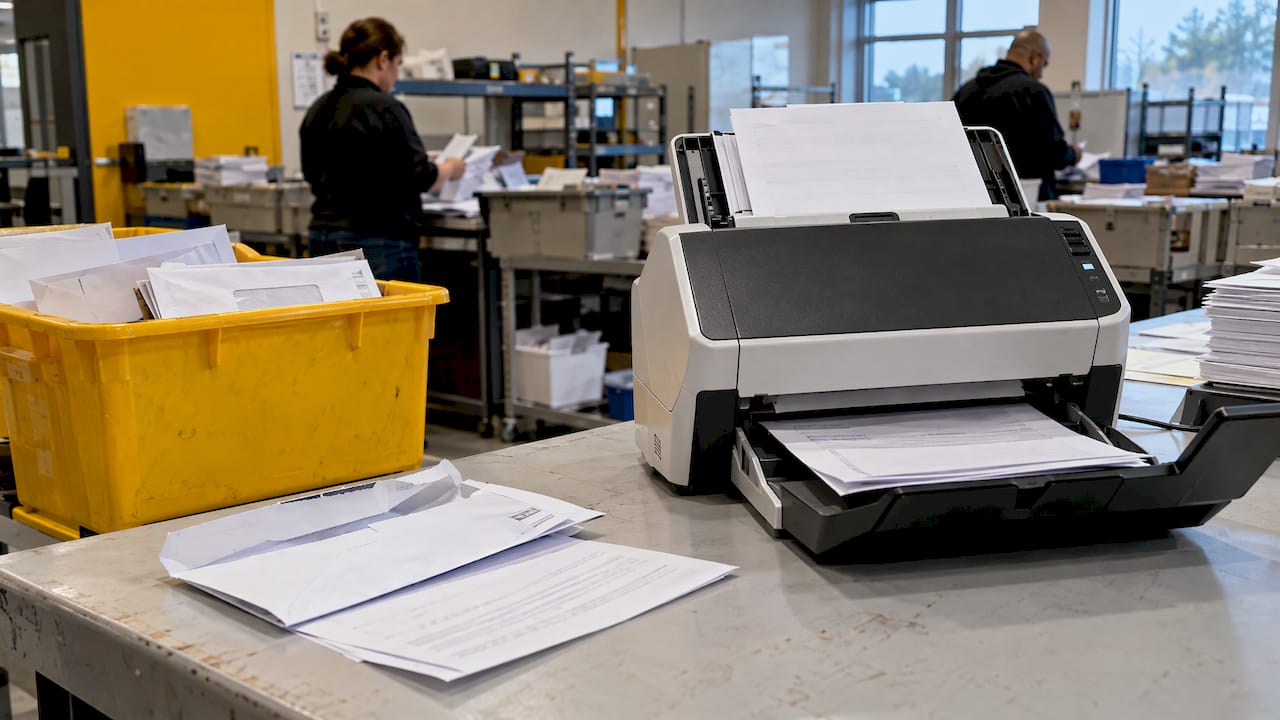
Digital mailroom outsourcing means handing the receipt, opening, scanning, classification and routing of your incoming mail to an outside team, so documents reach your people and systems as searchable files instead of paper in a tray. Done well, it shortens turnaround, removes a manual bottleneck and gives you an audit trail. Done badly, it puts sensitive documents in the hands of a vendor you cannot see into. This guide covers how the process works, what drives cost, which U.S. rules apply by industry, and how to choose a provider and plan the move.
TL;DR
- An outsourced digital mailroom receives paper mail at a controlled site, scans it, extracts data, routes it to the right team or system, and returns, stores or destroys the originals.
- The real work is in exceptions: unreadable, incomplete or unfamiliar documents need trained people, not only software.
- Cost depends on volume, document mix, turnaround, indexing depth, integrations and storage. Ask for pricing by these drivers, not a single headline rate.
- Compliance is industry specific. Healthcare mail with patient information requires a Business Associate Agreement. Financial and legal teams have their own obligations.
- Plan a phased transition, with a pilot, a mail-type inventory and clear service levels before full cutover.
Table of Contents
- What digital mailroom outsourcing actually is
- How an outsourced digital mailroom works day to day
- Benefits you can reasonably expect
- What determines the cost
- Security, privacy and U.S. compliance
- What mail types and workflows it supports
- Limits to plan for
- How to choose a provider
- Planning the transition
- Our perspective
- Where Altiam CX fits
- FAQ
- Sources
What digital mailroom outsourcing actually is
A traditional mailroom sorts and delivers physical mail by hand. A digital mailroom converts as much of it as possible into digital files, so information is available to the right person the same day, wherever they work. Outsourcing moves that conversion off your payroll and out of your building.
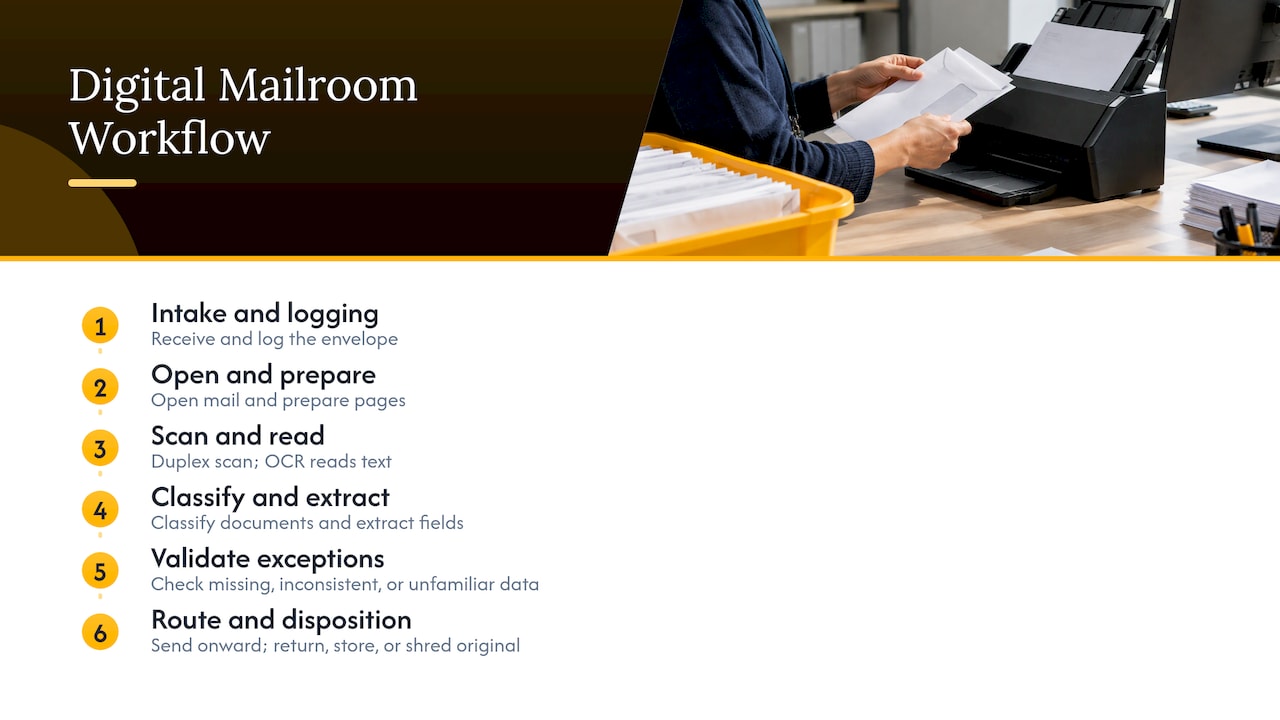
The typical scope has six parts:
- Receipt and logging. Mail arrives at a controlled intake site and is logged on arrival.
- Preparation. Envelopes are opened, staples removed and pages prepared for scanning.
- Scanning and OCR. Pages are imaged and optical character recognition turns images into searchable text.
- Classification and data extraction. Software identifies document types (invoice, claim, correspondence, court notice) and pulls key fields.
- Routing and integration. Rules send each item to a department, queue or business application.
- Disposition of originals. Paper is returned, stored or securely destroyed according to your policy.
The parts that decide quality are rarely the scanner. They are the intake discipline at the start, the rules in the middle and the human review of anything the software cannot read with confidence.
How an outsourced digital mailroom works day to day
A useful way to picture it is to follow one envelope.
It reaches the intake center and is logged. Someone opens it and prepares the pages. A duplex scanner captures both sides and OCR reads the text. The system classifies the document and extracts fields such as sender, account number, date and amount. Standard documents flow through automatically. Where data is missing, inconsistent or unfamiliar, the item goes to a person who validates it against your records. The cleared document is routed to a team inbox, a case file, a claims queue or an ERP. The original is then returned, held in storage or shredded on the schedule you set.
Where people still matter
Automation handles the routine majority. The exceptions are where errors, delays and risk concentrate:
- A faxed or handwritten page the OCR scores with low confidence.
- A letter that matches no known template.
- A payment or notice that references an account number that does not exist.
- A time-sensitive item, such as a legal notice or an insurer’s request, that must be escalated the same day.
A strong provider designs the exception path before launch: who reviews, how fast, and what gets escalated to you. If a proposal describes only software and says little about the review team, ask who handles the 5 to 15 percent of items the system flags.
Benefits you can reasonably expect
The case for outsourcing is operational, and it holds up best when you tie it to your own numbers:
- Faster access to information. Staff in any location see the same document at the same time, instead of waiting for internal delivery.
- Lower handling effort. Hours spent opening, sorting and walking mail are redeployed to higher-value work.
- Better control. Every item has a log entry, a timestamp and a routing record.
- Space and equipment freed up. Fewer scanners, mail tables and filing cabinets to maintain.
- Scalability. Volume swings from tax season, open enrollment or a billing cycle are absorbed by the provider’s capacity.
To make the case internally, measure your current state first: pieces of mail per day, average time from arrival to the right desk, error or misroute rate, and staff hours spent. Without a baseline you cannot show improvement later.
What determines the cost
Providers price in different ways, which makes quotes hard to compare. Rather than chasing one rate, ask each vendor to price the same scenario. The main drivers are:
| Cost driver | What to clarify |
|---|---|
| Volume | Pieces or pages per month, and how much it swings seasonally |
| Document mix | Standard letters versus multi-page forms, oversized items, bound documents, checks |
| Preparation effort | Staples, folded pages, mixed paper sizes and damaged items |
| Indexing depth | Basic classification versus full data extraction and validation |
| Turnaround | Same day versus next business day |
| Exception handling | Whether human review is included or billed per item or per hour |
| Integrations | Setup and maintenance of connections to your document, case or ERP systems |
| Storage and destruction | Retention periods, retrieval fees, certified shredding |
| Security and compliance | Audit support, dedicated staff, special handling of regulated mail |
Common pricing structures include per piece, per page, per hour of staff time, per seat for a dedicated team, or a monthly managed service fee. None is inherently better. Per-piece pricing suits stable, simple volume. A dedicated team or managed service tends to suit complex documents, regulated industries and work that needs judgment.
Also ask about the charges that appear later: onboarding and setup, rush handling, retrieval of stored originals, minimum monthly commitments, and fees to export your data if you leave.
Security, privacy and U.S. compliance
Outsourcing a digital mailroom means giving a third party access to your documents, including customer, patient, client and employee information. Which rules apply depends on your industry. They are not universal.
Healthcare
If the mail contains protected health information, such as claims, referrals, lab results or patient correspondence, HIPAA applies. Under HHS guidance on business associate contracts, a written contract with the vendor must set the permitted uses and disclosures of the information, require appropriate safeguards (including the Security Rule for electronic PHI) and require the vendor to report any unauthorized use or disclosure. In practice, that means any mailroom vendor handling patient mail must be willing to sign a Business Associate Agreement before the first envelope arrives.
Paper disposal is part of this. HHS states that covered entities must apply appropriate safeguards to PHI in any form, and that leaving PHI in dumpsters or publicly accessible containers is not permitted. So ask how originals are destroyed, who witnesses it and what record you receive. HHS also says workforce members involved in disposal must be trained on the policies, which is a fair question to put to a vendor about its own staff.
Legal and financial services
Law practices handle privileged correspondence, court notices and deadlines. A missed notice is a malpractice risk, so same-day triage and escalation matter more than raw scanning speed. Our guide to the legal document management process covers how to structure intake, indexing and retention for matter files.
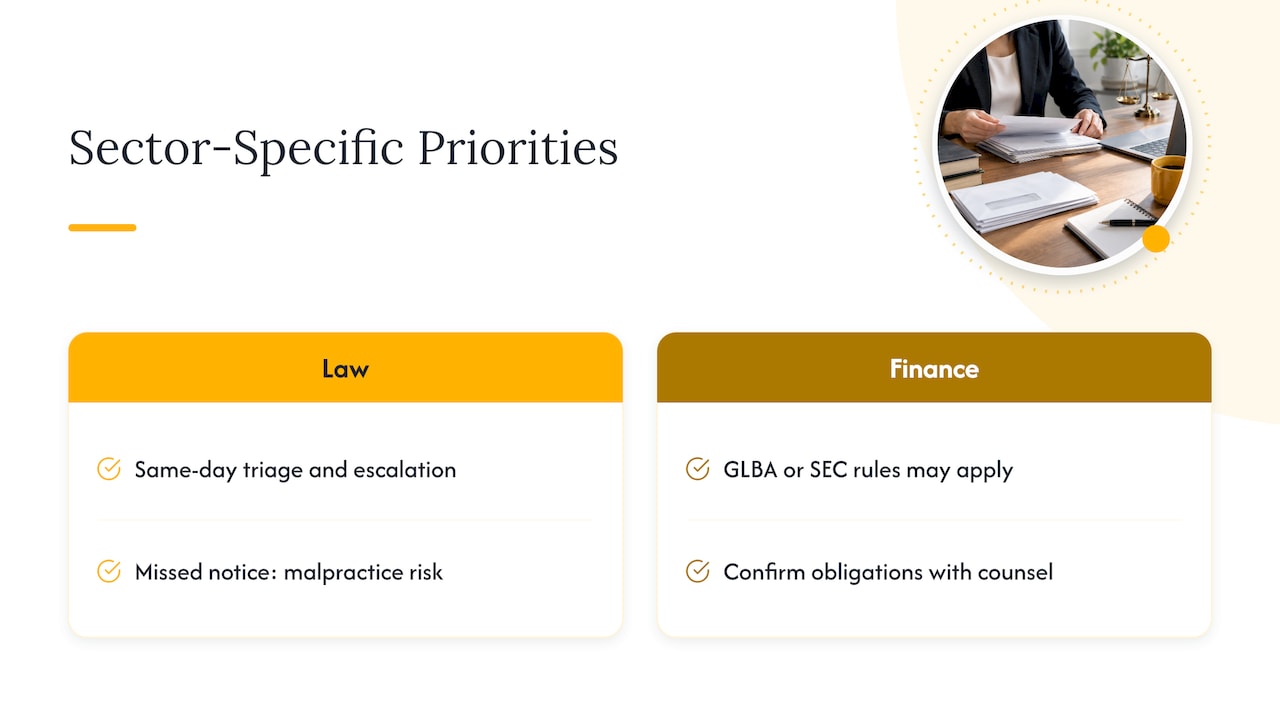
Financial firms may be subject to obligations such as GLBA and, for broker-dealers, SEC recordkeeping rules. Whether and how they apply to your mail depends on your business, so confirm with your compliance counsel. If GLBA is on your list, see how to outsource GLBA work while keeping deadlines.
Security questions for any vendor
- Is the intake site access controlled, monitored and limited to screened staff?
- Is there a documented chain of custody from receipt to disposition?
- Is data encrypted in transit and at rest, and who can access it?
- Are audit logs available to you on request?
- What is the incident notification process and timeline?
- Which independent security assessments or audit reports can the vendor share?
For a broader framework on vendor oversight, our piece on board-level controls that secure data in BPO partnerships is a practical checklist.
What mail types and workflows it supports
The right scope depends on what lands in your mailbox.
| Industry | Typical inbound mail | Typical destination |
|---|---|---|
| Healthcare | Claims correspondence, referrals, records requests, patient forms | Practice management or records system, patient support queue |
| Legal | Court notices, client correspondence, discovery materials, signed documents | Case management system, attorney or paralegal queue |
| Ecommerce and retail | Returns, chargeback letters, supplier invoices, customer letters | Order management, accounts payable, customer care |
| Financial services | Account change requests, disputes, loan documents, regulatory letters | Core systems, compliance or fraud review |
Two patterns repeat across industries. First, a handful of document types make up most of the volume, so start there. Second, the value is highest where a document triggers a downstream task: an invoice to pay, a claim to answer, a deadline to calendar.
Connecting the mailroom to your systems
Scanning is only half the job. If digital files land in a shared folder that someone must check, you have moved the bottleneck, not removed it. The goal is to push documents and extracted data into the systems where work happens: document management, case management, CRM, ERP or e-signature tools. Integration planning deserves its own workstream, and these integration steps and best practices show the kind of checklist worth borrowing when you connect a signing or document platform to your workflow.
Limits to plan for
Good planning is what separates a smooth launch from a rocky one. Build these into your scope:
- Mail forwarding lag. Redirecting mail to a processing site adds a day or more at the start. Set expectations with your teams.
- Items that cannot be digitized. Checks, certified mail, packages and original signed instruments need a separate return or hold process.
- Rules take tuning. Classification and routing improve over the first weeks as real mail reveals edge cases.
- Sender changes. Some correspondence is better moved to electronic delivery at the source, and a change-of-address campaign to vendors and customers helps.
- Retention policy. Decide how long originals are kept before shredding, and align it with your legal and regulatory retention rules.
When volume is very low or documents must stay on site by policy, an in-house or hybrid model can fit. Most mid-sized and large organizations, though, find that volume and distribution across locations make a managed approach worth evaluating.
How to choose a provider
Evaluate on operations, not brochures. A practical scorecard:
- Industry fit. Has the provider handled your document types and regulatory context?
- Exception handling. Who reviews flagged items, how are they trained, and how quickly are they cleared?
- Security posture. Controlled facility, chain of custody, encryption, audit logs and a willingness to sign the agreements your industry requires.
- Integration capability. Proven connections to your systems, with named owners on both sides.
- Service levels. Written turnaround, accuracy and escalation targets, with reporting you can audit.
- Scalability. Capacity for seasonal peaks without a renegotiation.
- Transparency in pricing. Clear charges for setup, storage, retrieval and exit.
- Exit terms. Data export formats and transition support if you change providers.
Ask for a reference in your industry and speak to someone who has been live for at least a year. Reporting, not promises, shows whether service levels hold.
Planning the transition
A phased rollout limits risk.
- Inventory your mail. Sample two to four weeks of inbound items. Categorize by type, volume, urgency and destination.
- Define outcomes. Set targets for turnaround, accuracy and routing, and agree how you will measure them.
- Run a pilot. Start with one location or one mail type. Review exceptions daily at first.
- Tune the rules. Adjust classification, routing and validation based on pilot results.
- Redirect mail in waves. Update addresses by department or sender group rather than all at once.
- Review monthly. Track volume, exceptions, turnaround and security events, and revisit scope each quarter.
As part of the transition, redeploy the staff who used to sort mail. They know your document types, and they are often the best people to own exception rules and quality checks. If you want a structured way to review adjacent processes at the same time, see our step-by-step back-office optimization guide.
Our perspective
We see digital mailroom outsourcing as a people and process decision as much as a technology one. Software can read a clean invoice in seconds. It cannot decide what to do with a letter that matches nothing in the playbook, and that is where service quality is won or lost.
At Altiam CX, we focus on nearshore customer experience and back-office operations, delivered from Latin America with bilingual staff and a disciplined, measurable approach. Our model is designed around scalable teams, clear performance frameworks and cultural alignment with U.S. organizations. For document-heavy functions, that means the follow-up work around the paper: validating data, handling exceptions, answering the patient or client who is waiting on a response, and keeping SOPs current.
Our view is simple. Choose the scanning and capture technology that suits your volume, then pair it with a trained, managed team that owns the exceptions and the communication that follows. That combination is what turns a faster mailroom into better service.
Daniela
Where Altiam CX fits
Digitizing mail creates new work downstream: cases to open, patients to reply to, intake forms to verify, appointments to schedule. That is where a managed team earns its keep.
For healthcare organizations, our managed customer support and patient support services include SOP management so processes stay consistent as volume grows. Law practices can look at our legal intake and client communication services, which cover inquiry handling, follow-ups, appointment scheduling and back-office legal support.

If you are scoping a digital mailroom project and want a bilingual, nearshore team to handle the review and response work around it, talk to Altiam CX about managed team extension. For more on why organizations turn to outsourcing for this kind of work, read about how business process outsourcing drives growth and back-office outsourcing for business efficiency.
FAQ
Is digital mailroom outsourcing the same as mail scanning?
Scanning is one step. A digital mailroom also covers intake logging, classification, data extraction, routing to your systems and the handling of the original paper. The value comes from getting the right document to the right person or workflow, not only from creating an image.
Does outsourcing digital mail meet HIPAA requirements?
It can, if the arrangement is set up correctly. HHS requires a written business associate contract that sets permitted uses of protected health information and requires safeguards and breach reporting. Confirm that your vendor will sign one and ask your compliance officer to review disposal and access controls.
How long does it take to move to an outsourced digital mailroom?
The timeline depends on mail volume, number of locations and integrations. A phased approach with a pilot on one mail type or location is the safest path, followed by waves of address changes and a period of rule tuning.
What should I ask a provider about pricing?
Ask for a quote on the same sample of your actual mail, broken down by setup, per-item or per-hour processing, exception handling, storage, retrieval and exit. Confirm minimum commitments and turnaround times, since these change the effective cost.
Who handles the documents the software cannot read?
Trained reviewers should. Define in writing who reviews flagged items, how quickly they are cleared and when urgent items are escalated to your team.
Sources
- HHS: Business Associate Contracts
- HHS: FAQs on the Disposal of Protected Health Information
- Integration steps and best practices