
Call center workforce management is the discipline of forecasting demand, scheduling the right agents at the right time, and monitoring execution in real time to hit service targets without overspending on labor. Done well, it lifts service levels, cuts unnecessary staffing cost, and lowers agent turnover. This guide walks through forecasting, scheduling, intraday adherence, analytics, agent well-being, and the buyer’s questions that separate a real program from a spreadsheet with good intentions.
TL;DR:
- Accurate call volume forecasting within 5 percent at the interval level is essential; poor forecasts lead to staffing gaps and increased wait times.
- Scheduling must incorporate skills-based shift templates and staggered breaks aligned with demand patterns to prevent coverage gaps.
- Intraday management requires real-time dashboards and clear thresholds to adjust agents, handle spikes, and maintain service levels without overreacting.
- Implementing a structured, phased rollout over 90 days with baseline measurements ensures a smooth transition and measurable improvements.
- Nearshore agents working during same hours and in the same language as the domestic team improve responsiveness and reduce coordination delays.
Table of Contents
- What Is Call Center Workforce Management?
- Why Call Center Workforce Management Matters to the Business
- How an Effective WFM Program Is Structured
- How Do You Forecast Call Volume Accurately?
- Building Schedules That Actually Hold Up
- What Does Real-Time Adherence Actually Look Like?
- Which KPIs Actually Drive Better Decisions?
- How Does WFM Design Affect Agent Stress and Turnover?
- What Should You Ask WFM Vendors Before You Buy?
- How Do You Roll Out a New WFM Program Without Breaking It?
- What We’ve Learned Running Nearshore WFM Programs
- Sources
What Is Call Center Workforce Management?
Workforce management, often shortened to WFM, is the operational system that connects predicted demand to staffing decisions. It answers three questions every shift: how many contacts are coming, how many agents do we need to handle them at an acceptable wait time, and are we actually running the plan we built. Everything else, forecasting models, scheduling software, real-time dashboards, exists to answer those three questions with less guesswork.
A few terms get used loosely, and mixing them up leads to bad decisions:
- Average handle time (AHT): the average duration of a contact, including talk time and after call work. It drives how many agent hours a given volume actually requires.
- Shrinkage: the percentage of paid time agents are not available to take contacts, covering breaks, training, meetings, and absenteeism. Most centers run shrinkage at a moderate rate, and ignoring it is the fastest way to understaff.
- Occupancy vs. utilization: occupancy measures how much of an agent’s logged in time is spent actively handling contacts, while utilization looks at how effectively that capacity converts into productive output across the whole shift, including non-phone work. High occupancy without matching utilization usually means agents are busy but not necessarily productive on the work that matters most.
- Erlang models: queuing formulas that translate forecasted volume and AHT into required staff counts at a target wait time.
Channel matters too. Voice queues use tight service-level windows because customers are waiting live on the line. Chat and email tolerate longer response windows because customers do not expect an immediate connection, which changes both the staffing math and the SL target you should set. Treating every channel like a phone queue wastes headcount on channels that never needed that level of coverage.
Why Call Center Workforce Management Matters to the Business
Every staffing decision is really a bet against two costs: paying agents who sit idle, or losing customers who wait too long and hang up. WFM exists to make that bet with data instead of habit. Get the balance wrong in either direction and the damage shows up in different places, wasted labor budget on one side, abandoned calls and frustrated customers on the other.
The KPIs leadership actually cares about, service level, average speed of answer, cost per contact, and agent attrition, all move when WFM improves. A tighter forecast means fewer emergency overtime approvals. Better intraday response means fewer customers stuck in queue during a lunch rush nobody planned for. Lower attrition means less time and money spent on hiring and training replacements who take months to reach full productivity.
The people side of this equation is not abstract. Agents working in chronically understaffed queues report the highest stress. Cornell’s research on contact center jobs found that 96% of agents report weekly stress and 74% qualify as at risk for burnout, with understaffing and rigid, discipline-focused monitoring named as leading drivers. Half of agents report physical exhaustion after every single shift, and nearly half cite poor management as a top reason to quit.
That statistic is not just an HR concern. Understaffed queues create the exact conditions that drive the burnout numbers above, which then drives the attrition that forces you to rebuild staffing capacity you never should have lost. WFM, when it works, breaks that cycle before it starts.
How an Effective WFM Program Is Structured
A mature workforce management function is not one tool. It is a chain of connected activities, each feeding the next, with clear ownership so nothing falls through the cracks between teams.
- Forecasting: predicts contact volume and AHT by interval, day, and channel, usually 4 to 13 weeks out.
- Capacity planning: converts that forecast into required staff hours, accounting for shrinkage and service-level targets.
- Scheduling: builds actual shifts and rosters that match required capacity to available, skilled agents.
- Intraday management: monitors real-time performance against plan and makes tactical adjustments as the day unfolds.
- Analytics and reporting: measures whether the whole system hit its targets and feeds lessons back into the next forecast cycle.
- Agent development: trains and coaches the people executing the schedule, closing the loop between planning and performance.
These pieces interact constantly. A forecasting miss cascades straight into an intraday crisis. A scheduling system that ignores skills data creates coverage gaps even when total headcount looks fine on paper. Ownership typically splits across three groups: the WFM team owns forecasting, capacity planning, and intraday tactics; operations managers own coaching and day-to-day execution; and HR or IT own the systems, integrations, and compliance guardrails around scheduling data. Platforms like those described in Microsoft Dynamics 365’s workforce management documentation bundle forecasting, scheduling, adherence tracking, and agent self-service into one system specifically so these handoffs happen without manual data transfer between disconnected tools.
How Do You Forecast Call Volume Accurately?
Forecasting is the foundation everything else in workforce management sits on. Get the volume prediction wrong and no amount of scheduling skill or intraday heroics fully recovers the gap.
A usable forecast needs several inputs working together:
- Historical volume and AHT, broken into the smallest reliable interval, usually 15 or 30 minutes, across at least 8 to 13 weeks.
- Shrinkage data, tracked separately from volume so planners know true available capacity, not just scheduled headcount.
- Known demand drivers, including marketing campaigns, billing cycles, product launches, and outage events that shift volume outside normal patterns.
- External context, such as seasonality, holidays, and competitor actions that move call patterns industry-wide.
For stable, low-variance queues, simple moving averages or exponential smoothing get the job done without much overhead. Once volume gets choppy or the queue runs 24/7 with tight SL requirements, Erlang-based models earn their complexity. Erlang C is the classic queuing formula, but it assumes customers never abandon the queue, which overstates staffing needs in real-world queues where people hang up. Erlang A adds an abandonment factor, producing a more realistic, and usually lower, staffing requirement.
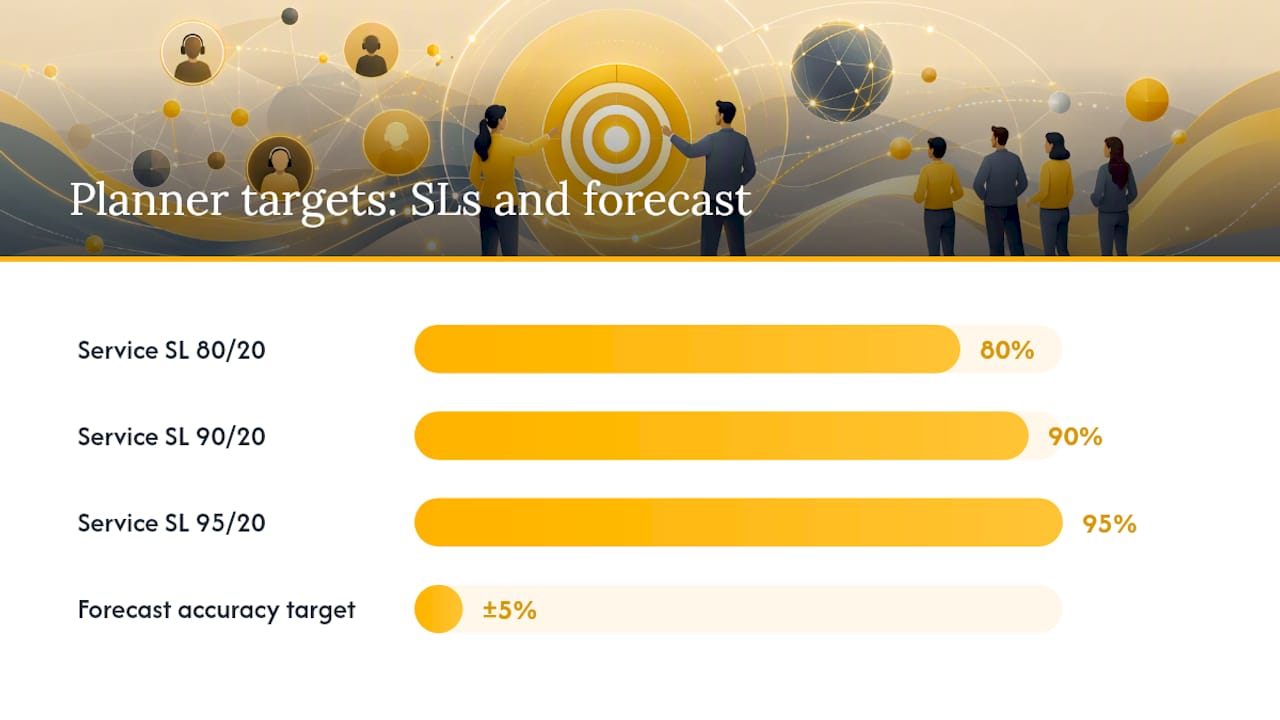
A realistic accuracy target for a mature program is within about 5% of actual volume, measured at the interval level, not just the daily total. Hitting daily totals while missing interval shape still produces staffing chaos, because the mismatch shows up as a 20 minute wait at 10 a.m. even though the day’s average looks fine. Forecast error does not stay contained.
Service level targets deserve the same scrutiny as the forecast itself. Most centers default to 80/20 (80% of calls answered within 20 seconds) without asking whether that number fits every queue. Value-based SL selection derives the target from the actual tradeoff between staffing cost and customer loss, and for high-value queues, the math often points to a target closer to 90/20 or even 95/20, while a low-value informational queue may not need 80/20 at all.
Pro Tip: Run your SL analysis by queue, not by center. A billing dispute queue and a general FAQ queue rarely deserve the same target, and treating them identically almost always means overstaffing one and underserving the other.
Building Schedules That Actually Hold Up
Capacity planning tells you how many hours you need. Scheduling is where that number turns into a roster real people can live with, and this is usually where good WFM programs quietly fall apart if skills and preferences get ignored.
Start with shift templates built around your interval-level capacity requirements, not round shift blocks that happen to be administratively convenient. Skills-based scheduling matters more as queues fragment across products, languages, and channels. A generalist schedule that ignores which agents can actually handle Spanish-language billing disputes will hit its headcount number while still leaving that specific queue understaffed.
Agent input improves adherence more than most operations managers expect:
- Shift bidding lets agents rank preferred shifts within business rules, which raises buy-in without sacrificing coverage.
- Self-service swap tools reduce the manual back-and-forth that eats a scheduler’s week and gives agents some control over their own calendar.
- Part-time and split-shift templates cover peak intervals without paying full-time rates for hours you do not need.
- On-call pools handle volume spikes without permanently overstaffing the baseline schedule.
Breaks deserve more planning attention than they usually get. Stacking every agent’s lunch in the same 30-minute window guarantees a coverage gap, no matter how accurate the forecast was. Stagger breaks against the interval-level demand curve, not the clock.
Pro Tip: Build your break schedule against your forecasted interval curve, not a fixed clock time. A break plan that ignores your actual demand shape recreates the coverage gap you just spent weeks forecasting away.
Split shifts and on-call rules need clear, written policy, since ad hoc decisions here generate the fastest path to agent resentment and grievance complaints. Nearshore team extension is worth considering as a deliberate capacity lever rather than a last resort. Adding a nearshore pool for overflow, off-hours, or seasonal spikes gives you flexible capacity without the full cost and lead time of hiring and training a domestic team from scratch, particularly for queues where bilingual coverage or extended hours are the real constraint.
What Does Real-Time Adherence Actually Look Like?
Forecasting and scheduling set the plan. Intraday management is where that plan meets the actual, messier day, and it is where a lot of otherwise solid WFM programs lose their advantage.
Schedule adherence, the percentage of time agents spend doing what their schedule says they should be doing, is the headline metric, but it needs context. The same 85% during an unexpected spike signals a real problem worth acting on immediately.
The tactical response playbook usually follows this sequence:
- Monitor real-time queue metrics against forecast every 15 to 30 minutes, watching for sustained deviation rather than single-interval noise.
- Reassign or overflow agents from lower-priority queues once a deviation crosses a defined threshold, not on gut feel.
- Offer callbacks during unexpected spikes to protect the customer experience without forcing emergency overtime.
- Adjust break and training schedules for the rest of the day once a deviation is confirmed as sustained, not transient.
- Escalate to management only when the deviation persists past a set time window, keeping minor noise from triggering unnecessary alarm.
The key discipline here is distinguishing a real trend from ordinary variance. Setting that threshold explicitly, in writing, before the day starts keeps intraday teams from either overreacting to every blip or underreacting to a genuine problem.
Which KPIs Actually Drive Better Decisions?
Dashboards full of metrics are easy to build and mostly useless if nobody agrees on which numbers trigger action. Effective performance management starts by narrowing the list to KPIs that connect directly to financial or customer experience outcomes.
- Service level and average speed of answer tie directly to customer experience and, for many businesses, to contractual SLAs with financial penalties attached.
- Occupancy and utilization flag whether agents are appropriately busy or quietly overstaffed relative to actual demand.
- Forecast accuracy measured at the interval level tells you whether the entire planning chain is trustworthy or guesswork dressed up as a spreadsheet.
- Schedule adherence shows whether the plan built on paper is the plan actually running on the floor.
- Cost per contact connects staffing decisions directly to the budget line leadership actually reviews.
- Attrition and absenteeism reveal whether the operational plan is sustainable for the people executing it.
Reporting cadence matters as much as the metric list. Intraday numbers need a live or near-live dashboard. Weekly reviews should focus on adherence trends and forecast accuracy. Monthly and quarterly reviews are where cost per contact and attrition trends belong, since those numbers need enough data to separate real signal from short-term noise.
None of this works without clean integration hygiene between your ACD (automatic call distributor), CRM, and HRIS systems. When those systems do not talk to each other reliably, WFM analysts spend their week reconciling spreadsheets instead of making decisions, and by the time the numbers are clean, the intraday moment they were meant to inform has already passed.
How Does WFM Design Affect Agent Stress and Turnover?
Workforce management is often framed as a math problem, forecasting formulas and staffing ratios, but the human side of the equation determines whether the math ever gets a fair chance to work. Poorly designed WFM practices are a direct driver of the burnout numbers cited earlier in this guide.
Peer-reviewed research tracking 1,440 contact center workers found exhaustion is common industry-wide, but burnout and overall well-being vary significantly by company, tied closely to how much an employer invests in recruitment quality, onboarding, training, and reward structures. That variance matters. It means burnout is not an inevitable cost of contact center work, it is a design choice, and WFM practices sit right at the center of that choice.
Two specific findings should shape how any operations manager builds their WFM program:
- Discipline-focused monitoring backfires. Cornell’s research found that intensive monitoring paired with punitive discipline increases absenteeism and turnover intent, while using the same monitoring data for coaching produces the opposite effect, higher satisfaction and lower turnover risk.
- Training and discretion protect agents. Greater job discretion and stronger training investment correlate with measurably lower stress, independent of raw call volume.
Translating that into practice means building predictable shift patterns instead of last-minute schedule changes, giving agents real input through shift bidding and swap tools, cross-training staff across queues so no single person is trapped in the most stressful line of work indefinitely, and using performance dashboards for coaching conversations rather than as a disciplinary weapon. Structured training programs that build real skill, not just compliance scripts, consistently show up in the research as one of the strongest levers against burnout.
What Should You Ask WFM Vendors Before You Buy?
Choosing between call center workforce management software options, or between software and a managed nearshore partner, comes down to a short list of questions that separate real capability from a polished sales deck.
Platform must-haves worth verifying directly, not taking on faith:
- Forecasting inputs and accuracy proof. Ask for a real accuracy report from an existing client, not a marketing claim, and confirm the model handles multi-channel volume, not just voice.
- Intraday tooling. Confirm real-time dashboards, automated alert thresholds, and the ability to reassign or overflow agents without a manual data export.
- Agent self-service. Shift swaps, bidding, and time-off requests should run through the platform, not a spreadsheet email chain.
- Integrations. Verify native connections to your specific ACD, CRM, and HRIS, since “API available” often means custom development work you will pay for later.
- Security and compliance. Confirm how agent data is stored and who can access scheduling and performance records, particularly relevant if you handle healthcare or financial services data.
A pilot is the only reliable way to test vendor claims before signing a multi-year contract. Run it in a single high-value queue for 4 to 8 weeks, long enough to capture a statistically meaningful run of business hours. Establish baseline forecast error, adherence, and SL performance before the pilot starts, then measure the same three numbers at the end, along with agent satisfaction, which is easy to skip and usually the most telling number in the report.
Pro Tip: Treat any vendor claim about “AI-driven forecasting” with healthy skepticism until they show you the actual accuracy number from a comparable client, measured at the interval level. A vague accuracy claim with no specific percentage is a red flag, not a feature.
Watch for contract red flags: unsupported channels buried in the fine print, integration fees not disclosed upfront, and opaque AI claims with no accuracy benchmark attached to them.
How Do You Roll Out a New WFM Program Without Breaking It?
Rolling out or upgrading a workforce management program works best as a staged process, not a single flip of the switch. A 30/60/90 day structure gives teams enough runway to build trust in the new system before it carries full operational weight.
- Weeks 1 to 2: Audit existing data quality, historical volume, AHT, shrinkage records, and confirm they are clean enough to forecast from reliably.
- Weeks 3 to 4: Identify quick-win roster fixes, staggered breaks, skills-based reassignment, that improve coverage without waiting on new software.
- Days 30 to 45: Launch a small pilot in one queue, with baseline metrics locked in before changes go live.
- Days 45 to 60: Tune the forecast model against real pilot data and correct for any systematic bias discovered during the run.
- Days 60 to 75: Automate scheduling for the pilot queue and begin building the intraday response playbook and escalation thresholds.
- Days 75 to 90: Expand successful pilot practices to additional queues, with named owners for forecasting, scheduling, and intraday response.
Change management determines whether any of this survives contact with the operations floor. Name specific owners for each workstream, forecasting, scheduling, intraday response, before the rollout starts, not after something breaks. Build a short communication plan for agents explaining what is changing and why, since a scheduling change introduced without explanation reads as arbitrary, even when the underlying logic is sound.
The most common pitfall is treating the pilot as a formality rather than a real test. Skipping the baseline measurement step means you have no way to prove the new system actually improved anything, which makes the next budget conversation with leadership a lot harder than it needs to be.
What We’ve Learned Running Nearshore WFM Programs
Forecasting discipline and schedule stability tend to move together, not separately. In nearshore team-extension engagements, the programs that hold up best are the ones where the client treats capacity planning as an ongoing conversation, not a document filed away after the kickoff call. A nearshore support case study we’ve been part of shows how adding a flexible bilingual capacity pool changed the coverage math for a client dealing with unpredictable seasonal spikes.
The pattern worth trusting here: cultural alignment and time zone overlap reduce the coordination friction that normally undermines intraday response. A nearshore agent working the same hours, in the same language register, as your domestic team catches a forecast miss just as fast as an in-house agent would, without the multi-hour lag that comes with offshore handoffs. That is a scheduling and capacity strategy as much as it is a cost strategy.
— Daniela
Sources
For deeper research on the topics covered here, these sources are worth bookmarking directly:
- Making call center jobs better (Cornell eCommons)
- Is stress in contact centers inevitable? (PMC/peer-reviewed study)
- Service level target selection (WFM Labs)
- Workforce Management overview (Microsoft Dynamics docs)