The best omnichannel routing strategy blends skills based routing, capacity limits, and priority scoring inside one unified queue, backed by clear fallback rules and a governance cadence to keep it maintainable. AI should augment those rules, not replace them. Aim for a simple configuration that effectively meets your SLAs, then improve it gradually in tested increments.
TL;DR:
- The routing setup should start with a minimal configuration focused on SLA targets, using only one queue, skill, and fallback rule.
- Data quality and accurate customer and agent information are critical for preventing misrouted interactions in skills-based routing.
- AI enhances specific functions like intent detection, sentiment scoring, and request triage but must be supported by rules-based fallbacks to avoid errors.
- Regular review of KPIs such as SLA attainment, handle time, and transfer rates helps maintain routing effectiveness and prevents rule sprawl.
- Operational success relies on organizational buy-in, clear ownership, and staged implementation with active governance to avoid complexity and decay.
Table of Contents
- What Are the Core Omnichannel Routing Models?
- How Do You Choose the Right Routing Mix?
- How to Implement Omnichannel Routing Step by Step
- Where Does AI Actually Help Routing?
- What Metrics and Governance Keep Routing on Track?
- How a Nearshore Partner Puts This Playbook to Work
- What CX Leaders Get Wrong About Routing
- Get Routing Built and Governed, Not Just Designed
- Sources
- FAQ
What Are the Core Omnichannel Routing Models?
Most contact center platforms run on four building blocks: queue-based, skills-based, capacity/availability-based, and priority-based routing. A unified queue pools every channel into one decision engine instead of running separate silos for voice, chat, and email, which is why Zendesk points to unified queues as the model that improves agent utilization over channel-by-channel dispatch.
Each model solves a different problem:
- Queue-based routing sends the next interaction to the next available agent, first in, first out. It’s simple and predictable, but blind to skill or urgency.
- Skills-based routing (SBR) matches interactions to agents who hold the right language, product knowledge, or certification, an approach with decades of use in contact centers when proficiencies are measured accurately.
- Capacity/availability routing caps how much an agent can handle at once, critical for blended chat and email work where one agent might juggle three conversations.
- Priority-based routing pushes high-value customers or urgent issues ahead of the line, often layered on top of the other three.
Channels don’t behave the same way. A voice call demands one agent’s full attention in real time. Chat allows concurrency. Email and SMS tolerate delay. Treating all four as interchangeable is where routing strategies start to break down.
How Do You Choose the Right Routing Mix?
Run this checklist before you configure a single rule:
- Map scale and topology. How many queues, sites, and time zones are involved, and where are the failure domains if one node goes down?
- Audit your channel mix. Voice, chat, email, SMS, and social each carry different urgency and concurrency profiles, so your rules need channel-specific logic, not one blanket policy.
- Set agent capability flags. Decide who’s blended across channels and who’s dedicated, and cap concurrency per channel so an agent isn’t routed into three simultaneous chats plus a live call.
- Design your priority signals. Combine customer value, issue urgency, and sentiment scoring into a single, weighted priority score rather than stacking competing priority rules.
- Check integration and data quality. Routing is only as good as the CRM records, knowledge base tags, and presence signals feeding it.
Pro Tip: Start every new routing configuration with a minimal set of rules: one queue definition, one skill match, one fallback. Add complexity only after measuring how the simple version performs under real volume.
Ensure data quality because even a well-designed skills taxonomy will misroute work if the routing engine lacks accurate customer and agent data.
How to Implement Omnichannel Routing Step by Step
Turn the checklist into a working configuration in this order.
- Define routing profile metadata. Tag each interaction with intent, language, and customer tier so the engine has something to route against before it even looks at agent skills.
- Build your skill taxonomy. Microsoft’s skill-based routing documentation walks through creating skills, assigning proficiency levels, and choosing between exact match and closest match algorithms, which decide whether a case waits for a perfect skill fit or accepts the nearest available agent.
- Set channel capability flags per agent. Mark who can take voice, who can blend chat and email, and what their concurrency ceiling is for each.
- Configure capacity limits and priority weights. Cap simultaneous interactions per channel and assign numeric weight to your priority signals so the engine can rank competing cases.
- Build fallback and escalation rules. Following Microsoft’s guidance, define what happens when no exact skill match exists: relax the proficiency threshold, expand the eligible skill set, or route to an overflow pool, and test each fallback path before go-live.
- Simulate load and failure states. Push synthetic peak volume through the configuration and watch whether escalation thresholds trigger the way you designed them, not the way you assumed they would.
- Roll out in stages with a rollback plan. Launch on one queue or one channel first, hold a rollback configuration ready, and expand only once the pilot clears its SLA targets.
Two implementation details commonly challenge teams. First, blended-agent designs need explicit concurrency limits per channel to avoid routing an agent into an impossible multitasking scenario. Second, deferred queue surfacing for asynchronous channels like email and SMS helps fill idle time between higher-urgency interactions, rather than letting them compete for capacity needed immediately by voice and chat.
Where Does AI Actually Help Routing?
AI adds real value in specific, narrow places: detecting intent from the opening message, scoring sentiment to flag at-risk conversations, triaging simple requests to self-service, and predicting handle time so the engine can balance queues more accurately. Talkdesk’s analysis of AI-driven routing frames this as augmentation, not autonomous decision-making, and that distinction matters for how you deploy it.
The risks are just as concrete:
- Model drift, where an intent classifier trained on last year’s ticket patterns starts misreading this year’s queries.
- Bias baked into training data that systematically underserved certain customer segments or languages.
- Over-automation, where teams let the model make final routing calls with no human review of edge cases.
Introduce AI incrementally. Start with intent detection and triage, prove the model’s accuracy, then extend it toward dynamic prioritization once you trust its performance under real load. Keep a human-in-the-loop review step, run A/B tests against your rules-based baseline, and maintain a dashboard tracking model accuracy over time.
Pro Tip: Always keep a rules-based fallback live behind your AI layer. If the model’s confidence score drops below a set threshold, route on skills and capacity instead of forcing an uncertain AI decision.
What Metrics and Governance Keep Routing on Track?
Routing configurations decay without active oversight. Track these core KPIs weekly, not quarterly:
- SLA attainment by channel and priority tier
- Average handle time (AHT) and first contact resolution (FCR)
- Agent occupancy and transfer rates
- CSAT scored against routing accuracy, not just agent performance
Build SLA timers directly into routing profiles so breaches trigger automated escalation and alerts before a customer notices the delay. Assign a named owner for every routing rule, review the configuration on a fixed cadence, and keep a rollback action ready for any change that underperforms. A useful discipline: each quarter, remove one rule or one custom fallback and measure the impact, which keeps the system from accumulating the rule sprawl that eventually causes routing loops. This mirrors a principle from network engineering: Cisco’s deployment guidance warns against unnecessary redistribution and undocumented ownership, both of which apply just as directly to a routing engine as to a network.
How a Nearshore Partner Puts This Playbook to Work
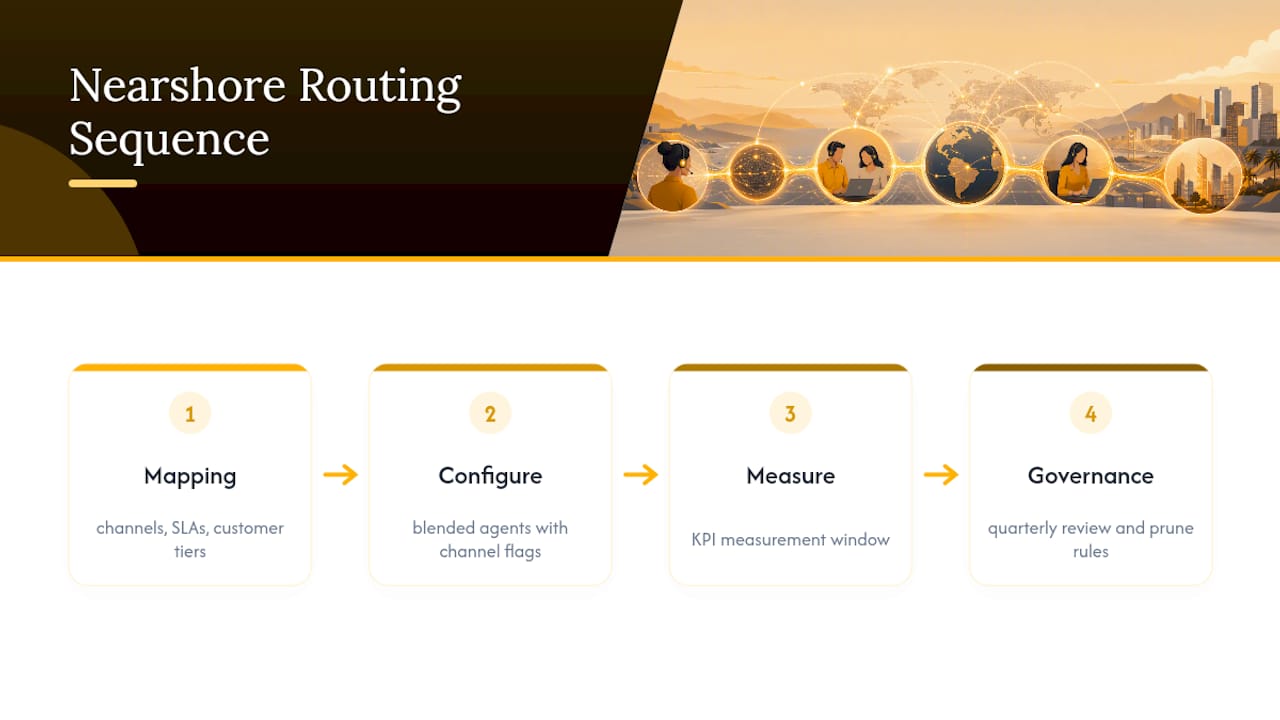
A nearshore partner builds routing profiles by mapping each client’s channel mix, SLA targets, and customer tiers before assigning blended agents with channel capability flags. Deployments happen in stages: baseline configuration, a KPI measurement window, then a governance cadence that reviews and prunes rules quarterly. That staged approach draws on the same workforce optimization principles used across Altiamcx’s managed teams, and pairs with a broader primer on omnichannel support for readers building the business case internally.
What CX Leaders Get Wrong About Routing
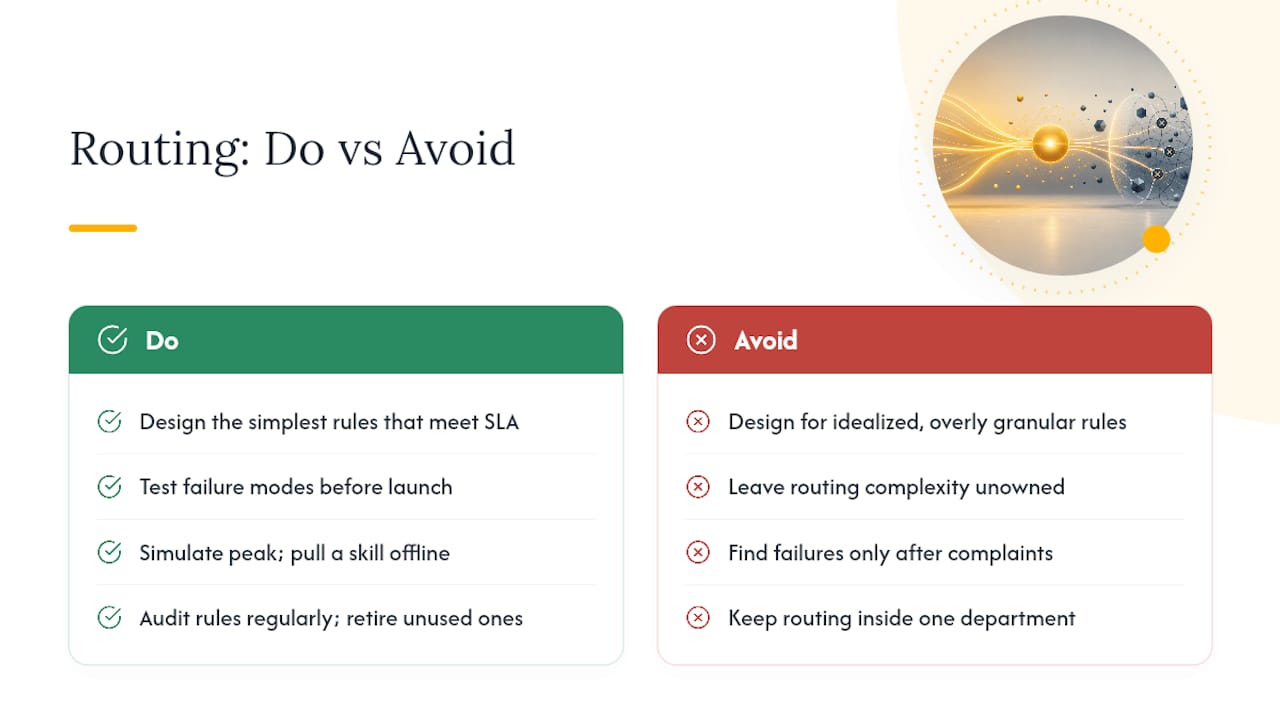
Most routing failures aren’t technical. They’re organizational. Teams design for an idealized, perfectly granular rule set instead of the simplest configuration that clears their SLA, and then nobody owns the resulting complexity. That’s backwards.
Test your failure modes before launch, not after a customer complaint surfaces one. Simulate peak load, pull a skill offline, and watch what your fallback actually does. Audit rules on a fixed schedule and retire anything that hasn’t earned its keep. Routing also can’t live inside one department. Ops, IT, and frontline supervisors all need a stake in it, or the rules drift out of sync with what agents are actually capable of handling day to day.
— Daniela
Get Routing Built and Governed, Not Just Designed
Designing a routing strategy on paper is one thing. Standing it up, staffing it with agents who can actually execute the skill and capacity flags you defined, and running the governance cadence that keeps it from decaying, is another. This gap is operationalized directly through managed nearshore teams configured for blended channel work, coverage, and the SLA discipline this playbook calls for.

Whether you’re building a new omnichannel queue from scratch or fixing one that’s drifted into rule sprawl, Altiamcx’s Customer Experience and Managed Team Extension services give you staffed, trained agents already mapped to skills-based and capacity-based routing profiles, so you’re not configuring rules and hiring agents on two separate timelines. If you’re in healthcare or legal services specifically, the healthcare CX operations program and legal intake and case communication services apply this same routing discipline to patient and client workflows. Reach out through the services page to scope a staged rollout for your queues.
Sources
Readers who want to go deeper into the technical and vendor detail behind this playbook can start with Microsoft’s skill-based routing configuration guide, Zendesk’s breakdown of omnichannel routing models, and Talkdesk’s explanation of AI-driven routing. For the network-engineering parallel on avoiding rule sprawl and undocumented ownership, Cisco’s IOS XR deployment best practices is worth a read even outside its original networking context. For a marketing-side view of unifying customer experience across channels, see this overview of omnichannel customer experience strategy.
- Set up skill-based routing — Microsoft Dynamics 365
- Omnichannel routing: What it is, how it works, + benefits — Zendesk
- Omnichannel routing: What it is and how it works — Talkdesk
- IOS XR deployment best practices — Cisco
FAQ
What Is the Difference Between Skills-Based and Priority-Based Routing?
Skills-based routing matches an interaction to the agent with the right qualifications, like language or product expertise. Priority-based routing ranks interactions by urgency or customer value regardless of skill, and most real deployments run both layered together.
How Many Routing Rules Should I Start With?
Start with the smallest set that meets your SLA: one queue definition, one skill match, and one fallback rule. Add complexity only after measuring how that minimal version performs under real traffic.
Can AI Fully Replace Rules-Based Routing?
No. AI works best as a layer that refines rules-based routing through intent detection, sentiment scoring, and predicted handle time, according to Talkdesk’s analysis, while a rules-based fallback stays in place for low-confidence predictions.
How Do I Prevent Routing Loops and Rule Sprawl?
Assign a named owner to every rule, review the configuration on a fixed cadence, and retire one rule each quarter to measure its actual impact. This mirrors network engineering guidance against unnecessary redistribution, as detailed by Cisco.
Does Altiamcx Help Implement Omnichannel Routing?
Yes. Altiamcx configures routing profiles, sources bilingual blended agents with channel capability flags, and runs staged rollouts through its Customer Experience and Managed Team Extension services. Current pricing details are available directly through that services page.