
A CX operations dashboard is a shared view of the numbers that run your customer experience operation: queue health, resolution quality, customer sentiment and team capacity, each shown to the person who owns it. A good one does one job. It tells a manager what to do next. This guide covers what belongs on it, where the data comes from, how to split views by role, and the mistakes that turn a dashboard into wallpaper.
TL;DR
- A CX operations dashboard combines operational, quality and customer-outcome metrics, not just ticket counts.
- Build three views, not one: real-time for frontline managers, weekly for support leaders, monthly for executives.
- Pair every speed metric with a quality metric, so improving one does not quietly damage the other.
- Define each metric in writing (population, period, calculation, exclusions, source) before you chart it.
- If you cannot name the action a number would trigger, remove it from the dashboard.
Table of Contents
- What a CX operations dashboard is, and how it differs from a general operations dashboard
- The metrics worth putting on it
- Balance speed with quality
- Build the data foundation first
- Tailor the view to the role
- Perspective: why we treat the dashboard as an operating tool
- Turn signals into action
- Common mistakes to avoid
- How Altiam CX supports CX operations
- FAQ
- Sources
What a CX operations dashboard is, and how it differs from a general operations dashboard
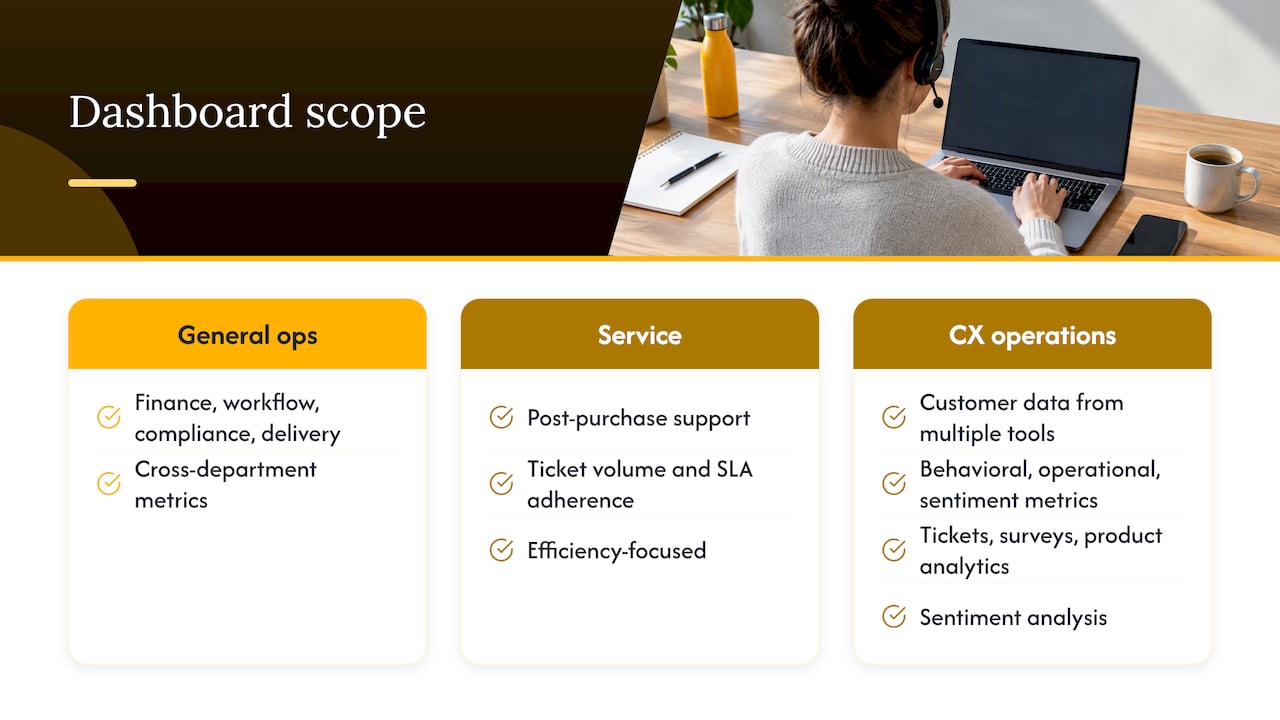
A general operations dashboard consolidates metrics across departments: finance, workflow, compliance, delivery. A CX operations dashboard narrows the lens to the customer-facing function and the operation behind it. It is a centralized view of customer data from multiple tools, built for a specific audience and showing the metrics that audience owns.
It also differs from a plain customer service dashboard. A service dashboard centers on post-purchase support and efficiency, such as ticket volume and SLA adherence. A CX dashboard is broader, adding behavioral, operational and sentiment metrics to cover the whole customer journey. The CX operations dashboard sits between the two. It keeps the operational control of a service dashboard and adds the customer outcomes that tell you whether the operation is working.
The inputs are usually support tickets, survey responses, product analytics and sentiment analysis, pulled into one visualized view that supports decisions.
The metrics worth putting on it
Group metrics by the question they answer. This keeps the dashboard readable and makes gaps obvious.
| Question | Metric group | Examples |
|---|---|---|
| Are we keeping up? | Efficiency and workload | First response time, resolution time, ticket volume, backlog |
| Are we solving problems well? | Quality | First contact resolution (FCR), reopen rate |
| How do customers feel? | Experience | CSAT, CES, NPS |
| Are customers staying? | Retention | Repeat purchase, churn, renewal |
| Can we staff the demand? | Capacity | Agent availability, adherence, queue depth |
This grouping follows the common structure of efficiency, quality, experience and retention measures. On the efficiency side, first response time, ticket volume and backlog are the usual indicators of operational health.
The experience metrics measure different things, and mixing them up is a frequent source of confusion:
- CSAT captures satisfaction with a specific interaction.
- NPS captures how likely a customer is to recommend you.
- CES captures how easy it was to get the issue resolved.
- AHT measures interaction handling time, and FCR measures whether the first contact solved the problem. Both are covered in this metrics overview.
If you are deciding between CSAT and NPS as your headline sentiment measure, our piece on the decisions CX ops must make to use CSAT and NPS walks through the trade-offs. For a broader view of how measurement fits a CX program, see proven strategies for measuring customer experience success.
Balance speed with quality
The most common way a dashboard misleads is by rewarding one number at the expense of another. Push handle time down and agents may rush. The ticket closes, the customer calls back, and your dashboard shows a win while your customers see a failure.
The fix is pairing. Best practice is to investigate falling handle time alongside repeat contacts, and avoid closing cases before the customer’s problem is addressed. The strongest performance programs combine efficiency with quality, resolution, customer experience and employee indicators, so that improving one metric does not create problems elsewhere.
A practical pairing set:
- Handle time with repeat contact rate. Faster is only better if customers do not come back.
- First response time with CSAT. A quick but empty reply should show up in satisfaction.
- Backlog with reopen rate. Clearing a queue by closing tickets early inflates throughput.
- Volume with agent availability. A demand spike is a staffing question before it is a performance question.
Build the data foundation first
A dashboard is only as trustworthy as its sources. The workable pattern is to use the helpdesk as the source for ticket and queue measures, connect CSAT and CES survey data, and add CRM data when needed, with a single aggregation point so nobody reconciles spreadsheets by hand.
Then write down the rules. Data accuracy depends on explicit record grains (ticket-level versus customer-level), timestamps, exclusions and aggregation methods. Without them, two reports can carry the same label and show different numbers. For each metric, record:
- The population it covers (all channels, or phone only?)
- The reporting period and timestamp used (created, first reply, resolved)
- The calculation, including what counts as a numerator and denominator
- The exclusions (spam, merged tickets, internal tests)
- The source system and the person who owns it
- The version, so you can explain a change in definition later
That last point matters more than it seems. When a definition changes, the trend line breaks, and someone will ask why the number moved. A short change log answers the question before it becomes an argument. The same discipline applies in other reporting domains: a live marketing dashboard works best when every figure comes from a shared, consistently defined source, and a CX dashboard is no different.
If you handle regulated customer information, such as patient or client records, involve your compliance or privacy lead before connecting those systems. Decide which fields the dashboard needs, and keep personal data out of views that do not require it.
Tailor the view to the role
One dashboard for everyone usually serves no one. Views should be role-specific: frontline managers need real-time operational control such as queue health, support leaders need weekly performance trends for coaching, and executives need monthly strategic summaries of customer health and business outcomes.
| Audience | Cadence | What they need to see | Typical action |
|---|---|---|---|
| Frontline managers and team leads | Live, checked through the day | Queue depth, wait time, agent availability, adherence, SLA timers | Reassign agents, open overflow, adjust breaks |
| CX and support leaders | Weekly | FCR, reopen rate, CSAT by team, backlog trend, contact drivers | Coach, fix a process, update a knowledge article |
| Executives | Monthly | CSAT or NPS trend, retention, cost to serve, risk items | Fund, staff, or change priorities |
Real-time teams should prioritize queue depth, wait time, agent availability and SLA timers. Operations dashboards exist for immediate correction of queue buildup, wait-time anomalies, abandonment spikes and SLA breaches, while executives review trends monthly for governance and risk.
For leadership, the question is how customer signals connect to revenue and retention. This look at customer feedback and revenue growth is one way to frame the executive conversation. For the operational side of the same story, read why operations drives CX outcomes.
Perspective: why we treat the dashboard as an operating tool
At Altiam CX, we see the same pattern in the operations we help run. The dashboard is rarely the problem. The operating model behind it is.
A team that cannot say who owns a number, what threshold triggers escalation and which decision follows will not be rescued by a better chart. That is why we build measurement into the service design from the start: defined metrics, named owners, clear thresholds and a review rhythm that matches each decision horizon.
This is also where nearshore delivery earns its place. When your extended team works in time zones close to yours, with bilingual agents who share cultural context with your customers, the weekly coaching loop and the daily queue correction can happen in the same working day. Our approach is designed to make those loops fast, so that what the dashboard shows turns into action while it still matters.
We would rather give you five metrics with owners than thirty without.
Daniela
Turn signals into action
A dashboard should change what someone does next rather than serve only as a report. Three habits make that happen.
Set red-flag thresholds in advance. Give each KPI a trigger for escalation. One example from a published template is a CSAT below 4.0 out of 5.0 or a queue wait above 5 minutes. Treat those as starting points and calibrate them to your own baseline, channels and customer expectations.
Apply the action test. A useful filter: if you cannot name the action you would take when a number moves 10 points, it does not belong on your weekly dashboard. Run this test on every tile once a quarter and remove what fails.
Keep decision horizons separate. Dashboard struggles are frequently operating model problems rather than technical ones, with organizations collapsing real-time control, short-term stabilization and long-term governance into one interface. Give each horizon its own view, its own owner and its own meeting.
A simple rhythm to start with:
- Daily huddle (10 minutes): live queue, SLA timers, staffing against forecast.
- Weekly review (30 minutes): FCR, reopen rate, CSAT drivers, top contact reasons, one coaching focus per team.
- Monthly business review: sentiment and retention trends, cost to serve, process changes shipped and their effect.
For teams that outsource part of the operation, the same rhythm should extend to your partner. Our CX outsourcing governance checklist covers the reporting cadence, ownership and escalation paths worth agreeing on up front.
Common mistakes to avoid
- Dashboard overload. A frequent error is stacking every available metric into a single view. Start with the handful that map to decisions.
- No owners. Pitfalls include tracking too many metrics, mixing decision horizons and failing to assign clear owners for actions. Put a name next to every tile.
- Identical labels, different math. Two teams reporting “resolution time” with different timestamps will never agree. Fix the definition, not the argument.
- Speed without quality. See the pairing set above.
- Technology without alignment. A steering group that brings together cross-functional stakeholders helps keep customer-focused actions consistent, a point made in this guide to CX dashboard metrics and reports.
How Altiam CX supports CX operations
Building the dashboard is the easier half. Running the operation it describes is the harder half. Altiam CX is a nearshore customer experience and operational services partner, supporting organizations with customer care, technical assistance, back-office operations and managed team extension, delivered from Latin America with bilingual agents and measurable performance frameworks.

If you are staffing queues in healthcare, legal, ecommerce or financial services and want performance measured the way this guide describes, explore our customer experience and managed team extension services. Healthcare teams can look at our patient support and SOP management, and law practices at our legal intake and inquiry handling.
FAQ
How many metrics should a CX operations dashboard have?
Fewer than you think. Each view should hold only the metrics its audience owns and can act on. A frontline view might carry five or six live indicators, while an executive view might carry a handful of trend lines. If a metric has no named action or owner, remove it.
How often should we review CX dashboard data?
Match the cadence to the decision. Frontline managers watch queue health live and correct it immediately, support leaders review weekly trends for coaching, and executives review monthly summaries for governance and risk.
What is the difference between a CX dashboard and a customer service dashboard?
A customer service dashboard focuses on support efficiency, such as ticket volume and SLA adherence. A CX dashboard adds sentiment, behavioral and journey metrics. A CX operations dashboard combines both: operational control plus the customer outcomes that show whether the operation is effective.
Which systems feed a CX operations dashboard?
Most teams start with the helpdesk for tickets and queues, add CSAT and CES survey data, and bring in CRM data where needed. Route everything through a single aggregation point and document each metric’s definition, so numbers stay consistent across reports.
Sources
- Customer Experience Dashboard: Stop Dashboard Overload
- Customer Service Dashboard Template: Metrics, Examples
- 6 Customer Experience (CX) Dashboard Examples by Role
- Customer Service Metrics: A Practical Measurement Guide
- Customer support analytics: Metrics that actually matter
- 25 Key Customer Service Metrics to Measure
- Call Center Performance Metrics: KPIs That Matter
- Help Desk Reporting & Dashboards Guide 2026
- Contact Center Dashboards for Effective Oversight
- The Ultimate Guide to Customer Service Metrics
- Customer Experience Dashboard Examples 2026
- Customer Experience Dashboard: How to Design Metrics and Reports
- Live marketing dashboard
- Customer feedback and revenue growth