
TL;DR:
- Implementing a structured client communication workflow improves clarity, consistency, and trust throughout all project stages. It incorporates clear standards, templates, suitable tools, and regular review to foster stronger client relationships and higher retention. Starting with onboarding communication charters and action summaries yields quick, measurable improvements in client confidence and satisfaction.
A client communication workflow is a structured process that manages every client interaction across all project phases, ensuring clarity, consistency, and measurable trust. Companies that prioritize improving client communication see an 84% direct uplift in revenue. That number reflects something most professionals already sense: disorganized communication costs real money. This guide covers the essential stages, the right tools, and the exact steps to build a process that works. Whether you manage five clients or five hundred, a well-designed communication process guide is the difference between relationships that grow and ones that quietly erode.
What is a client communication workflow guide?
A client communication workflow guide is a documented system that defines who communicates with clients, when, through which channels, and with what content at each stage of the relationship. The industry term for this broader practice is client relationship management (CRM), and the workflow guide is its operational backbone. Without it, teams default to improvised emails, missed follow-ups, and inconsistent messaging that undermines client confidence.
The core value is lifecycle consistency. When every client receives the same quality of communication from inquiry to offboarding, trust compounds over time. Altiamcx has observed that organizations with quality client communication standards built into their workflows consistently outperform those relying on individual team members to fill the gaps.
What are the key stages of an effective client communication workflow?
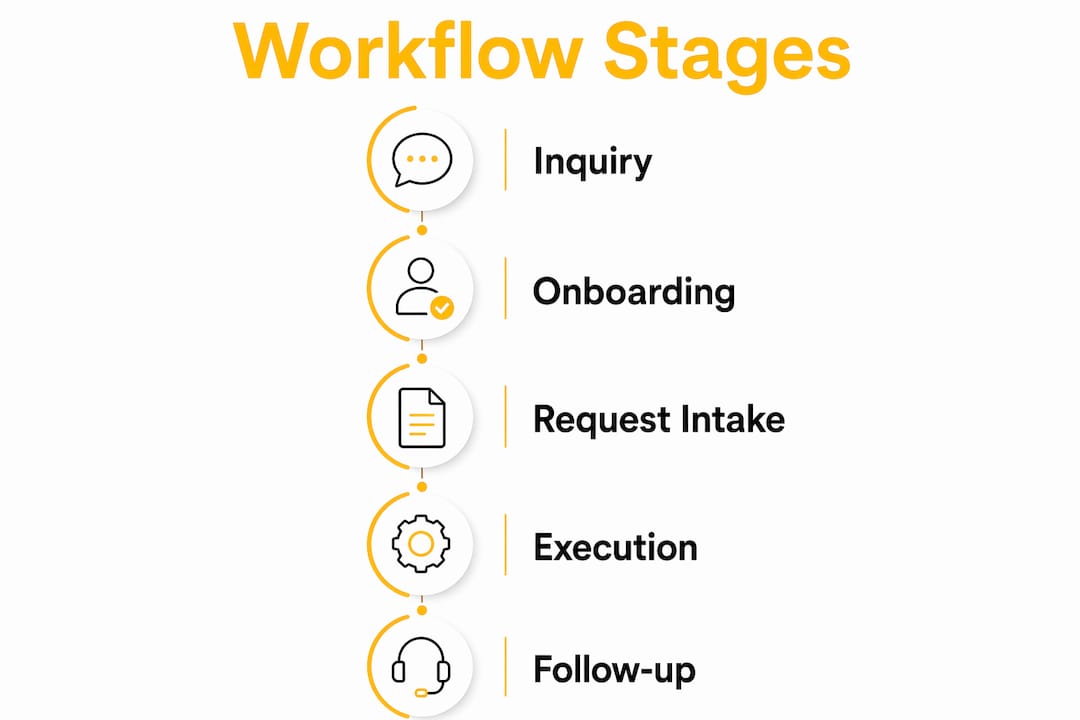
Five critical stages define a complete client communication lifecycle: initial inquiry, onboarding, request intake and triage, service delivery and review, and offboarding and follow-up. Each stage requires its own standardized templates and designated communication owners. Skipping standardization at any one stage creates a gap that compounds into larger problems later.
Here is what each stage demands in practice:
- Initial inquiry: Respond within a defined window (24 hours is the professional standard), use a templated but personalized reply, and qualify the client’s needs before the first call.
- Onboarding: Set communication expectations upfront. Define update cadence, response time commitments, and the platforms you will use. This single step prevents the majority of scope creep and miscommunication.
- Request intake and triage: Every client request should enter a formal intake system, whether that is a ticketing tool, a Kanban board, or a shared project management platform. Informal intake is one of the most common workflow breakdown points teams face.
- Service delivery and review: Schedule structured check-ins rather than ad hoc updates. Clients do not need more messages. They need the right messages at the right time.
- Offboarding and follow-up: A formal offboarding process with a satisfaction check, a summary of completed work, and a clear next-steps document turns one-time clients into repeat clients.
Pro Tip: Build a one-page communication charter during onboarding that lists the designated platform for each type of message (urgent issues, status updates, approvals). Share it with the client on day one and reference it throughout the engagement.
Which tools and channels optimize client communication workflows?
The right tools reduce friction without replacing human judgment. The wrong tools create new silos. The decision is not which platform is most popular. It is which platform serves each communication purpose in your workflow.
| Tool | Best use case | Key strength | Limitation |
|---|---|---|---|
| Slack or Microsoft Teams | Real-time messaging and quick decisions | Speed, searchable history | Can become noisy without channel discipline |
| HubSpot or Salesforce CRM | Client records, follow-up tracking | Centralized client data | Requires consistent data entry to stay useful |
| Asana, Monday.com, or ClickUp | Project and request management | Visibility, task ownership | Learning curve for clients unfamiliar with the tool |
| Loom or Zoom | Async video updates and live reviews | Personal, clear for complex topics | Not suitable for quick status updates |
| Formal approvals and documentation | Paper trail, universal access | Slow for iterative feedback |
The principle that matters most: assign a communication purpose to each channel and enforce it. Setting communication guidelines upfront, including which platform handles which type of message, prevents the information silos that derail even well-staffed teams. Slack is not for approvals. Email is not for urgent escalations. When everyone knows the rules, response times drop and nothing falls through the cracks.
Automation adds real value at the routine end of the workflow. Auto-sending onboarding checklists via tools like HubSpot, triggering status update reminders through Asana, or using standardized welcome templates for new clients frees your team to focus on the interactions that require genuine problem-solving. Automation handles the logistics. People handle the relationship.
Pro Tip: Audit your current tool stack before adding anything new. Most teams already have the tools they need. The gap is usually in how those tools are configured and whether the team follows the agreed communication rules.
How to build and implement your client communication workflow step by step
Building a workflow from scratch feels large. Breaking it into a sequence makes it manageable. Here is a practical process for any professional service team.

Step 1: Document what you currently do. Map every touchpoint where your team communicates with clients. Include emails, calls, project updates, and invoices. Identify where delays, confusion, or dropped messages occur most often.
Step 2: Define your communication standards. Establish response time expectations by channel (for example, Slack within two hours, email within 24 hours). Assign communication owners for each stage of the client lifecycle. Write this down in a shared document your entire team can access.
Step 3: Build your template library. Create reusable templates for the following:
- Onboarding welcome message and communication charter
- Weekly or bi-weekly status update
- Approval request with clear decision deadline
- Escalation notification with context and proposed resolution
- Offboarding summary with completed deliverables and next steps
Step 4: Pilot with one new client. Testing the workflow at small scale before full rollout surfaces gaps you cannot anticipate in planning. Run the complete workflow with one client, collect feedback at the 30-day mark, and adjust before scaling.
Step 5: Integrate with your systems. Connect your communication workflow to a ticket-based system or Kanban board so that every request, decision, and update has a permanent record. This prevents the common failure mode of important decisions living only in someone’s inbox.
Common mistakes to avoid during implementation:
- Designing the workflow for internal convenience rather than client clarity
- Skipping the onboarding communication charter because it feels like extra work
- Treating the workflow as finished after the first version. It is a living document.
- Assigning communication ownership to a role rather than a named person, which creates accountability gaps
Pro Tip: When introducing clients to a new communication process, frame it as a benefit to them. “This means you will always know where things stand and who to contact” lands better than “this is how we work.”
What are the best practices for sustaining strong client communication?
Effective communication is proactive consistency, not volume. Sending more updates does not equal better service. Sending the right update, on schedule, through the right channel, with clear next steps does. This distinction separates teams that clients trust from teams that clients merely tolerate.
The five pillars that Altiamcx and leading CX practitioners consistently identify are: active listening, openness, empathy, responsiveness, and adaptability. Each one requires deliberate practice, not just good intentions.
Active listening means reading both verbal and non-verbal cues, asking open-ended questions, and resisting the urge to respond before you fully understand the client’s concern. Teams that practice this technique reduce revision cycles and build trust faster than those who simply respond quickly.
“Communication plans are frameworks that enable consistent service, not replacements for human judgment.” The best outcomes come from combining structured processes with genuine human attention.
After every significant client meeting or milestone, use the summary of action technique. A concise post-meeting summary covering what was discussed, what was decided, and what happens next builds more client confidence than a long follow-up email. It takes three minutes to write and signals that you were fully present.
Here are the best practices that sustain strong client engagement over time:
- Schedule communication rather than reacting to silence. Proactive updates prevent anxiety-driven check-ins from clients.
- Shift from transactional language (“Here is the deliverable”) to relationship language (“Here is what we completed and what it means for your next milestone”).
- Create a formal feedback loop at 30, 60, and 90 days. Ask specific questions, not just “How are we doing?”
- Use high-touch service strategies for high-value clients while maintaining consistent baseline communication for all accounts.
- Review and update your communication workflow quarterly. Client needs change, team structures change, and your process should reflect that.
Pro Tip: Replace “Does that make sense?” with “What questions do you have?” The first invites a polite yes. The second invites real engagement.
Key takeaways
A structured client communication workflow, built around five lifecycle stages and enforced through designated tools and templates, is the most direct path to higher client retention and measurable revenue growth.
| Point | Details |
|---|---|
| Five lifecycle stages | Structure every client relationship around inquiry, onboarding, intake, delivery, and offboarding. |
| Proactive consistency wins | Schedule purposeful updates rather than sending frequent, unfocused messages. |
| Tools follow workflow | Assign a communication purpose to each platform before adopting any new tool. |
| Pilot before scaling | Test your workflow with one client and iterate based on real feedback before full rollout. |
| Human judgment stays central | Templates and automation handle logistics. People handle the relationship and complex decisions. |
What I have learned from watching workflows succeed and fail
The most common failure I see is not a technology problem. It is an onboarding problem. Teams invest in CRM platforms, project management tools, and communication templates, then skip the ten-minute conversation at the start of every engagement where they explain how communication will actually work. Clients are left to guess, and guessing breeds anxiety.
The second most common failure is treating the workflow as a one-time build. The teams that get the most value from structured communication revisit their processes every quarter. They ask what is generating the most client confusion, what is taking the most internal time, and what one change would have the biggest impact. That discipline is what separates a workflow that ages well from one that quietly becomes irrelevant.
My honest recommendation: start with the onboarding communication charter and the summary of action technique. Those two changes alone will produce noticeable results within 30 days. You do not need a perfect system on day one. You need a system that improves with every client engagement.
Automation has a real place in this work, but it earns its value only when the human layer is already strong. A well-timed automated status update builds confidence. An automated response to a frustrated client complaint does the opposite. The balance between automation and human empathy is not a philosophical question. It is a design decision you make when you build the workflow.
— Daniela
How Altiamcx supports your client communication goals
Altiamcx works with organizations across industries to design and operate client communication processes that perform at scale. From structured onboarding frameworks to real-time client care teams, Altiamcx brings the operational discipline and cultural alignment that turns good intentions into measurable outcomes.

Whether you are building a communication workflow from scratch or fixing one that has grown inconsistent, Altiamcx provides the team extension and process expertise to get there faster. The productivity gains from structured CX operations are documented. One software platform client improved productivity by 89% after migrating technical support operations to Altiamcx. See how a CX improvement case study from an orthodontic services provider demonstrates what structured client communication delivers in practice.
FAQ
What is a client communication workflow?
A client communication workflow is a documented process that defines how, when, and through which channels a team communicates with clients at every stage of the relationship. It includes templates, response time standards, designated platforms, and communication ownership assignments.
How many stages does a client communication workflow have?
A complete client communication workflow covers five essential stages: initial inquiry, onboarding, request intake and triage, service delivery and review, and offboarding and follow-up. Each stage requires its own standardized templates and assigned communication owners.
What tools work best for managing client communication workflows?
CRM platforms like HubSpot or Salesforce handle client records and follow-up tracking, while project management tools like Asana or Monday.com manage requests and task visibility. The key is assigning a specific communication purpose to each tool rather than using all platforms interchangeably.
How do I improve client communication without overwhelming my team?
Focus on proactive consistency rather than volume. Schedule structured updates, use templates for routine communications, and reserve human attention for complex decisions and relationship-building moments. This approach reduces reactive workload while improving client satisfaction.
What is the fastest way to see results from a new communication workflow?
Introduce an onboarding communication charter on day one of every new client engagement and use the summary of action technique after every significant meeting. These two practices produce visible improvements in client confidence within the first 30 days without requiring a full system overhaul.