
Unified retail CX is the coordinated delivery of omnichannel support, technical assistance, returns, and back-office work through a single operating playbook and shared KPIs, rather than siloed channels each run by different teams and tools. It ties together:
- Every customer touchpoint (chat, phone, email, social, in-store)
- Order and account context attached to each interaction
- Shared workflows and a common knowledge base
- One set of performance metrics across support, returns, and fulfillment
Centralizing channels alone reclaims roughly 20 to 30% of agent time, and managed models like Altiamcx’s nearshore team extension show how this plays out operationally at scale.
Key Takeaways
Unified retail CX succeeds when order context, tiered support, and back-office reconciliation run on one shared operating playbook with common KPIs, not on channel count alone.
| Point | Details |
|---|---|
| Definition first | Unified retail CX means coordinated omnichannel operations with shared context and KPIs, not just more channels. |
| Context beats channels | Attaching order and customer data to every ticket delivers the biggest single improvement in resolution speed. |
| Automate in stages | Simulate on historical tickets before enabling live auto-replies to reduce rollout risk. |
| Measure across systems | Blend CSAT, FCR, AHT, and order accuracy into one dashboard to prove real ROI. |
| Consider a managed partner | Altiamcx’s nearshore model handles front-line support, technical triage, and back-office reconciliation under one governed SLA structure. |
Table of Contents
- What Is Retail CX When It’s Actually Unified?
- Core Components Of A Unified Retail CX Operation
- What Business Benefits Does Unified Retail CX Deliver?
- How Do You Roll Out Unified Retail CX In Practice?
- Which KPIs Prove Unified Retail CX Is Working?
- When Should You Bring In A Managed Or Nearshore Partner?
- How Do You Evaluate A Nearshore CX Partner?
- What Does A Real Unified CX Engagement Look Like?
- Why Order Context Is The One Thing Leaders Underestimate
- Ready To Operationalize Unified Retail CX?
- Frequently Asked Questions
- Sources
What Is Retail CX When It’s Actually Unified?
Most retailers already have “omnichannel” in some form. What they usually lack is unification: a shared source of truth that lets an agent on chat see the same order history, return status, and prior conversation an agent on phone would see. That gap is what separates retail customer experience that merely spans channels from retail customer experience that actually functions as one system.
The distinction matters operationally, not just semantically. A retailer with five channels and five separate views of the customer has five chances to contradict itself. A retailer with five channels and one shared context has one consistent answer, no matter where the customer showed up.
Core Components Of A Unified Retail CX Operation
Building this operationally means assembling specific, interlocking pieces rather than buying one platform and calling it done.
- Unified inbox with order context: every ticket auto-attaches purchase history, shipping status, and prior interactions.
- Tiered technical support: front-line agents handle routine issues; escalations route to specialists without the customer repeating themselves.
- Returns and back-office reconciliation: refunds, exchanges, and inventory adjustments tie back to the same ticket record.
- Orchestration layer: routing and escalation rules that move a case to the right queue based on urgency and skill.
- Shared knowledge base: one set of answers, updated once, used everywhere.
- SLA-driven governance: defined response and resolution targets tracked across every channel, not per team.
| Component | Source of Truth | Primary Operational Outcome |
|---|---|---|
| Unified inbox | Order management system | Faster context recovery per ticket |
| Technical support tiers | Ticketing platform | Fewer repeat contacts, cleaner escalations |
| Returns/back-office | Inventory and refund records | Accurate reconciliation, fewer disputes |
| Orchestration | Routing rules engine | Right agent, right case, first time |
| Knowledge base | Central content repository | Consistent answers across channels |
Managed and nearshore teams typically plug into three of these directly: front-line agent labor, tier-one technical triage, and back-office reconciliation, which are the highest-volume, most repeatable parts of the operation.
What Business Benefits Does Unified Retail CX Deliver?
The case for unification is a financial one as much as an experience one. Once channels share context, the downstream effects show up in cost, retention, and even product decisions.
- Consistency across touchpoints: customers get the same answer whether they call, chat, or message on social.
- Faster resolution: agents skip the “let me pull up your order” delay entirely.
- Lower cost-per-ticket: fewer transfers and repeat contacts reduce handling time.
- Higher first-contact resolution: context at hand means fewer escalations.
- Better retention and lifetime value: unifying support data turns interactions into real-time sentiment signals that inform product and marketing decisions, not just closed tickets.
- Fewer order errors and returns: shared reconciliation catches mismatches before they become disputes.
Statistic callout: Centralizing channels and context reclaims roughly 20 to 30% of agent time, time that finance leaders can redirect toward higher-value retention work instead of headcount growth. Operations teams feel the resolution speed. Finance feels the cost-per-ticket drop. Merchandising and customer success benefit from the sentiment data flowing back upstream.
How Do You Roll Out Unified Retail CX In Practice?
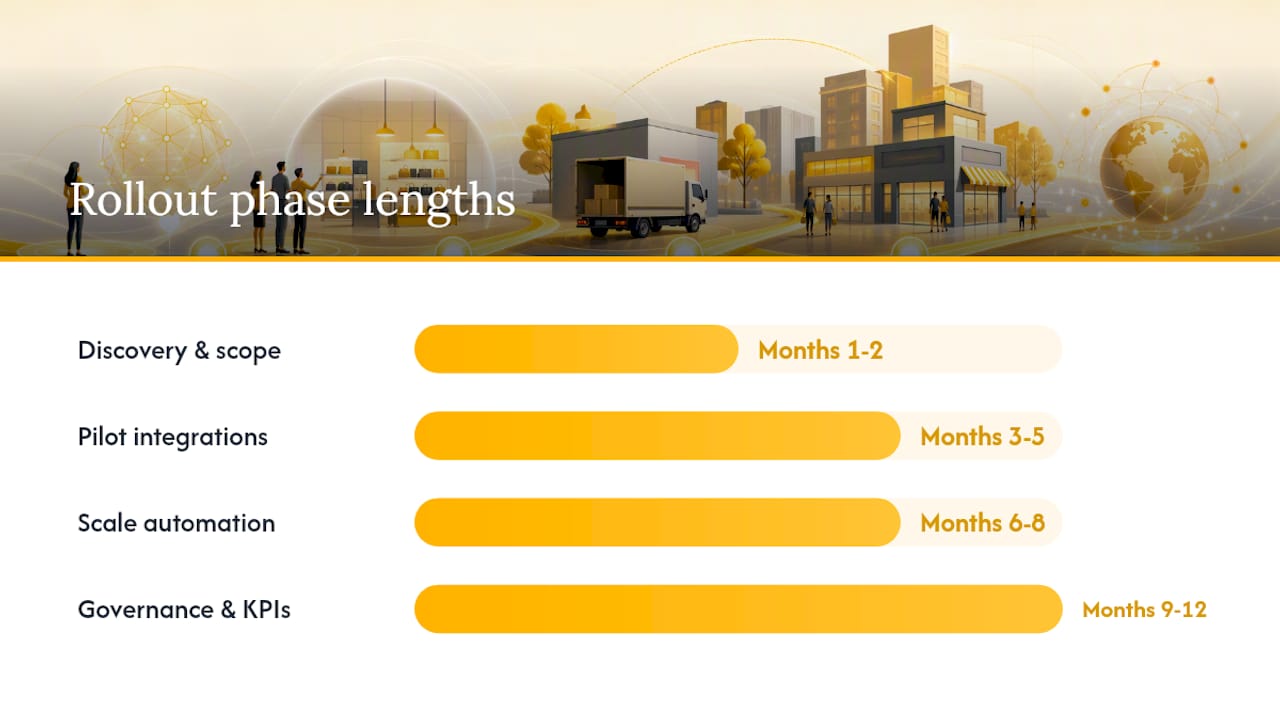
A realistic rollout runs six to twelve months, phased so each stage produces a measurable result before the next begins.
- Months 1 to 2, discovery and scope: audit current channels, ticket volume, and where order context is missing. Pick your highest-volume channel as the pilot.
- Months 3 to 5, pilot channels and integrations: attach order and customer context to tickets first. This single step is typically the highest-impact change a support operation can make, ahead of adding more channels or automation.
- Months 6 to 8, scale automation and onboarding: simulate automation on historical tickets before enabling live auto-replies, then expand coverage for high-confidence queries while escalating the rest.
- Months 9 to 12, operationalize governance: lock in SLAs, shared KPIs, and a continuous improvement cadence across every channel and team.
Cost typically breaks into two buckets: a one-time integration and automation setup effort, and an ongoing managed service billed per seat or per hour. Savings usually accrue in reduced repeat-contact volume and lower average handle time, not in headcount cuts alone.
Pro Tip: Attach order context before you add another channel. Retailers that expand channels first without unifying context just multiply the number of places customers get inconsistent answers.
Which KPIs Prove Unified Retail CX Is Working?
You cannot manage unified retail CX without metrics that blend commerce data and support data into one dashboard.
- CSAT: direct signal of whether the unified experience feels coherent to the customer.
- First Contact Resolution (FCR): rises when agents have order context on the first interaction.
- Average Handle Time (AHT): drops as context lookup time disappears.
- Cost per ticket: the clearest financial proof point for leadership.
- Order accuracy and return-to-resolution time: ties support performance directly to fulfillment quality.
- SLA compliance: tracked across channels, not siloed by team.
Baseline these metrics before your pilot, then measure the same window post-launch to isolate the effect of unification rather than seasonal noise. Blending commerce and support metrics into a single operational view is what separates a real ROI case from anecdotal wins.
Statistic callout: In some automated deployments, AI resolves up to 70% of routine queries once context and workflows are unified, a ceiling worth testing against your own ticket mix before you set expectations with the executive team.
When Should You Bring In A Managed Or Nearshore Partner?
Not every retailer should build this in-house from scratch. The decision usually comes down to a handful of practical factors.
- Time to value: if you need results in one quarter, not one year, a managed partner already has the playbook.
- Internal skill gaps: technical support and back-office reconciliation require specialized staffing most retail ops teams haven’t built yet.
- Seasonal spikes: peak-season volume is exactly where nearshore scale flexibility pays off without permanent headcount.
- Bilingual coverage: nearshore teams often bring language coverage that’s expensive to build internally.
- Risk transfer: a managed provider absorbs staffing, training, and turnover risk that would otherwise sit on your team.
Pro Tip: When contracting a nearshore partner, negotiate SLA terms around time-to-first-response and FCR targets, not just seat count, and insist on a documented ramp plan for the first 60 to 90 days.
How Do You Evaluate A Nearshore CX Partner?
Vendor selection is where good intentions meet reality. Use a structured checklist during RFPs and demos rather than judging on pitch quality alone.
- Ask the vendor to demo real ticket handling, not a scripted walkthrough.
- Request a simulation of their approach against a sample of your historical tickets.
- Confirm native integrations with your order management and ticketing systems.
- Review their SLA and penalty framework in writing before signing.
- Ask how staffing, training, and cultural alignment work for your specific market.
Watch for these red flags:
- No ability to attach order or customer context to tickets.
- No native integrations, only manual data exports.
- Limited or delayed reporting and analytics.
- Inability to simulate performance against your own historical ticket data.
- Vague or bundled pricing with no clear per-seat or per-hour breakdown.
What Does A Real Unified CX Engagement Look Like?
A mid-sized ecommerce retailer running fragmented email and chat support engaged a nearshore partner to unify its front-line and back-office operations. The engagement scope covered a shared inbox with auto-attached order context, tiered technical support for platform issues, and centralized returns handling tied to the same ticket record.
- Unified inbox replaced three disconnected tools.
- Tiered support cut escalation time for technical issues.
- Returns processing tied directly into ticket resolution, closing the loop between support and fulfillment.
Outcomes tracked against baseline included faster resolution times and improved SLA compliance, consistent with the productivity gains Altiam CX has documented in comparable technical support migrations. The pattern holds across sectors: context first, tiering second, reconciliation third.
Why Order Context Is The One Thing Leaders Underestimate
Most retail ops teams I talk with focus first on adding channels or deploying a chatbot. The step that actually moves the needle is smaller and less exciting: attaching order and customer context to every single ticket before anything else changes. Skip that, and every other investment, automation, more agents, more channels, just amplifies inconsistency faster. If you do one thing this quarter, pilot context attachment on your highest-volume channel and measure the resolution time delta before you touch anything else.

Ready To Operationalize Unified Retail CX?
You don’t have to build tiered support, returns reconciliation, and bilingual coverage from scratch to get the consistency unified retail CX promises. Altiamcx runs this as a managed nearshore operation, so you skip the twelve-month internal build and start with a team already structured around order context, SLA-driven governance, and disciplined execution.
Retailers evaluating nearshore team extension get a staffing model built specifically for this kind of unification, not a generic call center bolted onto your ticketing tool. Pro Tip: On your first discovery call, ask exactly how the provider attaches order context to tickets and what their ramp plan looks like for the first 90 days. If you’re ready to see how a nearshore team could run your unified support operation, start with a discovery conversation about your current channel setup and volume.
Frequently Asked Questions
What is unified retail CX in simple terms? It’s the practice of running customer care, technical support, returns, and back-office work off one shared set of data, workflows, and KPIs, so a customer gets the same answer no matter which channel they use.
How is unified retail CX different from omnichannel support? Omnichannel means you’re present on multiple channels. Unified means those channels share the same order context, knowledge base, and performance metrics, so the experience is actually consistent, not just available everywhere.
How long does it take to implement unified retail CX? Most programs run six to twelve months, starting with context attachment on your highest-volume channel and scaling automation and governance from there.
Do I need a nearshore partner to unify retail CX? Not always, but nearshore or managed teams speed up time to value significantly when you lack internal technical support capacity, need bilingual coverage, or face seasonal volume spikes that don’t justify permanent headcount.
What KPIs prove unified retail CX is working? Track CSAT, First Contact Resolution, Average Handle Time, cost per ticket, order accuracy, and SLA compliance together, baselined before your pilot and measured again after launch.
Sources
- Unified Inbox Platforms: A Guide for Retail Leaders
- How to Unify Customer Communication Channels in 2026
- How to automate retail customer support (2026 guide) | eesel AI