
An invoice processing workflow is the path a supplier invoice takes from the day it arrives to the day it is paid and archived. The standard version has seven steps: capture, entry, matching, exception resolution, approval, payment and record retention. Most of the delay and error sits in two of them, matching and exceptions. That is where a well-staffed back office pays for itself, and where a managed nearshore team can take the volume off your internal staff.
This guide walks through each step, shows what goes wrong, explains the three-way match, and lays out the metrics that tell you whether the workflow is getting better. It is written for operations, customer support and finance-adjacent leaders who own back-office throughput and need to decide what to fix, automate or staff.
TL;DR
- The invoice processing workflow runs in seven steps: capture, entry, match, resolve exceptions, approve, pay, retain records.
- Steps three and four, three-way matching and exception handling, are where most delays and errors accumulate.
- Every exception needs a category, a named owner and a time limit, or it sits in a queue.
- Track cost per invoice, cycle time, exception rate and touchless rate before changing anything.
- When volume outgrows your team, managed back-office staffing keeps the workflow running without a hiring scramble.
Table of Contents
- What an invoice processing workflow covers
- The seven steps, in order
- How the three-way match works
- Invoice exception handling
- Automating the workflow
- Measuring whether the workflow is improving
- When to bring in managed back-office support
- How Altiam CX supports back-office workflows
- Our perspective
- FAQ
- Sources
What an invoice processing workflow covers
Invoice processing is the part of accounts payable (AP, the function that pays what a company owes suppliers) that begins when a vendor invoice lands and ends when it is paid. Amazon Business describes it as the downstream half of procure-to-pay: purchasing decisions such as vendor selection and purchase order (PO) issuance happen upstream, and invoice processing verifies and pays after the vendor delivers.
That upstream link matters. When purchases happen outside structured channels with no PO attached, matching turns into a manual review of every record. A clean invoice workflow starts with disciplined purchasing.
The workflow also connects to the wider AP cycle. Sage’s AP process overview notes that invoice activity ties into purchasing records, payment authorization, accounting entries and reconciliation. So an invoice is never only a document: it is a liability that has to reach the balance sheet correctly and then be cleared.
The seven steps, in order
The most widely used breakdown comes from APQC’s invoice processing cycle. Here it is with what each step takes and where it breaks.
1. Receive and capture the invoice
Invoices arrive by mail, email, supplier portal or electronic data interchange (EDI, a standard format for exchanging business documents between systems), as Ramp’s workflow overview lists. The job is to get every invoice into one queue, whatever the channel.
Where it goes wrong: invoices sent to individual inboxes, to the wrong department or to a buyer who is on leave. An invoice nobody has logged cannot be paid on time or accrued.
2. Enter it into the AP system
Key the header and line data: vendor, invoice number, date, amount, tax, PO reference and general ledger (GL) coding. Optical character recognition (OCR, software that reads text from images) or AI extraction can do this, but someone still has to check low-confidence fields.
Where it goes wrong: transposed digits, wrong vendor record, missing tax and wrong GL codes. A small entry error here becomes a match failure two steps later.
3. Validate and match
The invoice is compared against the PO and receiving records. This is the three-way match, covered in detail below.
4. Research and resolve exceptions
Anything that fails validation becomes an exception. This step consumes the most hours and is covered in its own section below.
5. Approve and schedule payment
Approval routing usually depends on amount, department or policy. Clean, matched invoices go to the budget owner or an approval chain, and approved invoices are scheduled to pay according to terms. Some terms reward speed: NetSuite’s guide gives the example of a 1% discount for paying within 10 days.
Where it goes wrong: approvers who never see the request, verbal approvals that are not recorded, and invoices that reach approvers still carrying unresolved problems. A better rule is to keep exceptions out of the approval queue, so approvers only see invoices that are ready to decide.
6. Process payment
Payment goes out by ACH, check, card or wire, on the due date that terms allow. Confirm the payment date and method against the approved record.
Where it goes wrong: duplicate payments, payments to changed bank details that were never verified, and early payments that forfeit working capital for no discount.
7. Retain records and adjust accounting
Archive the invoice, the PO, the receipt and the approval trail, and post the accounting adjustments such as accruals, reversals and taxes. Auditors will ask for this trail, so it must be retrievable by vendor, date and amount.
How the three-way match works
Three-way matching compares three documents: the purchase order, the receiving record and the invoice. Workday’s documentation calls it the most common method because it relies on proof that goods were actually received.
In practice the check covers:
- Price: unit price on the invoice against the PO.
- Quantity: invoiced quantity against what was received, not what was ordered.
- Existence: a receipt record that proves the delivery happened.
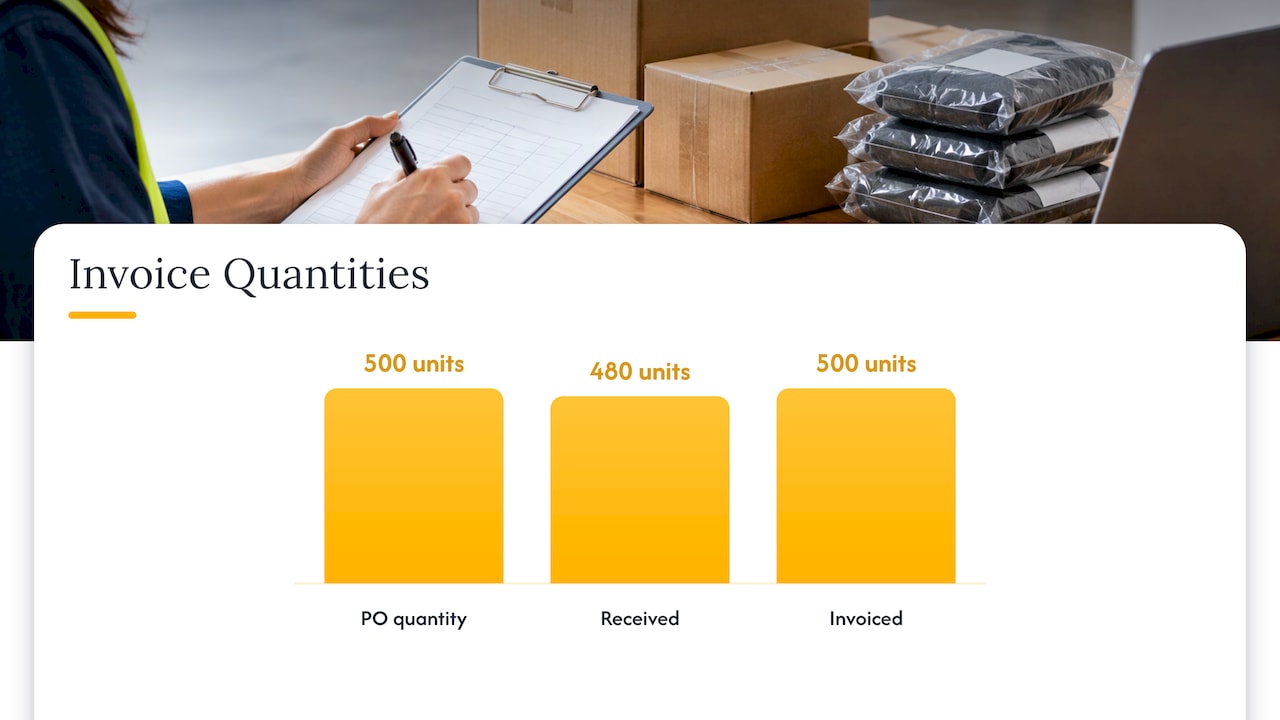
A worked example: you order 500 units at $12.00 on a PO. Receiving logs 480 units. The invoice bills 500 units at $12.40. The match fails twice: the quantity is 20 over the receipt and the price is $0.40 over the PO. The invoice should not be paid as submitted. It should go to an exception queue with both discrepancies recorded.
There are variations. A matching guide for Oracle users distinguishes two-way matching (PO and invoice, common for services), three-way matching (adding the receipt, common for goods) and four-way matching (adding an inspection, for items that need quality checks).
If all three documents agree on vendor, items, quantities and prices, the invoice can clear automatically. If they do not, exception handling starts. A practical tolerance rule from one AP guide is to auto-approve variances within a threshold, such as the lesser of 5% or $100, so people are not spending twenty minutes on a two-dollar freight difference.
Invoice exception handling
An exception is any invoice that cannot move through normal processing without human intervention. Typical types include PO match failures, missing data, no identifiable approver, suspected duplicates, coding problems and vendor disputes, as one AP exceptions guide lists.
Where exceptions come from
One analysis of exception root causes puts 40 to 50% on vendor-side issues such as wrong pricing and duplicate submissions, 30 to 40% on internal process gaps such as no-PO invoices and late receipts, and 10 to 20% on system configuration such as tolerances set too tightly. The point for a manager: most exceptions are not random. Roughly half trace back to how vendors invoice you, and a third to how you buy and receive.
A resolution routine that works
- Categorize at the moment of failure. Price mismatch, missing PO, no receipt, duplicate suspect, coding error.
- Assign a named owner. AP for data issues, procurement for PO discrepancies, the budget owner for unclear charges.
- Start an SLA clock. Age every exception and escalate when it stalls.
- Reconcile field by field against the PO and receipt, fix what is actually wrong, and route the corrected invoice to the right approver.
- Confirm in writing the cleared match and payment date, so the invoice does not re-enter the queue.
- Report monthly on root causes. A category that keeps recurring is an upstream defect, not an AP problem.
Two defined paths deserve special care. Invoices with no goods receipt should be held, and vendor bank-detail changes should be treated as a security event and verified through a separate, known channel, because fraudulent payment redirection is a common attack on AP teams.
Cross-border suppliers add another layer: foreign tax rules can invalidate an invoice that looks fine on its face. Israeli VAT invoice rules for cross-border sales are one example of how invoice compliance differs by country, which is worth building into your vendor onboarding checklist.
Automating the workflow
Automation typically means OCR or AI capture, automated two- and three-way matching, rule-based approval routing and automated payment. The Association for Financial Professionals describes the full chain: extraction, matching, exception notifications, routing by amount or vendor, payment through the ERP, bank reconciliation and secure archiving with audit trails.
Automation also improves control. JPMorgan’s treasury guide points out that automated matching catches billing errors before payment and that routing rules enforce approval hierarchies consistently.
The catch is that software speeds up the clean invoices. The exceptions still need people who understand the vendor, the PO and the contract. A program that automates capture but leaves exception handling unredesigned just moves the pile.
Measuring whether the workflow is improving
Baseline before you change anything. Track:
- Cost per invoice
- Cycle time from receipt to payment
- Exception rate
- Exception resolution time
- Touchless rate (invoices that need no human touch)
- Late-payment penalties and missed discounts
- Invoices handled per full-time employee
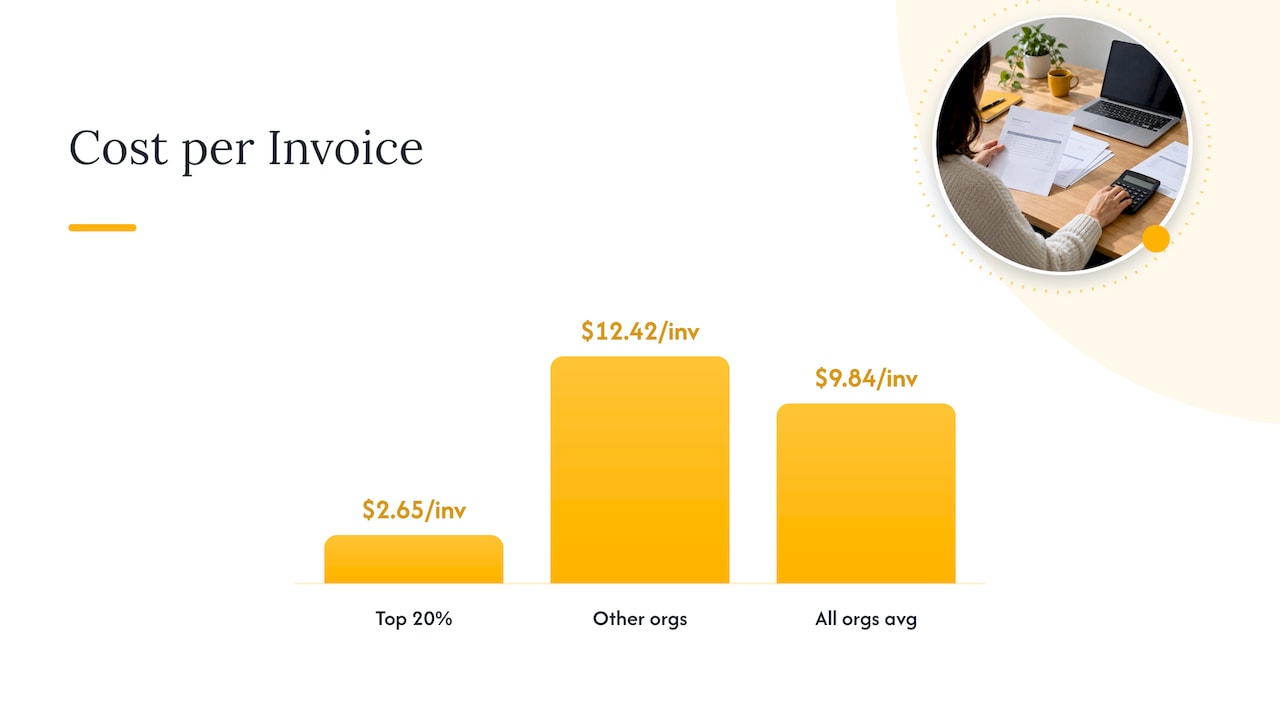
For a reference point, a 2025 AP benchmark survey summarized here reports that the top 20% of AP organizations process invoices in 2.9 days against 13.5 days for others, hold exception rates to 11.1% against 20.9%, and spend $2.65 per invoice against $12.42. The all-organization average cost was $9.84. Use these as direction, and compare your own numbers with your own baseline, since survey samples and invoice mixes differ.
Accuracy is a useful companion metric. APQC benchmarking data cited by Corpay shows the median organization processes 95% of disbursements error-free on the first try.
Review weekly for the first 90 days after any change, then monthly. If the exception rate falls but resolution time rises, your team is spending longer on the hard cases, which usually means the easy ones are now flowing and the remaining work needs more skilled attention or more capacity.
When to bring in managed back-office support
The workflow breaks at predictable points: month-end spikes, a backlog of exceptions, vendor inquiries that pull AP staff off processing, and turnover that erases institutional knowledge. Hiring through each of those swings is slow and expensive.
A managed team extension answers the capacity problem directly. You keep ownership of policy, approval limits and vendor relationships, while a dedicated, trained team works the queue: logging invoices, chasing missing documents, handling vendor inquiries and keeping the exception list aging against its SLA. Our own guides on back-office operations checklists and step-by-step back-office optimization show how to document those routines so any team, in-house or extended, can run them the same way.
When you weigh outsourcing against automation, the core question is control. One AP outsourcing overview frames outsourcing as suited to high-volume, resource-constrained businesses and recommends looking at industry expertise, security certifications, flexible service-level agreements and clear exit terms. Ask any provider about all four, and read how penalties and credits are structured: our guide to BPO SLA penalties explains what to negotiate.
How Altiam CX supports back-office workflows
Altiam CX is a nearshore customer experience and operational services partner. We provide back-office operations, managed team extension and bilingual agents, delivered from Latin America, with scalable team deployment and measurable performance frameworks. If your invoice queue, vendor inquiries or document-heavy back-office work are outgrowing your team, our managed team extension model gives you capacity that scales with volume.

See how we structure engagements on our services page, or review how back-office automation affects ROI and efficiency before you decide how much to automate and how much to staff.
Our perspective
Most invoice workflows are documented for the clean case. Real work is the exception: the missing PO, the short shipment, the vendor who changed bank details. That is why we treat exception handling as the part of the workflow to staff and measure first.
Automation is worth having, and we encourage it. But software reads and matches documents; it does not call the vendor, chase the receipt or decide whether a price difference is a true dispute. Those tasks need trained, consistent people who follow a written procedure.
Our approach is to pair disciplined execution with cultural alignment and bilingual coverage, so the team handling your queue communicates clearly with your vendors and your internal approvers. Add measurable performance frameworks, and you get a back office that can grow with the business without a hiring scramble every quarter.
Daniela
FAQ
What are the steps in an invoice processing workflow?
The common sequence is receive and capture, enter into the AP system, validate and match against POs and receipts, resolve exceptions, approve and schedule payment, process payment, and retain records. Some teams collapse this to five steps, but the content is the same.
What is the three-way match process?
It compares the PO, the receiving record and the invoice on price, quantity and proof of delivery. If all three agree, the invoice moves to approval. If not, it goes to an exception queue before any payment is made.
How do you handle invoice exceptions?
Categorize the failure when it happens, assign a named owner, set an SLA clock and fix the discrepancy against source documents. Then route the corrected invoice to the right approver and review root causes monthly to remove the recurring ones.
Should we outsource invoice processing or automate it?
Automation suits teams that want efficiency while keeping full control of data and workflows. Outsourced or extended teams suit high-volume operations that need capacity fast, and the two combine well: software handles the clean invoices, people handle the exceptions.
Sources
- What Is Invoice Processing? A Guide for AP Teams
- What Is the Accounts Payable Process?
- APQC: Key Steps in the Invoice Processing Cycle
- What Is Invoice Processing? Steps and Best Practices
- What Is Invoice Processing? | NetSuite
- Invoice Approval Workflows: How to Design Routing
- Workday: Matching
- Resolving Match Exception Invoice Holds
- Invoice Approval Workflow: A Practical Guide for AP Teams
- What is an invoice exception in AP
- AP Exception Resolution Guide
- Israeli VAT invoice rules for cross-border sales
- AFP: Automating Accounts Payable Processing
- JPMorgan: Invoice Automation and Processing Guide
- Automated Invoice Processing: The Complete Guide for 2026
- Accounts payable outsourcing: Pros and cons