
TL;DR:
- Most technical issues can be resolved quickly through four simple first-tier steps: refreshing the app, clearing cache, logging out and back in, and restarting the device. Proper problem definition and testing one change at a time improve support efficiency and prevent recurring issues. Thorough documentation and clear communication help support teams diagnose problems faster and handle growing ticket volumes effectively.
Technical support troubleshooting steps are a standardized, sequential process designed to diagnose, isolate, and resolve operational issues without guesswork. Structured troubleshooting is the difference between a 10-minute fix and a two-hour spiral of random changes. Approximately 90% of user-reported issues resolve through just four first-tier actions, which means most tickets never need to reach a senior engineer. For IT professionals and support teams managing high ticket volumes, mastering this process is not optional. It is the foundation of every efficient support operation.
What are the core technical support troubleshooting steps?

The four first-tier actions every support professional must master are: refresh the application or page, clear browser cache and cookies, log out and back in, and restart the device. These steps are core triage in SaaS and client-side support workflows as of Q2 2026. They work because they reset transient states, flush corrupted temporary data, and reload processes that may have stalled silently.
One detail most support teams get wrong: restarting and shutting down are not the same thing. A full restart reloads all processes and drivers, while a shutdown followed by power-on can preserve broken states due to OS fast startup features in Windows. Always instruct users to select “Restart,” not “Shut Down and Power On.”
Pro Tip: Before escalating any ticket, confirm the user performed a true restart. Ask them to click Restart from the Start menu, not just close the lid or press the power button.
| First-tier step | What it resets | Common problems it resolves |
|---|---|---|
| Refresh app or page | Active session state | Frozen UI, missing data display |
| Clear cache and cookies | Stored temporary files | Login loops, outdated content |
| Log out and back in | User authentication token | Permission errors, sync failures |
| Full device restart | All processes and drivers | Slow performance, driver conflicts |
These four steps cost less than five minutes. Skipping them wastes everyone’s time and inflates ticket escalation rates unnecessarily.
How do you define a technical problem with precision?
Vague problem descriptions are the single largest barrier to troubleshooting efficiency. A user saying “the system is broken” gives you nothing to work with. A user saying “the login page returns error code 403 after I enter my credentials, starting this morning after a password reset” gives you a starting point, a timeline, and a likely cause.
The goal of problem definition is to convert a complaint into a measurable symptom. Use guided questioning to establish two things: what the user expected to happen, and what actually happened. That gap is the problem statement.
Collect the following data before touching any settings:
- Error messages and codes (exact text, not paraphrased)
- Screenshots or screen recordings of the issue
- Device details: OS version, browser version, hardware model
- Environment details: network type, VPN status, location
- Timeline: when the issue first appeared and what changed before it started
- Reproducibility: does it happen every time, or intermittently?
ITIL-aligned problem definition practices treat this data collection as non-negotiable before any technical intervention. Well-defined problems statistically increase the likelihood of single-pass resolution. That means fewer follow-up contacts, lower handle time, and higher customer satisfaction scores.
Pro Tip: Ask users to reproduce the issue while you observe or while they record their screen. Live observation catches details users forget to mention, like a VPN toggle or a browser extension that fires at login.
How do you test theories and isolate root causes?
Professional IT troubleshooting follows a standardized six-phase lifecycle: define the problem, hypothesize the cause, test the theory, implement the solution, verify functionality, and document findings. This structure prevents the most common failure mode in support work: fixing symptoms instead of causes.
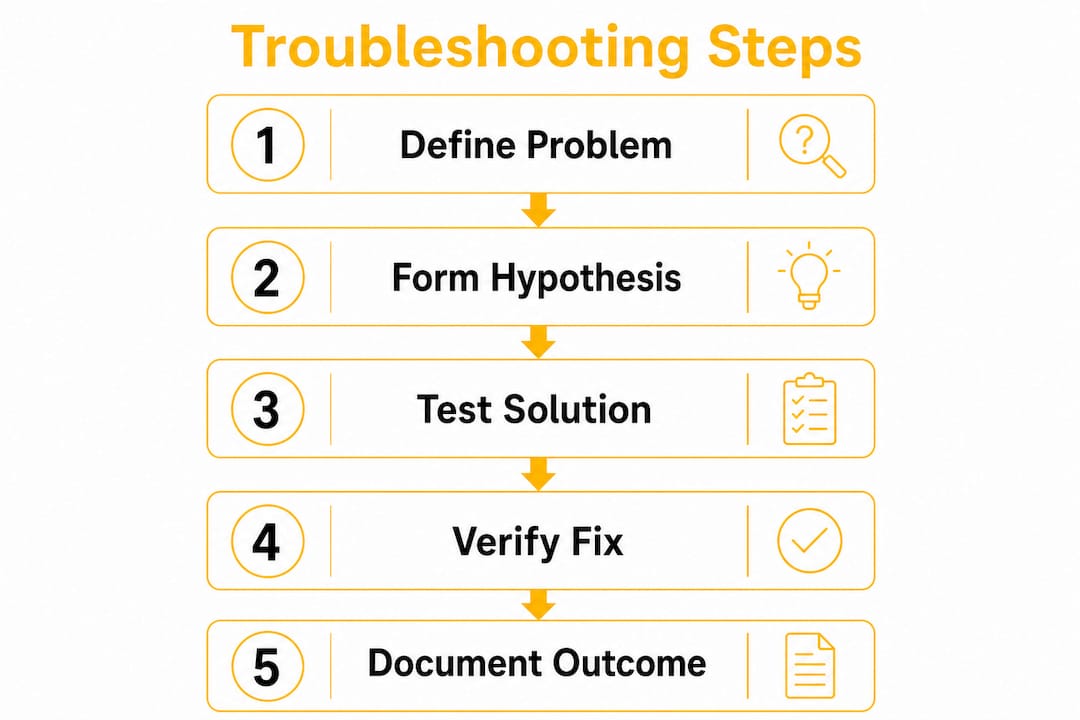
Once you have a clear problem definition, form a hypothesis. A hypothesis is a specific, testable statement. “I believe the issue is a corrupted browser cache” is testable. “Something is wrong with the software” is not. Rank your hypotheses from most likely to least likely, then test them in that order.
The single most important rule during testing is the Change One Variable rule. Altering multiple settings simultaneously obscures root cause identification and increases the risk of recurring issues. If you change three settings and the problem disappears, you do not know which change fixed it. That gap in knowledge guarantees the issue returns.
- Form a specific hypothesis based on symptoms and collected data.
- Test one variable at a time. Change a single setting, driver, or configuration.
- Observe the result. Did the symptom change, worsen, or disappear?
- Eliminate non-involved components. Systematic component elimination reduces mean-time-to-repair sharply on complex issues.
- Escalate with evidence. If your hypothesis is wrong, document what you tested and move to the next theory.
- Document every test. Record what you changed, when, and what happened.
For network issues specifically, power cycling in order matters: modem first, then router, then client device, waiting 60 seconds between each step. This sequence allows systems to negotiate clean handshakes and prevents stale configuration errors that are notoriously hard to diagnose.
Pro Tip: Build a short elimination checklist for your most common issue types. For a connectivity complaint, list: local device, browser, VPN, router, ISP, server. Check each box as you rule it out. This keeps your testing logical and prevents backtracking.
| Problem type | Primary hypothesis to test first | Diagnostic technique |
|---|---|---|
| Slow performance | RAM or CPU overload | Task Manager, Activity Monitor |
| Blue screen (Windows) | Driver conflict (60% of cases) | Event Viewer, driver rollback |
| Network failure | Router or modem state | Ping test, power cycle sequence |
| Login error | Authentication token or cache | Clear cache, test incognito mode |
| Application crash | Corrupted install or update | Reinstall, check update logs |
How do you verify solutions and prevent issues from recurring?
Verification is not just confirming the symptom disappeared. A symptom can vanish temporarily while the root cause remains. True verification means testing related functions, confirming system stability over time, and checking that no new issues appeared as a side effect of your fix.
After applying a solution, run through this verification checklist:
- Reproduce the original scenario to confirm the fix holds under the same conditions.
- Test adjacent functions that share components with the affected area.
- Monitor for 15–30 minutes on intermittent issues before closing the ticket.
- Confirm with the user that the experience matches their expected outcome.
- Check system logs for new errors that may have appeared post-fix.
Prevention starts where verification ends. Software updates, configuration reviews, and user training are the three most effective preventive measures for recurring technical issues. Thorough documentation of problem details, steps tried, and results forms a knowledge base that raises the entire team’s capability over time. A well-written ticket from today prevents a 45-minute investigation six months from now.
Pro Tip: Document the “last known good” state before making any changes. Note the exact configuration, version numbers, and settings that were working. If your fix creates a new problem, you have a clean rollback target.
What mistakes reduce troubleshooting efficiency the most?
The most damaging mistake in technical support is skipping the problem definition phase. Support teams that jump straight to fixes based on a vague complaint waste time on the wrong solution and frustrate users with repeated contacts. Precise symptom definition is not a formality. It is the fastest path to resolution.
The second most common mistake is changing multiple variables at once. This feels faster in the moment but creates ambiguity that causes the same issue to resurface. The third is poor documentation. Tickets closed with “issue resolved” and no detail force the next agent to start from zero.
Key pitfalls to avoid:
- Skipping first-tier steps because the issue “seems complex.” Basic checks resolve the majority of tickets regardless of apparent complexity.
- Accepting vague user descriptions without asking clarifying questions.
- Testing without documenting. Every test result is data. Undocumented tests are wasted effort.
- Closing tickets before full verification. Premature closure is the leading cause of ticket reopening.
- Failing to escalate with evidence. Escalating without documented steps forces senior engineers to repeat your work.
Pro Tip: When communicating with end users during troubleshooting, set clear expectations at each step. Tell them what you are testing, why, and what you expect to happen. Users who understand the process are more patient and more accurate in reporting results.
Effective helpdesk communication practices treat user updates as part of the resolution process, not an afterthought. Teams that communicate clearly during troubleshooting close tickets faster and generate higher satisfaction scores.
Key Takeaways
Structured technical support troubleshooting steps, applied consistently from problem definition through documentation, resolve the majority of issues faster and prevent recurrence more reliably than ad hoc approaches.
| Point | Details |
|---|---|
| First-tier steps resolve most issues | Refresh, clear cache, log out, and restart resolve approximately 90% of reported problems. |
| Precise problem definition is critical | Vague descriptions increase handle time; specific symptoms with timelines enable single-pass resolution. |
| Change one variable at a time | Testing multiple changes simultaneously hides the root cause and increases recurrence risk. |
| Verification goes beyond symptom check | Test adjacent functions and monitor stability before closing any ticket. |
| Documentation multiplies team capability | Detailed tickets with timestamps, error codes, and steps tried prevent redundant work across the team. |
What I have learned after years of watching support teams troubleshoot
I have seen support teams with excellent technical knowledge consistently underperform because they skip problem framing. They hear a complaint, recognize a pattern, and jump to a fix. Sometimes it works. More often, it produces a closed ticket that reopens within 48 hours.
The teams that consistently hit high first-contact resolution rates share one habit: they treat the first two minutes of every ticket as an investigation, not a solution session. They ask the same structured questions every time, regardless of how familiar the issue sounds. That discipline is what separates a 70% first-contact resolution rate from a 90% one.
Documentation is the part most support professionals undervalue until they inherit someone else’s poorly documented queue. A ticket that reads “user called, issue fixed” is not a ticket. It is a liability. When that issue returns, and it will, the next agent starts from zero. A ticket that reads “user reported 403 error on login after password reset; cleared auth token via admin panel; verified login successful; monitored for 20 minutes; no recurrence” is an asset.
The trend I am watching closely in 2026 is AI-assisted escalation. Platforms are beginning to surface similar historical tickets automatically during active troubleshooting, which compresses the hypothesis-testing phase significantly. But AI tools are only as useful as the documentation they are trained on. Teams that document well today will get the most value from these tools tomorrow. The discipline you build now is not just good practice. It is infrastructure.
— Daniela
How Altiamcx supports technical support teams at scale
Technical support operations that rely on ad hoc processes hit a ceiling fast. Ticket volume grows, institutional knowledge walks out the door, and resolution quality becomes inconsistent.

Altiamcx works with organizations to build disciplined, measurable technical support operations that scale without sacrificing quality. One software platform that moved its tech support to Altiamcx improved productivity by 89% through standardized workflows, structured escalation paths, and performance frameworks that keep resolution quality consistent across every agent. If your team is managing growing ticket volumes and needs a partner with proven execution, Altiamcx delivers the structure and the people to make it work.
FAQ
What are the first steps in technical support troubleshooting?
The first steps are refreshing the application or page, clearing browser cache and cookies, logging out and back in, and restarting the device. These four actions resolve approximately 90% of user-reported technical issues before any advanced diagnosis is needed.
Why is problem definition so important in troubleshooting?
Vague problem descriptions are the leading cause of extended resolution times. Precise symptom definition, including error codes, timelines, and environmental details, increases the likelihood of resolving the issue on the first attempt.
What is the Change One Variable rule?
The Change One Variable rule means altering only one setting or configuration at a time during testing. Changing multiple variables simultaneously makes it impossible to identify which change resolved the issue, which leads to recurring problems.
How does documentation improve troubleshooting efficiency?
Documentation acts as a knowledge multiplier. Tickets that include timestamps, error codes, steps already tried, and system states prevent redundant work and allow any agent to pick up where another left off without starting from scratch.
When should a support agent escalate a ticket?
Escalate when your tested hypotheses have been exhausted and the root cause remains unidentified. Always escalate with full documentation of what was tested, what changed, and what the results were, so senior engineers can continue without repeating your work.