
TL;DR:
- Scalability in customer support relies on automation and technology, reducing costs per interaction.
- Successful models balance automation with human agents to maintain quality and build customer trust.
- Continuous tuning, data integration, and strategic design are essential for effective scalable support systems.
Most leaders assume that growing customer support means growing headcount at the same rate. That assumption is expensive. Costs rise slower than volume when you build support operations around automation, intelligent routing, and tiered workflows — meaning the cost per interaction actually decreases as demand increases. This article breaks down what scalable support truly looks like, which methodologies deliver measurable results, where the real risks hide, and how to build a hybrid framework that protects both efficiency and customer satisfaction. If you lead CX or operations at a mid-to-large organization, this is the strategic clarity you need.
Table of Contents
- What makes support solutions scalable?
- Core methodologies for operational leverage
- Benefits and limitations: Finding the right balance
- Practical frameworks for scalable support implementation
- The uncomfortable truth most leaders miss about scalable support
- Explore scalable CX solutions with Altiam CX
- Frequently asked questions
Key Takeaways
| Point | Details |
|---|---|
| Scalability unlocks leverage | Support operations scale without proportionally increasing headcount or cost thanks to automation and workflow optimization. |
| Hybrid models work best | Combining automation and human expertise preserves quality and efficiently handles high volumes. |
| Measure and tune continuously | Tracking KPIs and iteratively tuning AI and workflows ensures optimal outcomes and avoids common pitfalls. |
| Avoid over-deflection | Targeting 70-80% automation ensures efficient support while keeping customer satisfaction high. |
What makes support solutions scalable?
Scalability in customer support is not simply about adding capacity. It is about building systems that absorb increased demand without requiring proportional increases in cost or staffing. Scalable support solutions enable organizations to handle surges in customer demand using automation, tiered workflows, and AI to achieve genuine operational leverage.
Traditional support models are linear. More tickets mean more agents, more managers, and more overhead. Scalable models break that linearity. They use technology and process design to handle volume without the same cost curve.
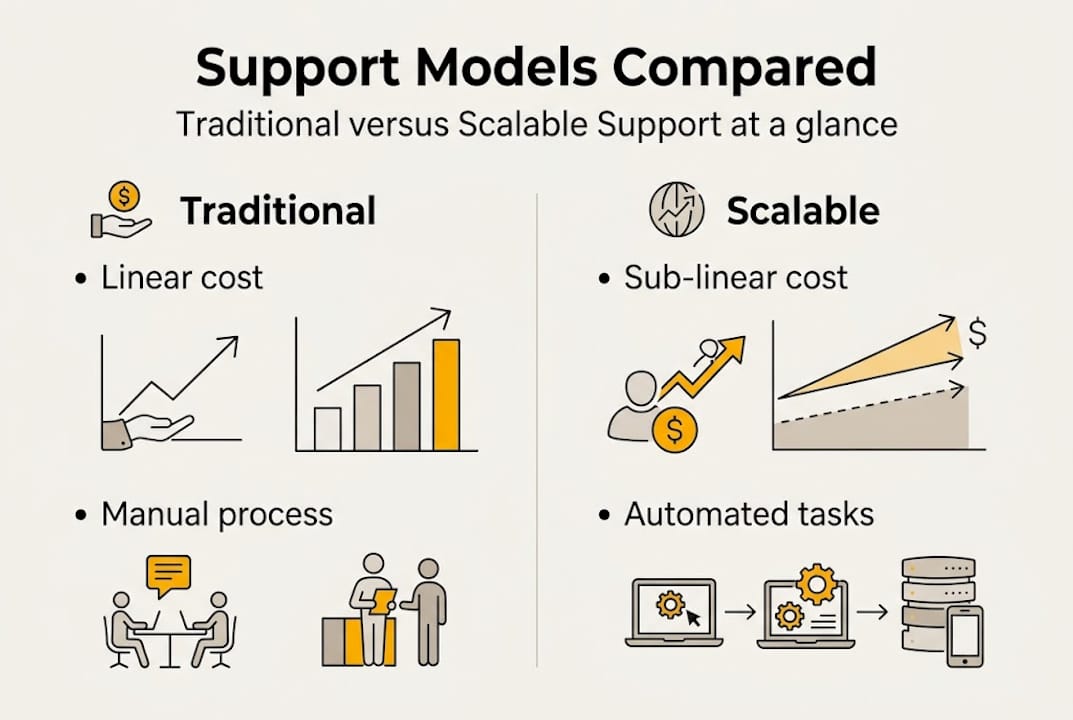
Here is how the two models compare:
| Dimension | Traditional support | Scalable support |
|---|---|---|
| Cost structure | Linear with volume | Sub-linear; cost per ticket drops |
| Staffing model | Headcount-driven | Automation-first, human-assisted |
| Responsiveness | Dependent on agent availability | 24/7 via bots and self-service |
| Flexibility | Slow to scale up or down | Elastic by design |
| Quality control | Agent-dependent | Process and data-driven |
The technologies that power scalable support are well established. Organizations that implement them strategically see compounding returns over time.
Key scalable solution technologies:
- AI-powered chatbots and virtual agents for first-contact resolution on routine queries
- Intelligent routing and triage that directs tickets to the right tier or agent automatically
- Self-service portals and knowledge bases that deflect high-volume, repetitive requests
- Omnichannel platforms that unify voice, chat, email, and social into one workflow
- Workflow automation tools that handle back-office automation examples like order updates, refunds, and account changes without agent involvement
- Analytics dashboards that surface bottlenecks and guide continuous improvement
Each of these technologies works best when deployed as part of a coordinated system, not in isolation. The organizations that see the greatest gains treat scalability as an architectural decision, not a tool purchase.
Core methodologies for operational leverage
Once you understand what scalability means structurally, the next step is mastering the methodologies that generate real-world results. These are not theoretical. They are proven operational levers with measurable benchmarks.
Automation for repetitive tasks is the foundation. When your team spends hours answering the same questions about order status, password resets, or billing cycles, that is capacity being wasted. Automating those interactions frees agents for work that actually requires judgment.

Intelligent triage and routing ensures that tickets land with the right resource immediately. Poor routing is one of the most common causes of high resolution times and low first-contact resolution rates.
Self-service portals shift the resolution burden to the customer in a way that most customers now prefer. Deploying self-service tools effectively requires mapping your top request categories and building content that answers them clearly.
Omnichannel unification and proactive monitoring close the gaps between channels. When a customer starts a conversation via chat and escalates to phone, context should travel with them.
Here is a practical audit sequence for identifying automation opportunities:
- Pull your ticket data for the last 90 days and categorize by request type
- Identify all request types that exceed 100 tickets per month
- Score each category by complexity: low, medium, or high
- Prioritize low-complexity, high-volume categories for immediate automation
- Build or configure self-service content or bot flows for each prioritized category
- Monitor deflection rates weekly and tune based on drop-off points
The back-office efficiencies unlocked by this audit process often surprise leadership teams. The volume of automatable work is almost always larger than expected.
Industry benchmarks for 2026:
| Metric | Industry benchmark |
|---|---|
| AI deflection rate | 30-85% depending on maturity |
| CSAT median | 78-85% (top performers exceed 90%) |
| First-contact resolution (FCR) | 70-85% |
| Email first response time | 7-12 hours |
| Resolution time (SaaS) | 11-24 hours |
| Cost per ticket (AI-handled) | $0.50-$2.00 |
| Cost per ticket (human-handled) | $13-$30 |
Those cost-per-ticket figures make the business case for automation impossible to ignore. The gap between AI-handled and human-handled interactions is not marginal — it is an order of magnitude.
Pro Tip: Always start your automation audit with the requests that exceed 100 per month. Targeting high-volume, low-complexity tickets first delivers the fastest ROI and builds organizational confidence in the approach before you tackle more complex workflows.
Benefits and limitations: Finding the right balance
Understanding core methodologies leads directly to weighing their benefits and acknowledging their risks. Both sides of this equation deserve honest attention.
The benefits are significant. Scalable support reduces cost per interaction, improves response times, enables 24/7 availability, and frees skilled agents to focus on high-value interactions. Organizations that implement these models well consistently see CSAT scores in the 78-85% range, with top performers exceeding 90%.
But the risks are real. Here are the most common ones and how to address them:
- Over-deflection: Pushing too many tickets through automation frustrates customers who need human help. Target 70-80% deflection as your ceiling, not your floor.
- Knowledge drift in AI: Chatbots and virtual agents trained on outdated content give wrong answers. Schedule quarterly reviews of all bot content and knowledge base articles.
- Escalation context loss: When a customer moves from bot to agent, lost context creates repetition and frustration. Unified data platforms prevent this.
- Emotional and ambiguous issues: Automation cannot handle grief, anger, or nuanced situations. These interactions must route to humans quickly and cleanly.
- Small operation constraints: Smaller teams may not generate enough volume to justify specialist tiers. Right-size your model to your actual ticket distribution.
“Escalation context loss can undermine customer trust. Balance automation with human judgment to protect the customer relationship at its most critical moments.”
Pro Tip: Set your automation target at 70-80% deflection and hold it there. Going beyond that threshold without careful monitoring is where CSAT scores begin to drop. The goal is efficiency with quality, not automation for its own sake.
For organizations managing complex or emotionally sensitive customer relationships, high-touch CX strategies remain essential. Scalable support works best when it is paired with clear escalation paths and human expertise at the right moments. The human-AI balance is not a philosophical debate — it is an operational design decision with measurable consequences.
Practical frameworks for scalable support implementation
With benefits and risks mapped out, the focus shifts to implementation. How do you actually build a scalable support operation that performs?
The most reliable approach starts small and expands deliberately. Organizations that try to automate everything at once typically create more problems than they solve. Start with your top five ticket intents and build from there.
Steps for building a hybrid support approach:
- Identify your top five ticket categories by volume using the last 90 days of data
- Design automation or self-service flows for each of those five categories
- Configure escalation paths that carry full conversation context to human agents
- Launch with a pilot group of customers and measure deflection, CSAT, and FCR weekly
- Tune bot logic and knowledge base content based on drop-off and escalation data
- Expand to the next five categories once the first set is performing above benchmark
- Establish a monthly review cadence to catch knowledge drift and routing errors early
This staged approach mirrors what hybrid support structures look like in practice. Automation handles volume. Humans handle complexity. Unified data connects both layers.
Common pitfalls and how to avoid them:
- Skipping the audit phase: Deploying automation without data on your actual ticket distribution wastes resources and misses the highest-impact opportunities
- Neglecting escalation design: A bot that cannot hand off cleanly is worse than no bot at all
- Treating AI tuning as a one-time task: Models drift. Content goes stale. Build a review schedule into your operating rhythm
- Ignoring agent feedback: Frontline agents see what automation misses. Their input is essential for continuous improvement
- Measuring deflection without measuring CSAT: High deflection with low satisfaction is not a win
Scaling workflows efficiently requires unified data above all else. When your CRM, ticketing system, and bot platform share the same customer record, escalation friction drops dramatically. That integration is not optional — it is the infrastructure that makes everything else work.
The uncomfortable truth most leaders miss about scalable support
Most organizations approach scalable support as an automation project. They buy a chatbot platform, deploy it on their highest-traffic channel, and wait for costs to drop. Sometimes they do. But the CSAT numbers tell a different story six months later.
The real lesson from organizations that get this right is that scalability is a design discipline, not a technology purchase. The human-AI balance is the actual product. Automation handles the volume. Humans protect the relationship. Unified data makes the handoff invisible to the customer.
Leaders who chase 100% automation consistently damage their CSAT scores and spend months rebuilding trust. Leaders who treat hybrid models as a permanent operating strategy — not a transition phase — build support organizations that scale efficiently and retain customer loyalty.
“Hybrid models not only cut costs — they preserve the empathy that drives loyalty.”
The organizations that win long-term are the ones that invest in continuous tuning, treat agent feedback as a data source, and resist the temptation to over-automate. That discipline is harder than it sounds. But it is what separates scalable support that performs from scalable support that just looks good on paper.
Explore scalable CX solutions with Altiam CX
Building a scalable support operation that actually performs requires more than the right technology. It requires the right partner. Altiam CX brings nearshore expertise, measurable performance frameworks, and proven implementation experience to organizations ready to grow without sacrificing service quality.
Whether you are designing your first automation layer or optimizing an existing hybrid model, nearshore CX outsourcing gives you access to culturally aligned teams and disciplined execution at scale. For organizations in high-growth environments, CX for fast-growth tech outlines how Altiam CX supports rapid scaling without the operational friction. Explore the full range of Altiam CX solutions and take the next step toward a smarter, more efficient support operation.
Frequently asked questions
How do scalable support solutions reduce operational costs?
Scalable solutions use automation, tiered workflows, and AI to handle growing ticket volume without proportional headcount increases, and cost per interaction decreases as volume grows — making the model increasingly efficient over time.
What KPIs should be tracked for scalable support effectiveness?
The most important metrics are AI deflection rate, CSAT, first-contact resolution, email response time, resolution time, and cost per ticket. Industry benchmarks for 2026 show AI-handled tickets costing $0.50-$2.00 versus $13-$30 for human-handled ones.
What are common pitfalls when scaling support?
Over-automation is the most damaging pitfall, often causing CSAT to drop. Escalation context loss and knowledge drift in AI systems are close behind, both of which erode resolution quality over time.
How do hybrid models help with scalable support?
Hybrid models pair automation for high-volume, routine requests with human agents for complex or emotional cases, allowing organizations to balance quality and efficiency without sacrificing customer satisfaction at the moments that matter most.