
Customer support is one of the most direct levers ecommerce leaders have over revenue and retention. When ticket volumes spike, response times slip, and customer expectations keep rising, the gap between good intentions and operational reality widens fast. This guide gives you a practical, step-by-step framework to assess, optimize, and scale your support operations using proven benchmarks, self-service strategies, smart automation, and nearshore team models. Whether you manage a mid-market brand or a high-growth operation, the steps ahead will help you build a support function that drives loyalty, not just resolves complaints.
Table of Contents
- Assess and benchmark your current support operations
- Build and optimize self-service solutions
- Implement scalable automation and hybrid support
- Monitor, analyze, and iterate for ongoing improvement
- Why customer support transformation demands a strategic blend of technology and human skill
- Next steps: Partnering with nearshore experts for scalable support
- Frequently asked questions
Key Takeaways
| Point | Details |
|---|---|
| Benchmark your support | Compare your FCR, CSAT, and response times with leading ecommerce brands to spot improvement gaps. |
| Offer smart self-service | Build order tracking, structured FAQs, and returns portals to cut ticket volume and boost satisfaction. |
| Scale with hybrid solutions | Start automation with frequent inquiries and use nearshore teams for flexible and quality support during spikes. |
| Measure for continuous growth | Track KPIs, analyze feedback, and iterate to consistently improve customer experience and drive repeat purchases. |
| Balance tech and human touch | Combine automation tools with skilled team training to enhance loyalty and maximize revenue impact. |
Assess and benchmark your current support operations
Before you can improve anything, you need an honest picture of where you stand. Many ecommerce operators track ticket volume but miss the metrics that actually signal support health. Start by pulling data across five core areas:
- Ticket volume (daily, weekly, seasonal peaks)
- First contact resolution (FCR) rate: the percentage of issues resolved without a follow-up
- Customer satisfaction score (CSAT): post-interaction survey ratings
- First response time (FRT): how fast your team acknowledges a new ticket
- Cost per ticket: total support spend divided by ticket volume
Once you have these numbers, compare them against ecommerce support benchmarks to identify where you’re underperforming. According to key industry targets, best-in-class ecommerce operations hit FCR between 70% and 80%, CSAT averaging 78% to 80%, email FRT under 6 hours, live chat FRT under 1.5 minutes, and cost per ticket between $4 and $5.
Here’s a quick reference for how those benchmarks typically compare to common operational realities:
| Metric | Industry average | Best-in-class target |
|---|---|---|
| FCR rate | 55-65% | 70-80% |
| CSAT score | 70-75% | 78-90%+ |
| Email FRT | 12-24 hours | Under 6 hours |
| Live chat FRT | 3-5 minutes | Under 1.5 minutes |
| Cost per ticket | $8-12 | $4-5 |
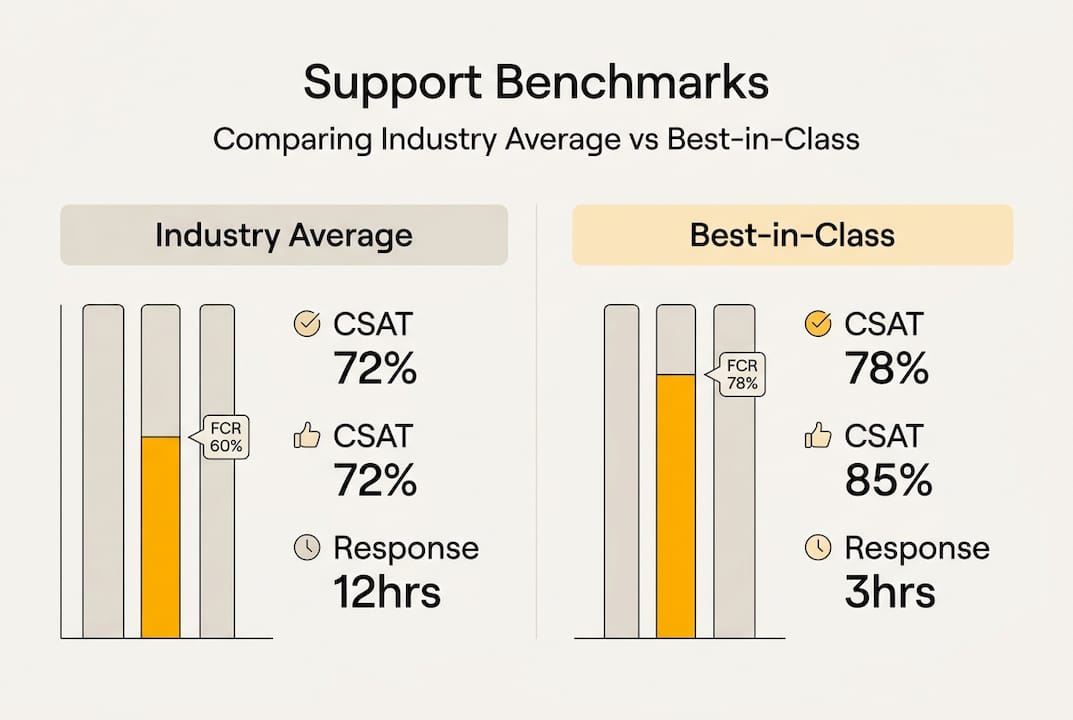
The gap between average and best-in-class is significant. If your numbers fall in the average column, you have clear, measurable room to improve. Understanding customer care fundamentals is essential before layering on tools or headcount.
Pro Tip: Don’t stop at satisfaction scores. Link your support data to repeat purchase rates. Customers who receive fast, effective support are statistically more likely to buy again. That connection turns your support team from a cost center into a revenue driver.
A strong audit also reveals which inquiry types consume the most agent time. That insight feeds directly into the next step.
Build and optimize self-service solutions
Once you know your baseline, the most cost-effective move is reducing avoidable ticket volume. Many of the inquiries flooding your queue are repetitive and predictable. Order status, return policies, shipping timelines, account access. These are prime candidates for self-service.
Strategic self-service tools can reduce ticket volume by 20-40%, freeing your agents to focus on complex, high-value interactions. The most effective self-service options for ecommerce include:
- Branded order tracking portals: give customers real-time visibility without contacting support
- Structured FAQ pages: organized by customer journey stage, not just topic
- Self-service returns portals: let customers initiate and track returns independently
- Account management tools: password resets, order history, and preference updates without agent involvement
- Chatbot triage: route simple inquiries to automated answers before escalating to a live agent
Here’s how these tools compare on deflection impact:
| Self-service tool | Avg. deflection rate | Implementation complexity |
|---|---|---|
| Order tracking portal | 25-35% | Low |
| Structured FAQ page | 10-20% | Low |
| Returns self-service | 15-25% | Medium |
| Chatbot triage | 20-30% | Medium-High |

The biggest mistake teams make is building self-service content that mirrors internal process language. Customers don’t think in your operational terms. They think in questions: “Where is my package?” or “How do I send this back?” Structure your FAQ and help content around those exact questions.
Pro Tip: Map your FAQ structure to the customer journey. Pre-purchase questions (sizing, compatibility) belong in one section. Post-purchase questions (tracking, returns) belong in another. This reduces friction and speeds resolution without agent involvement.
For teams looking to go further, optimizing CX processes and cutting handling time are natural next steps once self-service is in place.
Implement scalable automation and hybrid support
Self-service handles the most predictable inquiries. Automation takes that further by handling structured, rule-based interactions at scale. But the key is starting small and building deliberately.
Follow this sequence to implement automation without degrading customer experience:
- Identify your top 10 most frequent inquiry types from your ticket data. These are your automation candidates.
- Build automated responses or flows for those specific inquiry types only. Don’t automate everything at once.
- Measure deflection rates for each automated flow. If a flow pushes customers back to agents, it needs refinement.
- Introduce hybrid routing: when automation can’t resolve an issue, escalate immediately to a live agent rather than looping the customer.
- Scale for seasonal peaks by adding nearshore agent capacity alongside automation, not instead of it.
Starting automation small and measuring deflection rates before scaling prevents the most common failure mode: deploying chatbots that frustrate customers and damage CSAT scores.
For high-volume periods like holiday campaigns or product launches, a hybrid AI and nearshore model is the most operationally resilient approach. Automation handles the repetitive load. Nearshore agents handle escalations, complex cases, and emotionally charged interactions. This combination keeps quality consistent without the cost of permanently overstaffing.
“Track revenue-tied KPIs like repeat purchase post-support to understand whether your automation investments are actually building loyalty or just deflecting contacts.”
Pro Tip: Set a deflection rate target before you launch any automation. If your chatbot is supposed to handle 30% of order status inquiries, measure it weekly. If it falls short, diagnose the failure point before expanding to new inquiry types.
For deeper guidance on nearshore support optimization and scalable support strategies, these resources give practical frameworks for building flexible team models. You can also explore back-office solution examples to see how operational support extends beyond the front line.
Monitor, analyze, and iterate for ongoing improvement
Deployment is not the finish line. The brands that consistently outperform competitors treat support as a continuous improvement cycle, not a one-time project. With automation and hybrid teams in place, your focus shifts to measurement and refinement.
Review these analytics on a regular cadence:
- CSAT trends: are scores improving, plateauing, or declining after changes?
- FCR rate: is the first contact resolution rate moving toward the 70-80% target?
- Cost per ticket: are efficiency gains showing up in your unit economics?
- Repeat purchase rate post-support: are customers who contact support buying again?
- Escalation rate from automation: how often are bots handing off to agents?
The live chat FRT benchmark of under 1.5 minutes is a strong signal of process health. If your live chat response times are creeping past that threshold, it usually points to understaffing, poor routing, or agents handling too many concurrent chats.
Close the measurement loop by surveying customers immediately after support interactions. Short, two-question post-support surveys generate the highest response rates and give you actionable signal. Compare those results against your benchmarks monthly, not quarterly.
For customer care strategies for retail and guidance on optimizing back-office operations, those resources provide frameworks that connect front-line performance to broader operational efficiency.
Iteration means acting on what you find. If training gaps show up in your CSAT data, update your agent playbooks. If a specific inquiry type keeps escalating from automation, rebuild that flow. Continuous improvement is not a mindset. It’s a scheduled process.
Why customer support transformation demands a strategic blend of technology and human skill
Here’s a perspective that most automation vendors won’t share: chasing automation as the primary strategy often backfires. When brands replace too much human interaction with bots, CSAT scores frequently drop and customer effort scores rise. The efficiency gains on paper don’t translate to loyalty gains in practice.
The brands that achieve the best long-term outcomes invest in both technology and human capability simultaneously. Automation amplifies agent capacity. Skilled agents convert that capacity into loyalty and revenue. Neither works as well alone.
“Automation amplifies, but skilled agents convert loyalty to revenue.”
Investing in human-centric skill training alongside technology upgrades is not a compromise. It’s the model that produces durable results. Nearshore teams, when selected for cultural alignment and trained on brand voice, add a layer of empathy and judgment that no automated flow can replicate.
The support operations strategy that wins in 2026 is not the most automated one. It’s the most balanced one.
Next steps: Partnering with nearshore experts for scalable support
The steps in this guide give you a clear path from assessment to iteration. But executing that path at scale requires the right operational partner.
Altiam CX helps ecommerce leaders build and manage nearshore customer experience teams that are calibrated to your brand, your benchmarks, and your growth targets. From hybrid support models to back-office operations, our frameworks are built for measurable outcomes. Explore our CX services overview to see how we structure scalable support, or review a real CX case study to understand what implementation looks like in practice. Connect with our team to map the steps from this guide to your specific operation.
Frequently asked questions
What is the best benchmark for ecommerce support ticket resolution?
Top-performing ecommerce brands achieve a first contact resolution rate between 75% and 85%. Tracking FCR alongside CSAT gives you the clearest picture of support quality.
How much can self-service tools reduce ecommerce support workload?
Strategic self-service portals can lower ticket volume by 20% to 40%, especially when focused on order tracking and returns. The impact depends on how well content is structured around customer questions.
Should I start automation with all inquiries at once?
No. Begin with your top 10 inquiries, measure deflection rates for each, and scale only after validating performance. Broad automation rollouts without measurement often damage customer experience.
How do nearshore support teams improve scalability?
Nearshore teams provide cost-effective capacity that flexes with demand, particularly during seasonal peaks and campaign periods. They maintain service quality without the overhead of permanent overstaffing.
What KPI links support quality to ecommerce revenue?
Tracking repeat purchase rates after support interactions ties customer care directly to sales growth, making it the most revenue-relevant metric in your support dashboard.