
AI in customer support now does three things reliably: it automates routine requests, gives human agents real-time answers and suggestions, and surfaces operational insights leaders couldn’t see before. That’s the whole verdict. The technology has moved past the chatbot novelty phase into something CX teams can actually build a budget around.
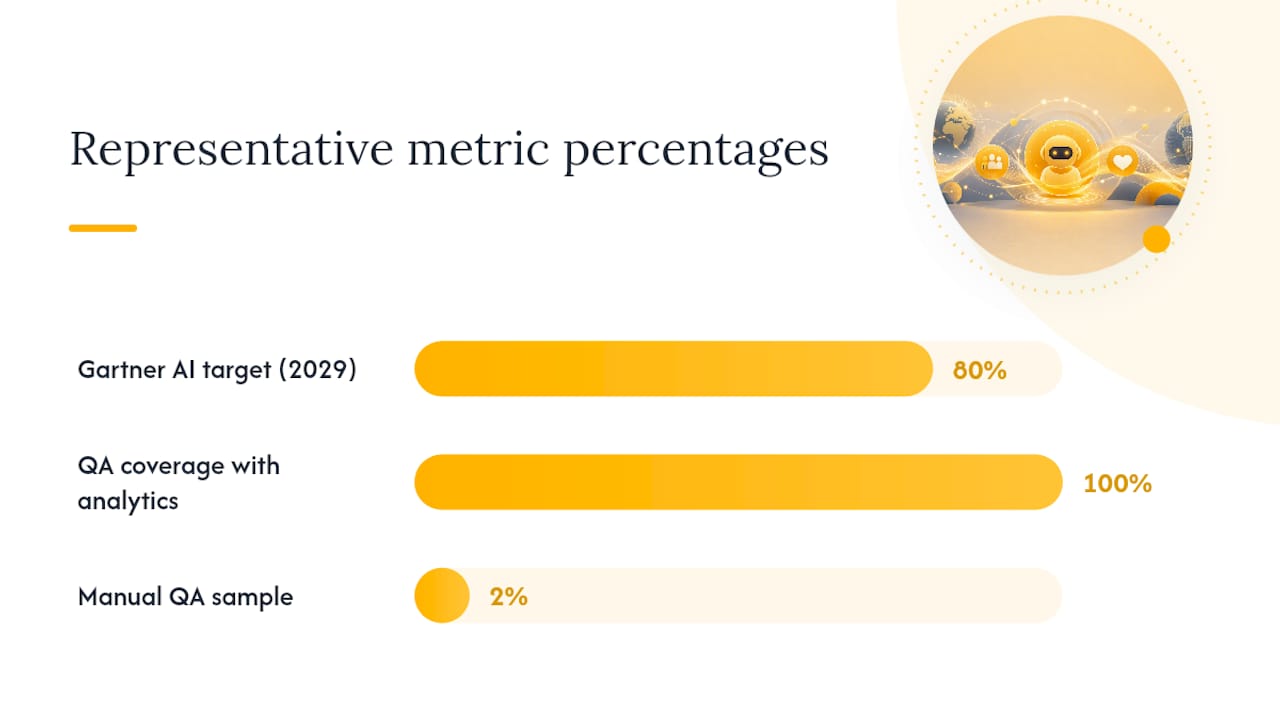
Gartner projects that agentic AI will autonomously resolve 80% of common customer service issues without human intervention by 2029. That’s an industry planning heuristic, not a guarantee for your operation, but it tells you where the puck is going. The right next step isn’t a company-wide rollout. It’s a small, grounded pilot on a use case you already understand well.
Here’s how to start within the next 90 days:
- Pick one high-volume, low-risk workflow (password resets, order status, appointment scheduling)
- Ground your model in your own knowledge base and past ticket data, not generic training data
- Set three measurable targets before launch: containment rate, handle time, CSAT
- Decide upfront whether you’re building this in house or bringing in a managed partner like Altiamcx to run the pilot alongside your team
Key Takeaways
AI in customer support delivers measurable value only when paired with grounded data, a measurement-first pilot, and clear human escalation paths.
| Point | Details |
|---|---|
| Start with one grounded pilot | Choose a high-volume, low-risk use case and ground the model in cleaned company data before launch. |
| Define KPIs before launch | Track containment rate, FCR, AHT, CSAT, and accuracy from day one, not after rollout. |
| Build human-in-loop checkpoints | Set confidence thresholds that force escalation to a human agent when certainty is low. |
| Audit data and integrations early | Clean ticket history and knowledge base content before connecting CRM, ticketing, and telephony systems. |
| Consider a managed partner for scale | A nearshore partner like Altiamcx can run the operational side of a pilot while your team focuses on strategy. |
Table of Contents
- What Is AI in Customer Support, Exactly?
- What Business Case Justifies AI Investment in Support?
- Which Use Cases Deliver the Fastest Results?
- How Do You Build an Implementation Roadmap?
- Which KPIs Actually Prove AI Is Working?
- What Are the Biggest Risks in Deploying AI for Support?
- What Technology Architecture Supports AI at Scale?
- How Altiamcx Supports AI-Enabled Support Operations
- What Limits AI in Customer Support Today?
- What’s Next for AI in Customer Support?
- What CX Leaders Get Wrong About AI Adoption
- Sources
What Is AI in Customer Support, Exactly?
The phrase covers five distinct technologies, and mixing them up is where most CX strategy conversations go sideways. Here’s the breakdown your product, ops, and legal teams need to agree on before anyone writes a requirements doc.
- Conversational AI handles structured, rules-based conversations. Think order tracking or FAQ bots. It’s fast to deploy and predictable, but brittle outside its script.
- Generative AI produces novel, human-sounding responses by drawing on a large language model. It’s flexible but needs tight guardrails to avoid saying something your brand never would.
- Agent assist (or copilot) sits beside a human agent, suggesting responses, pulling up account history, or drafting replies the agent approves before sending.
- Speech and text analytics scans calls and chats for sentiment, topic trends, and compliance flags, feeding QA and coaching programs rather than talking to customers directly.
- Agentic AI goes further than a copilot. It can take multi-step action, like issuing a refund or rebooking a shipment, inside pre-approved limits.
Self-service tools fit repetitive, low-stakes questions. Agent assist earns its keep on complex or emotionally charged interactions where a human still needs to lead. Autonomous agents belong only where the downside of a mistake is small and reversible.
None of these work well without grounding. Grounding an LLM in your company’s own secure knowledge base is what separates a chatbot that sounds smart from one that’s actually right. A generic model trained on the open internet doesn’t know your refund policy, your product catalog, or the tone your brand uses with an angry customer. Skip grounding and you’re not deploying AI in customer support, you’re deploying a liability.
What Business Case Justifies AI Investment in Support?
The benefits are specific enough to put dollar figures against, which is exactly what a CFO wants to see before approving a pilot budget.
Faster resolution shows up first. Automating repetitive lookups and surfacing contextual account data lets agents skip the search-and-verify grind that eats up a large share of average handle time. Cost containment follows close behind: every ticket resolved by a bot instead of a human is a ticket you didn’t have to staff for, especially during seasonal spikes.
Industry Benchmark: Gartner’s prediction that agentic AI will resolve 80% of common service issues autonomously by 2029 is a directional target, not a promise for your queue. Use it to set a multi-year ambition, then measure your own containment rate quarter over quarter.
Here’s how the benefit categories typically map to metrics leaders track:
- Deflection and containment → lower average handle time and reduced headcount pressure during peaks
- Agent assist adoption → higher first-contact resolution because agents stop transferring calls to find answers
- Speech and text analytics → broader QA coverage, since you can review patterns across 100% of interactions instead of a 2% manual sample
- Personalization at scale → improved CSAT, particularly in retail and ecommerce where 24/7 availability and tailored responses directly affect repeat purchase behavior
- Proactive detection → fewer escalations, because sentiment analysis flags a frustrated customer before they demand a supervisor
Build your investment case around one or two of these, not all five at once. A pilot that promises everything usually proves nothing.
Which Use Cases Deliver the Fastest Results?
Some AI applications in customer support pay off in weeks. Others take quarters. Knowing the difference protects your credibility with stakeholders who expect quick wins from the first pilot.
- Ticket triage and classification sorts and routes incoming requests by intent and urgency, typically cutting misroute rates and shaving minutes off time-to-first-response.
- Knowledge generation and article maintenance uses AI to draft or update help-center content from resolved tickets, closing gaps agents were previously filling from memory.
- Real-time agent assist surfaces suggested replies and account context mid-conversation, a lever that tends to move first-contact resolution more than any other single use case.
- Autonomous resolution of simple issues (password resets, refund status, appointment changes) handles the transactional volume that never needed a human in the first place.
- Voice transcription and sentiment analysis turns every call into structured data, which is where speech and text analytics earns its budget through coaching and compliance monitoring.
- Proactive outreach flags accounts likely to churn or escalate based on behavior patterns, letting teams intervene before a ticket even gets filed.
A mid-sized ecommerce operation running a triage pilot might see order-status and shipping tickets, easily half its inbound volume, deflected to self-service within the first month, freeing agents to focus on refunds and disputes that actually need judgment. Our ecommerce support playbook covers this pattern in more depth.
Pro Tip: Start your pilot with the use case that has the most historical ticket data. The model needs examples to ground on, and a thin data set produces thin results no matter how good the underlying technology is.
How Do You Build an Implementation Roadmap?
Most AI in customer support projects fail not because the technology underperforms, but because the rollout skips a step. Here’s the sequence that holds up under scrutiny.
Step 1: Choose the right first pilot. Look for high ticket volume, repeatable patterns, and low regulatory risk. A billing dispute in healthcare is a bad first pilot. A shipping status inquiry is a good one.
Step 2: Do the data work before you touch the model.
- Audit your knowledge base for outdated, contradictory, or missing articles. AI trained on stale documentation will confidently repeat stale mistakes.
- Clean your ticket history so the model learns from resolutions that actually worked, not from abandoned or mis-tagged conversations.
- Put PII controls in place before any customer data touches the model, not after.
- Ground the LLM in this cleaned, current data set. This is the step most vendors and analysts agree gets rushed and causes the most post-launch complaints.
Step 3: Design the pilot with guardrails built in.
- Define scope narrowly: one channel, one or two intent categories, a fixed customer segment.
- Set success metrics before launch, not after you see the results.
- Build human-in-loop checkpoints for anything involving a refund, cancellation, or account change above a defined dollar threshold.
- Write escalation rules explicitly: what triggers a handoff to a human, and how fast.
- Set a realistic timeline, typically 6 to 10 weeks for a first measurable pilot, not a full quarter.
- Define rollout criteria in advance: what containment rate, accuracy score, or CSAT threshold earns the green light to expand.
Our guide to clearing the fog on AI deployment walks through how to sequence this without stalling in committee. The team that owns this roadmap matters as much as the roadmap itself: assign a single accountable owner, usually a CX operations lead, rather than splitting it across IT and support with no tiebreaker.
Which KPIs Actually Prove AI Is Working?
Six metrics tell you almost everything you need to know about whether an AI deployment in customer support is earning its keep.
- Containment rate: the percentage of conversations resolved without human handoff
- First-contact resolution (FCR): whether the customer’s issue got solved on the first interaction, human or AI
- Average handle time (AHT): how AI shortens or, in poorly designed deployments, lengthens resolution time
- CSAT: whether customers actually like the experience, not just whether it was fast
- Agent productivity: tickets resolved per agent per shift once assist tools are live
- Accuracy and hallucination rate: how often the AI’s response was factually correct and on-policy
Run your first comparison as a simple A/B test: route half of eligible tickets to the AI-assisted flow and half to the standard process for two to four weeks, then compare containment and CSAT side by side. Zendesk’s best-practice guidance on starting small and defining KPIs before scaling applies directly here.
Sample size matters more than most teams assume. A test running on fewer than a few hundred tickets per arm will bounce around too much to trust. QA sampling should widen too: speech and text analytics let you review a much larger share of interactions than manual QA ever could, which is the real upgrade over legacy sampling methods.
Assign one owner for these metrics, typically the CX operations or analytics lead, and report on a weekly cadence during the pilot, moving to monthly once the deployment is stable. Our scaling playbook covers what that reporting rhythm should look like as volume grows.
What Are the Biggest Risks in Deploying AI for Support?
Hallucination is the risk everyone mentions first, and it deserves the attention. An ungrounded model will state a return policy that doesn’t exist with total confidence. But it’s not the only risk on the list.
- Hallucination and incorrect responses: mitigated primarily through grounding and confidence thresholds that force a human handoff when the model isn’t certain
- Privacy and PII exposure: any system touching customer data needs access controls and logging from day one, not retrofitted after an incident
- Bias and fairness issues: models trained on historical ticket data can inherit patterns you don’t want repeated, like deprioritizing certain complaint types
- Escalation failure modes: the riskiest deployments are the ones where a customer can’t reach a human when the AI gets stuck
Pro Tip: Set a confidence threshold that automatically routes to a human agent when the model’s certainty score drops below a fixed level. This one control prevents most of the embarrassing headlines about AI in customer service gone wrong.
Before any deployment goes live, get legal and compliance to sign off on: data retention policy, PII handling procedures, an audit log of AI-generated decisions, and a documented escalation path. That handoff should happen before the pilot, not after a near-miss forces it.
What Technology Architecture Supports AI at Scale?
Four architecture patterns cover most deployments: an API-first LLM with a grounding layer for knowledge accuracy, a connector layer linking CRM, ticketing, and knowledge systems, a real-time pipeline feeding agent-assist suggestions, and an autonomous agent flow with a hard-coded escalation path. Platforms like Claude build customer support features around exactly this kind of grounding-plus-routing structure, and integration platforms such as MuleSoft exist specifically to solve the connector problem between systems that were never designed to talk to each other.
Telemetry is the piece teams underbuild. You need drift detection to catch when model accuracy degrades as your product or policies change, logging that captures every AI decision for audit, feedback loops that route flagged bad responses back into retraining, and clear retraining triggers instead of an ad hoc “let’s fix it when someone complains” process.
| Integration Priority | Typical Connector | Why It Matters |
|---|---|---|
| Ticketing system | Zendesk, Freshdesk, ServiceNow | Feeds ticket history for grounding and routing |
| CRM | Salesforce, HubSpot | Supplies account context for personalization |
| Knowledge base | Confluence, internal wikis | Source of truth the LLM grounds against |
| Telephony | Call recording and transcription tools | Enables speech analytics and sentiment scoring |
Integration work is almost always underestimated in initial timelines. Budget more time for connector setup than for the AI model configuration itself.
How Altiamcx Supports AI-Enabled Support Operations
Deploying AI in customer support well requires more than technology. It requires people who can run the pilot, monitor quality daily, and adjust workflows as the model learns. That’s the gap a managed nearshore partner closes.
Altiamcx pairs bilingual nearshore agents with the operational discipline to run AI pilots without dropping service quality: knowledge-base audits, human-in-loop QA, and the performance frameworks that turn a pilot into a scaled program.
- Nearshore bilingual teams trained to work alongside AI assist tools, not replace the judgment they still require
- Managed operations that handle the day-to-day monitoring most internal teams don’t have bandwidth for
- Measurable performance frameworks tracking the same KPIs, containment, FCR, CSAT, that any serious AI deployment needs
One software platform client that shifted its tech support operation to Altiamcx saw productivity improve by 89%, a result driven by pairing trained agents with the right workflows and tools rather than technology alone. Engagement typically starts with a scoped pilot on one workflow, then scales once metrics validate the approach.
What Limits AI in Customer Support Today?
AI in customer support still hits real walls. Complex, emotionally charged issues, a billing dispute tangled with a service outage and a frustrated customer, remain genuinely hard for any model to navigate without a human making the final call.
Data quality is the limitation nobody wants to admit. An AI system is only as good as the knowledge base and ticket history it’s grounded on, and most companies discover mid-pilot that their documentation is years out of date. Integration complexity compounds this: legacy CRM and ticketing systems that were never built with APIs in mind slow down connector work far more than the AI model configuration itself.
Change management is underrated as a limitation. Agents who fear replacement will resist adoption quietly, using the tool halfheartedly or ignoring its suggestions, which tanks the metrics a pilot is supposed to validate. Cost is real too. Grounding, integration, monitoring, and retraining all carry ongoing expense that a flashy demo never shows.
Finally, regulatory uncertainty in healthcare, financial services, and legal support means some use cases that look attractive on paper carry compliance risk that isn’t fully settled yet. None of this means AI doesn’t work. It means the rollout needs the same rigor as any other operational change, not more optimism than the technology has earned.
What’s Next for AI in Customer Support?
Multimodal AI is the clearest near-term shift: models that process text, voice, and image together, so a customer can send a photo of a damaged product and get a response grounded in both the image and the account history, without switching channels or repeating themselves.

Emotion detection is maturing past simple positive/negative sentiment tagging. Newer speech and text analytics can flag escalating frustration in real time during a live call, giving a supervisor the chance to intervene before the customer asks for one.
Agentic AI capable of completing multi-step tasks, not just answering questions, is the trend with the most disruptive potential, tracking with Gartner’s projection of autonomous resolution for the bulk of routine issues by 2029. Expect tighter integration between agent-assist tools and coaching platforms too, closing the loop between what AI observes during a call and how an agent gets developed afterward. The direction is consistent: less standalone chatbot, more AI woven into every layer of the support stack.
What CX Leaders Get Wrong About AI Adoption
The conventional advice tells leaders to “start small,” and that’s correct as far as it goes. What it leaves out is that starting small only works if you also start grounded. Too many pilots launch on a generic model with none of the company’s actual policy data behind it, then get judged as an AI failure when the real failure was skipping the data work entirely.
The bigger blind spot is measurement discipline. Teams love to celebrate a containment rate without checking whether CSAT held steady or quietly dropped. A bot that deflects tickets while making customers angrier isn’t a win, it’s a liability wearing a good dashboard.
What I’d prioritize first isn’t the flashiest use case. It’s the boring one: clean data, a defined escalation path, and a partner or internal team disciplined enough to watch the numbers weekly instead of quarterly. The technology is ready. Most organizations’ operational maturity isn’t quite there yet, and that gap, not the AI itself, is what determines whether a pilot becomes a program.
— Daniela
Sources
- Gartner prediction on agentic AI (press release)
- AI in customer service: Benefits, uses + best practices